Audience Network is Meta’s way of showing your ads inside third-party mobile apps, outside Facebook, Instagram and Messenger. If you are asking “what is audience network in meta ads”, the short answer is that it extends your campaign’s reach into games, news apps and utility apps that partner with Meta. This guide explains how delivery works, which formats you can run, when the extra reach pays off, and how to turn it off.
What Is Audience Network in Meta Ads?
Audience Network in Meta Ads is a placement that uses Meta’s targeting data to show your ads in partner apps, for example while people play mobile games or read the news.
For advertisers, Audience Network runs through Advantage+ placements in Meta ads. Meta recommends Advantage+ placements and sets them as the default for new ad sets, so your budget is spread across every available placement. If no one has removed Audience Network, your campaigns may already be delivering ads inside apps.
How Does Meta Audience Network Work?
Meta Audience Network delivers ads inside third-party apps in four stages: the ad request, Meta’s auction, audience matching and creative rendering.
The ad request:
When someone opens a third-party app partnered with Meta, the app sends an ad request. The request carries the available placement (banner, interstitial, native or rewarded video) and anonymous device data.
Meta’s auction:
Meta’s ad server weighs each impression opportunity against the targeting, budget and bid in your active campaigns. As on Facebook, a real-time auction decides whether your ad serves, based on your goal, your bid and the estimated action rate.
Matching people, not placements:
Your audience targeting decides which people see the ad, wherever they use apps outside Meta. Demographics, interests and Custom Audiences all apply, although the match depends on the signals Meta has for that person, such as a Facebook or Instagram login on the device. The app changes; the people still match your targeting. Our guide on how to run Meta ads covers how to build that audience.
Creative rendering:
Meta assembles your images, videos, headlines and CTAs into the size and format each slot needs. A feed-style native ad fits into a news app, while a full-screen interstitial might appear in a game between levels.
Meta’s playback rules also set a view threshold for video: 25% of the pixels must be in view in native, banner and interstitial placements, and rewarded video requires 100%.
Attribution is less reliable on Audience Network than on Meta’s own apps. Apple’s App Tracking Transparency limits cross-app tracking, so conversions can be underreported.
What Placements and Ad Formats Are Available?
Audience Network offers native, banner and interstitial placements, rewarded video, and in-stream video for some objectives. Image, video, carousel, playable and collection formats are available depending on your objective and placement.

- Native, banner and interstitial: Native ads blend into the app’s own layout, banners sit at the top or bottom of the screen, and interstitials take over the full screen at natural breaks, such as between game levels.
- Rewarded video: Users choose to watch a video in exchange for an in-app reward, such as an extra life. Viewers want the reward, not your offer, so judge these views carefully.
- In-stream video: Short ads play within third-party video content, much like pre-roll, and appear only for objectives such as video views or reach.
Video placements support aspect ratios from 9:16 to 16:9, and Meta recommends designing with sound. Check Meta’s current specification pages before you export, because the recommended video lengths differ between pages.
Accidental taps can inflate click counts. Meta itself warns that native ads can look too much like the app around them, and ads that load late can push content down or sit where people expect a start button. If in-app banner clicks rise but landing page behavior does not, people may be missing a tiny close button rather than showing buying interest. A visitor can leave your page a second later and the click still counts.
When Should You Use Audience Network?
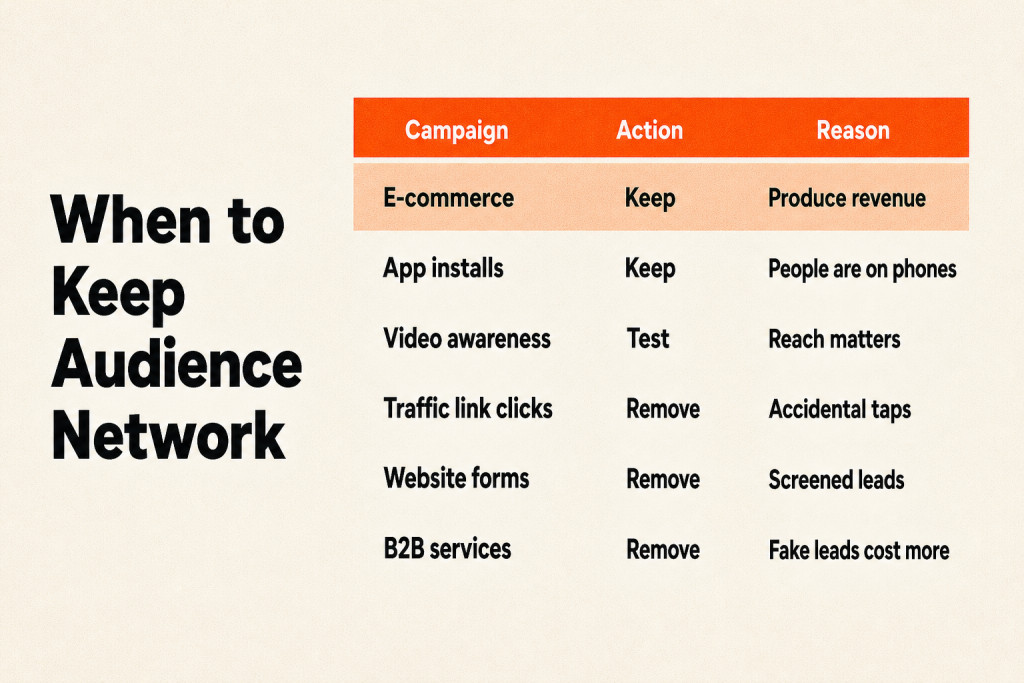
Keep Audience Network for app installs and purchase-focused campaigns with reliable conversion tracking, test it for video awareness or very small local audiences, and turn it off for link click, landing page view or lightweight lead form campaigns.
| Campaign | Keep or remove Audience Network |
|---|---|
| E-commerce optimized for purchases or purchase value | Usually keep. Bots and accidental taps don’t buy, so Meta learns which app placements produce revenue |
| App installs | Usually keep. People are already on their phones, in apps |
| Video awareness, or a very small local audience | Test it. Reach matters more than click quality |
| Traffic campaigns optimizing for link clicks | Remove, or optimize for landing page views instead. Accidental taps count as link clicks |
| Leads campaigns with website forms | Remove, unless only screened leads are sent back to Meta |
| B2B, high-ticket services, demo requests | Remove. A handful of fake leads costs more than the extra reach is worth |
Reaching core audiences:
Once Facebook and Instagram have saturated your core audience, Audience Network can reach the same people in other settings. That added reach does not always produce more conversions for the same spend, so compare results by placement.
Cost per result:
Meta calculates cost per result from the action you tell it to count. If any form submission qualifies, a bot’s entry and a real buyer’s request count equally, so a low cost per result alone does not prove the submissions are valuable. Our breakdown of how much Meta ads cost explains which numbers to watch.
Mobile app campaigns:
Audience Network suits mobile app campaigns, especially games, because people already spend time in similar apps. An app install prompt inside another app feels like a natural next step, with little friction between seeing the ad and acting on it.
How Do You Control or Turn Off Audience Network?
You can turn off Audience Network for the whole account in Advertising settings, remove it from a single ad set, or block specific apps with a publisher block list.

To keep Audience Network out across your account:
- Open All tools in Meta Ads Manager.
- Under Advertise, select Advertising settings.
- Click Placement controls.
- Turn on My business can only advertise on specific placements.
- Uncheck Audience Network native, banner and interstitial and Audience Network rewarded videos.
- Click Review changes, then Confirm.
Campaigns that are already running can take up to 48 hours to reflect the change. Meta is rolling out account controls in stages, so they may not be in your account yet. The controls also do not cover ads about social issues, elections or politics, financial products and services, employment or housing. You can exclude Audience Network by objective too, for example removing it from Leads campaigns while keeping it for Sales.
To remove it from one ad set:
- Open the ad set and scroll to Placements.
- For Awareness, Traffic or Engagement, hover over Advantage+ placements, click Edit and select Manual placements. For Leads, App promotion or Sales, click Show more settings, hover over Placement controls and click Edit.
- Uncheck both Audience Network placements.
- If Allow limited spend to excluded placements appears, uncheck it.
- Publish the change.
Step 4 is easy to miss. After you exclude a placement, Meta puts eligible advertisers into limited spend by default, which can send around 5% of your budget to each excluded placement if its system forecasts better results. Leave it on, and Audience Network can still receive some spend.
If you keep Audience Network on, use a publisher block list to stop apps that send junk traffic:
- Open the Meta Brand Safety and Suitability Center and click Delivery reports.
- Choose Audience Network native, banner and interstitial or Audience Network rewarded videos to see which apps showed your ads.
- Select the apps to exclude, click Add to publisher block list, choose a list and save.
You need a business portfolio, and each block list holds up to 10,000 entries. New apps keep joining the network, so review the list regularly.
Wait 48 hours, then check the exclusion. In Ads Manager, open Breakdown and select Placement under Delivery. Audience Network should no longer show new impressions. If it does, check whether limited spend is still on or whether the campaign falls into a special ad category.
The Inventory filter controls the type of content that can appear next to your ads, with expanded, standard or limited options. Sensitive brands should choose standard or limited.
Conclusion
So, what is audience network in meta ads worth to your account? It is extra reach inside partner apps, and it earns its place when app installs or purchases prove it, not when clicks rise. Check placement breakdowns, keep it for conversion-focused campaigns, and switch it off where accidental taps and fake leads cost more than they bring. Remember that account settings can take 48 hours to apply and block lists need regular upkeep. If you want a second pair of eyes on your placements, our digital ads team can audit your Meta campaigns.