This Magento ecommerce SEO guide covers the settings and fixes that matter most on Adobe Commerce and Magento Open Source stores: crawl control, layered navigation, canonicals, catalog metadata, Core Web Vitals and extensions. It also explains how to split the work between your own team and an agency, and how to build links to a Magento store.
Magento gives you a lot of SEO control out of the box, but several important defaults are switched off, and layered navigation can create thousands of near-duplicate URLs. Getting the foundations right first saves months of wasted crawl budget.
Technical Architecture and Crawl Optimization
Magento’s crawl rules and sitemap settings let you steer crawlers toward useful catalog pages and away from utility URLs. Use INDEX, FOLLOW as the default robots directive, then edit robots.txt under Content > Design > Configuration > [store view] > Search Engine Robots.
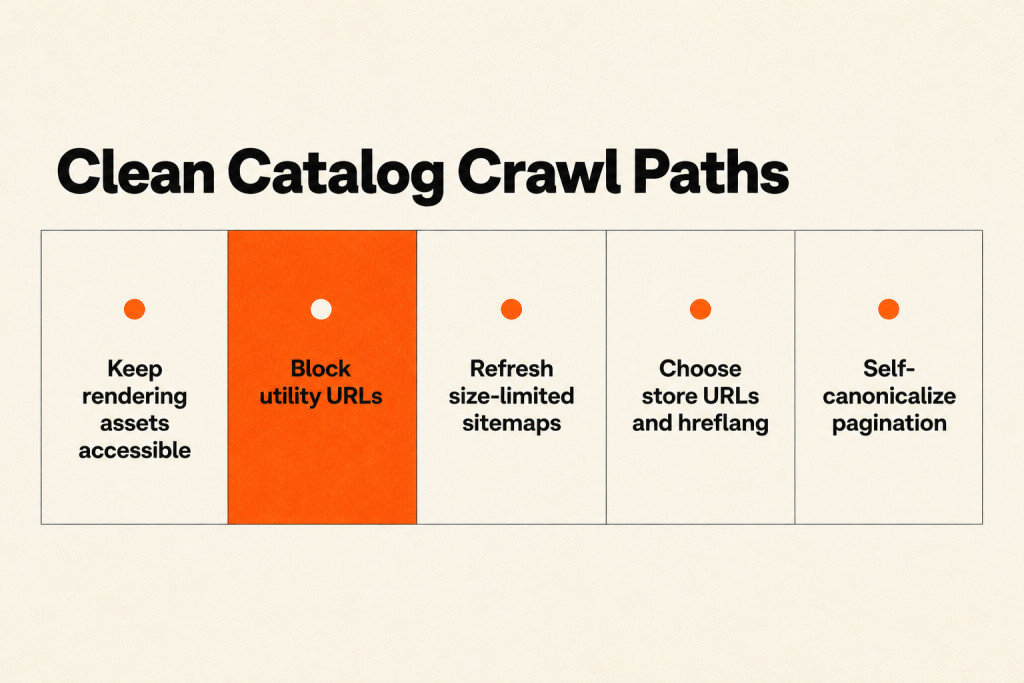
A typical setup for all user agents disallows /catalogsearch/, /checkout/, /customer/, /wishlist/, /sendfriend/, /catalog/product_compare/ and the sort and display parameters product_list_order, product_list_limit and product_list_mode. Leave /static/ and /media/ crawlable, because Google needs your CSS, JavaScript and images to render pages and see the real layout.
Remember that robots.txt controls crawling, not indexing. A blocked URL can still enter the index through links, which is why layered navigation relies on noindex rather than robots.txt alone.
XML sitemaps
Magento can build XML sitemaps, but you need to set them up. Create the sitemap at Marketing > SEO & Search > Site Map, then configure generation under Stores > Configuration > Catalog > XML Sitemap. Turn on scheduled generation, include images, make sure cron is running, and add the sitemap location to robots.txt. Then submit it in Google Search Console.
Keep each sitemap file under 50MB and 50,000 URLs. Large stores should use a sitemap index that splits products and categories into smaller files. A stale sitemap points crawlers to URLs that have changed or disappeared, so let cron refresh it as products come and go.
International stores and hreflang
Magento 2 supports multiple store views, but the core platform does not output hreflang tags. If your store views target different countries or languages, add an extension or theme logic that outputs hreflang pairs for every page; without them, Google may treat your markets as competing duplicates.
Two structural choices matter even more. First, choose between country domains, subdomains and subfolders; for most stores, subfolders work well because they pool authority. Second, decide early whether to enable Add Store Code to Urls at Stores > Configuration > General > Web > Url Options. It gives every store view a clear URL prefix, but changing it after launch rewrites every URL.
Pagination
When category pages use ?p=2, ?p=3 and so on, give each page a self-referencing canonical rather than pointing it to page one. If every page points back to page one, Google may treat deeper pages as duplicates and the products on them lose their crawl path. Google no longer uses rel=prev/next, so rely on self-canonicals and strong internal links.
Layered Navigation
Every filter a shopper applies adds a parameter and another URL. Five filterable attributes with six values each can leave one category with thousands of URLs showing roughly the same products. Left alone, those URLs consume crawl budget, split link equity and crowd the index with near-duplicates.
Native Magento 2 does not add noindex to filtered pages, so an SEO extension or theme logic usually needs to set the controls:
- noindex,follow on filtered URLs lets crawlers follow links while keeping the pages out of the index. This is usually the right default.
- Canonical to the base category consolidates signals, but still spends crawl budget.
- robots.txt rules should block pure sort and display parameters: product_list_order, product_list_limit and product_list_mode.
Some filter combinations deserve their own pages. If people search for a specific combination, such as “leather boots” or “waterproof jackets”, build an indexable landing page with its own title, description and intro copy. Choose those pages carefully, then noindex the rest.
Canonicalization
Canonical tags tell search engines which URL is the master version when duplicates exist, so ranking signals stay together. Common duplication problems each have a clear fix:
- A product in multiple categories: use flat product URLs and product canonicals.
- Filtered and sorted category URLs: use the layered navigation controls above.
- www and non-www, or http and https, both serving: consolidate at the server with a single 301 redirect.
- Staging or development domains left crawlable: block them completely, ideally with password protection.
To switch on Magento’s canonicals:
- Go to Stores > Configuration > Catalog > Catalog > Search Engine Optimization.
- Set Use Canonical Link Meta Tag for Categories to Yes.
- Set Use Canonical Link Meta Tag for Products to Yes. Both settings ship disabled.
- Set your preferred secure and unsecure base URLs at Stores > Configuration > General > Web > Base URLs, then add a server-level 301 redirect (for example with mod_rewrite in .htaccess, or in your Nginx config) from every other version to the preferred one.
Once active, canonicals send parameter URLs, session leftovers and category-path duplicates to one master URL, so ranking signals consolidate instead of splitting. If you are planning redirects at the same time, our guide to 301 vs 302 vs 307 redirects explains which one to use.
Catalog Optimization and SEO for Magento Ecommerce
Catalog work decides whether your product and category pages are worth indexing. Start by keeping configurable product variants out of search: set their simple products to Not Visible Individually, so each size and color does not create a thin page that competes with the parent.
Store view defaults
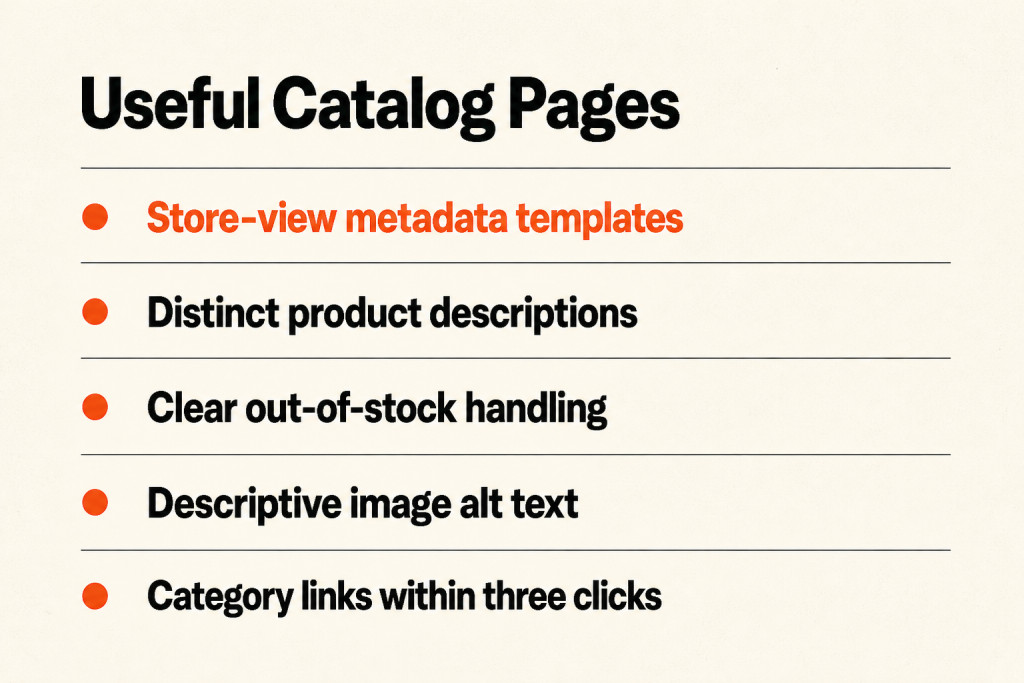
Set default metadata for each store view at Content > Design > Configuration > HTML Head: a default page title, a title suffix (usually your brand) and a default meta description. These cover pages that have no individual metadata yet.
Metadata templates for the catalog
Create product metadata masks at Stores > Configuration > Catalog > Catalog > Product Fields Auto-Generation, using a pattern such as {{name}} | Buy Online | YourStore. Hand-writing every tag across a five-figure catalog is not practical, so templates set a usable floor.
Manual overrides for key products
For best sellers, open the product, expand Search Engine Optimization, and write the URL key, meta title and meta description yourself. Put the product name before the brand and keep titles to roughly 60 characters. Meta descriptions do not affect rankings directly, so write them to earn the click.
Leave Meta Keywords empty. Google has ignored the field for well over a decade, and filling it only shows competitors which terms you target.
Product descriptions
Distinct product descriptions are the cheapest way to stand out, because thousands of stores reuse the same supplier copy. Use the short description to make the buying case and the full description for detailed specifics.
Image alt text
Under Images and Videos, open each image and describe what the photo shows, including the product name. Alt text meets an accessibility requirement first, then gives image search an entry point and adds a relevance signal.
URL keys
Keep URL keys short, hyphenated and descriptive. When you change one, Magento can create the permanent redirect automatically if Create Permanent Redirect for URLs if URL Key Changed is enabled.
Out-of-stock and discontinued products
Leave temporarily out-of-stock products live and indexable, with a restock note and alternatives. When a newer model replaces a product, 301 the old URL to its successor through Marketing > SEO & Search > URL Rewrites. If a product is gone for good with no successor, redirect it to the closest category, or return a deliberate 410 if the URL has no equity worth keeping.
Categories
Add a short, useful description to each category, give every product and category a unique meta title and description, and keep important categories within three clicks of the homepage.
Core Web Vitals and Performance Tuning
Aim for these real-user targets on every template: Largest Contentful Paint (LCP) at or under 2.5 seconds, Interaction to Next Paint (INP) at or under 200 milliseconds, and Cumulative Layout Shift (CLS) at or under 0.1. Magento’s reputation for slow scores comes mostly from its defaults; with the right setup the platform can meet these targets.
- Run production mode: use bin/magento deploy:mode:set production so the live store serves compiled, minified assets.
- Use Varnish for full page cache: set it at Stores > Configuration > Advanced > System > Full Page Cache. The built-in cache is fine for development, but Varnish serves cached pages far faster.
- Use Redis for sessions and backend cache on any store with real traffic.
- Know your theme’s ceiling: heavy JavaScript in Luma-based themes makes good scores hard. Hyvä and similar modern themes remove most of that weight, so if you are re-theming anyway, make performance a selection criterion.
- Audit extensions: each one can add scripts to every page, so remove the ones you no longer use.
- Serve images in WebP at the rendered size, not the upload size, and lazy-load images below the fold.
- Test JavaScript and CSS bundling and minification in Stores > Configuration > Advanced > Developer rather than switching everything on blindly; on HTTP/2 servers, merging files does not always help.
Pull field data from PageSpeed Insights and track trends in Search Console’s Core Web Vitals report. Fix the specific LCP element each report names instead of making broad changes. Moving to Hyvä or a headless frontend cuts script weight significantly, but both mean rebuilding your theme, and third-party extensions often need custom work. For a broader view of platform trade-offs, see our comparison of the best CMS for SEO.
Essential Extensions for Magento SEO Optimization
Magento’s native SEO features cover more than many owners expect: canonical tags, automatic redirects when URL keys change, XML sitemaps and metadata at every level. Extensions are worth adding for four remaining needs:
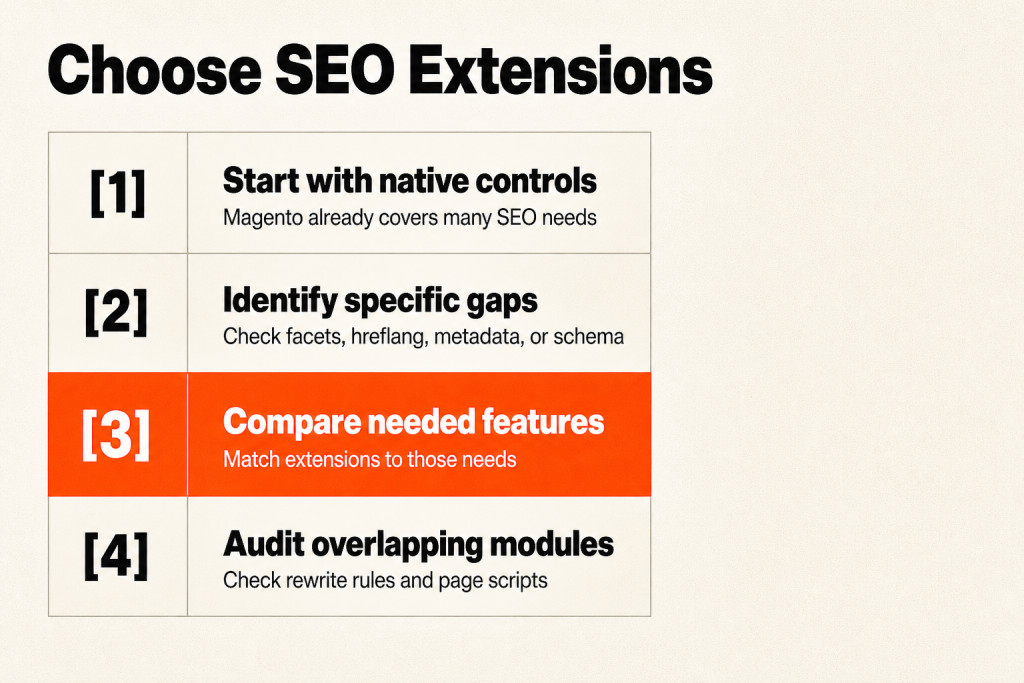
- Indexing controls for layered navigation
- hreflang output for multi-country or multi-language stores
- Complete JSON-LD structured data for products, reviews and breadcrumbs
- Finer sitemap settings
Treat these as feature groups, not product endorsements, and check each extension you consider against one of those needs. Avoid stacking several SEO suites: overlapping modules can clash through rewrite rules, duplicate tags and slow down the admin and storefront.
Choosing Magento Link-Building and Digital PR Support
Technical fixes make your store crawlable; links give it authority. There are two main routes, and most stores benefit from both.

Link-building firms
Specialist firms often own websites or have relationships with site owners who can place links when you need them. This is the fastest route, so vet the company before you pay: ask for case studies, ideally in your industry, and examples of the sites they place links on. Cheap links rarely deliver value, and low-quality placements can do harm. Our guide on how to find backlinks shows how to check what competitors are earning.
Digital PR
Digital PR earns coverage and links from strong publications with data stories, expert commentary and newsworthy campaigns. Brand awareness is welcome, but the main goal is links from authoritative sites. It is slower than placement-based link building, but the links are earned and harder for competitors to copy.
When you evaluate any agency for Magento work, ask how it handles crawl paths, layered navigation, canonical tags and XML sitemaps, and ask to see Magento-specific fixes it has delivered.
In-House Team or Agency for Magento SEO?
Keep routine content updates, metadata and standard theme changes with your internal team, so control stays in the business. Bring in an experienced agency for server-level indexing problems, custom layout XML, large URL rewrite tables or a re-platforming project, where Magento experience prevents costly development detours. For complex catalog roadmaps, outsourced SEO services can cover strategy and execution while your developers stay focused on the store.

Frequently Asked Questions
Do I need a Magento SEO agency or can my dev team handle it?
Your dev team can handle routine updates and standard settings. Bring in a Magento SEO agency when indexing problems sit at server level, when layered navigation or rewrite tables have grown out of control, or when you are migrating, and ask it to explain how it will prioritize crawl paths.
Does Magento need third-party SEO extensions to rank?
Not always. Magento 2 includes canonical tags, sitemaps, URL rewrites and metadata controls. Extensions become worthwhile for layered navigation indexing, hreflang output, richer structured data and advanced sitemap control, but avoid overlapping modules that conflict with each other.
How long does Magento SEO take to show ranking improvements?
Technical fixes such as canonicals and noindex on filters can change how Google crawls the store within weeks, while ranking and traffic gains usually build over several months. Results depend on competition, catalog size and how consistently content and links are added.
What is the most underrated Magento SEO fix?
Switching on the canonical settings for products and categories. Both ship disabled, and turning them on consolidates duplicate URLs that would otherwise split ranking signals.
Conclusion
This Magento ecommerce SEO guide comes down to one principle: decide which catalog paths deserve crawling first, then build content, speed and tools around those high-intent pages. Turn on canonicals, control layered navigation, keep sitemaps fresh, write unique catalog metadata and fix the Core Web Vitals issues your field data names. Add extensions only for real gaps, build authority through quality links and digital PR, and bring in specialists where Magento’s complexity calls for them. If you want a team to audit your store and run the roadmap, explore our SEO services.