When your content reaches someone on a phone but the next step feels awkward, it is hard to tell whether the problem is the format, the channel, or the experience around it. That is the challenge a mobile content marketing strategy needs to solve.
You’ll get a practical way to choose formats and channels, catch technical friction, and use context and performance data to improve the path forward. A location-triggered message can still lose its moment if the page it opens makes the next action hard to find.
Creating Content for Your Mobile Content Marketing Strategy
Create mobile content by combining visual, technical, and conceptual elements in a multichannel approach, then test formats such as infographics, stories, podcasts, and interactive quizzes. Articles, media, answers, and products are among the things internet users seek on mobile devices, which have become leading portals for online activity. A mobile content marketing strategy combines visual, technical, and conceptual elements in a multichannel approach to mobile engagement (all on the small screen). Professional content marketing strategy services can help adapt editorial workflows for mobile.
Infographics, stories, podcasts, and interactive quizzes give you more formats to test when you want to catch a mobile audience’s interest.
Scannable Content Structure and Length
Short on time and attention, mobile users want immediate value without digging through a post; make that value easy to spot with clear, scannable text. Facebook IQ found that people spend an average of 1.7 seconds with a piece of content in Facebook’s mobile News Feed, compared with 2.5 seconds on desktop.
- Speak directly to your audience’s needs with short, strong messaging.
- Turn chunky, complex information into short, bite-sized pieces.
- Give scrolling a clear purpose with clear headings.
- Keep the wording clear and simple, and use direct calls to action.
Put the most important information at the beginning of your content, so readers get value even if you stop before the end of a blog post. That’s front-loading.
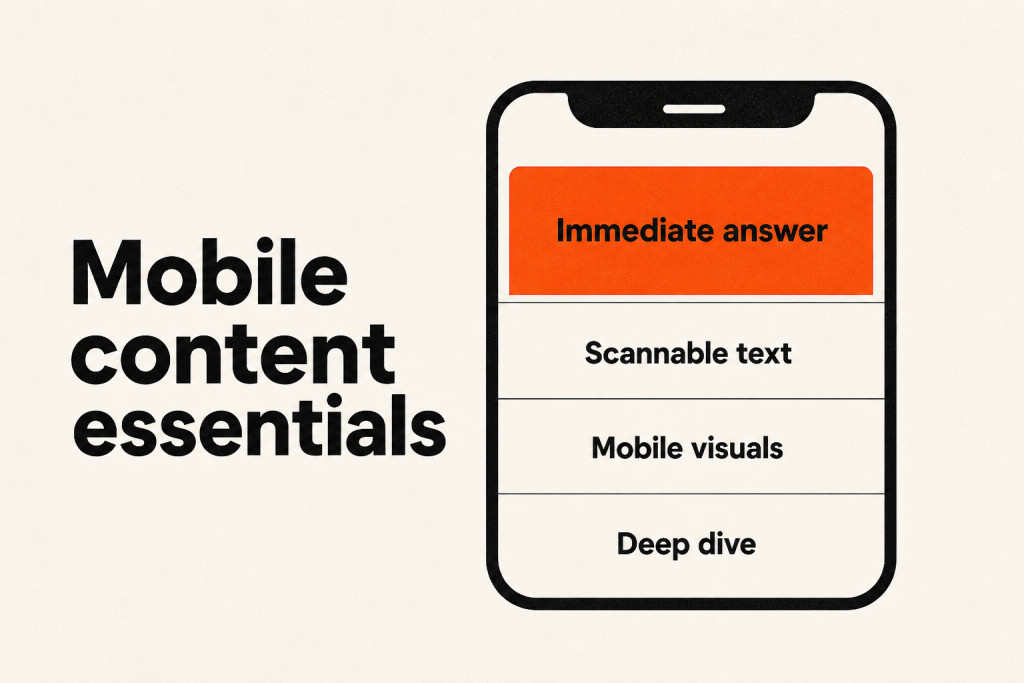
When readers want an immediate answer during a busy routine, start with an executive summary. For a complex workflow, keep the deep dive available in collapsible sections instead of cutting critical context.
Typography, Spacing, and Viewport Configuration
Blog posts need responsive design, mobile-friendly formatting, and functionality to work on small screens; readability still matters when the layout fits.
Use a comfortably readable type size, leave enough space between lines and around text blocks, and configure the viewport to match the device width. Check that readers can scan and tap through the page without zooming or scrolling sideways.
Visual Content and Media Optimization
Optimize mobile visuals by using brand colors, preparing images for mobile viewing through size, metadata, and orientation, and pairing visuals with powerful messages:
- Build impact and connection by using brand colors in images.
- Prepare every image for mobile viewing by optimizing its size, metadata, and orientation.
- Pair visuals that pop with powerful messages.
A strong call to action (CTA) should prompt action without sounding pushy or generic; choose direct wording such as “Download now” or “Get your free trial,” instead of a vague phrase like “Click here.” A CTA can appear as a button or a link.
Devices, audiences, and contexts respond differently, so use Heatmaps and A/B testing to assess your CTA’s performance and see what works. Use the results to strengthen ROI.
Mobile Video and Sound-Off Viewing
Make mobile videos work with sound off by using captions and visual storytelling, and adapt them to different screen sizes, devices, and connection speeds. Video continues to be one of the foremost marketing trends in 2025, but mobile versions must accommodate different screen sizes, devices, and connection speeds. Keep videos ready for mobile.
- Make videos prominent so users and search engines can notice them.
- Use captions and visual storytelling so the video works with sound off.
- Keep videos concise, with strong, engaging content at the start.
- Follow Google’s Video SEO best practices.
Mobile User Experience and Technical Architecture
Responsive Design Architecture
A responsive design adjusts to screen size and orientation, both of which can shift, while keeping the experience consistent on mobile and desktop.
- Adapt the design to different screens, sizes, and orientations.
- Put essential information up front, with more details available as needed.
- Keep the experience consistent across mobile and desktop.
Page Speed and Asset Delivery
Mobile visitors are more likely to leave when pages load slowly. Keep every content element quick to load, with extra attention to what sits at the top of the page, and check performance regularly; Think with Google found that the probability of a mobile visitor bouncing rose by 123% as load time increased from one second to 10 seconds.
Omnichannel Mobile Distribution Channels
For omnichannel mobile distribution, combine email, SMS, and push in a multi-channel campaign; this mix can outperform relying on one channel. With page speed handled, nearly 7 in 10 marketing teams treat mobile as their leading channel, either on its own or jointly with another. Of those teams, 94.6% say mobile-centric messaging beats an email-only approach.
Multi-channel campaigns outperform single-channel campaigns by 63%; Email, SMS, and push form an especially effective mix.
In-App Messaging, Onboarding, and App Tracking
Fastest-growing channel
Marketers report that in-app messaging volume grows 3 to 4 times year over year, making it the fastest-growing channel.
Behavior and context together
Messages that support product metrics need to match behavior and context: offer a tip when someone leaves a setup step unfinished, celebrate a milestone as soon as they reach it, and show a walkthrough the first time they open an advanced feature in the app.
These in-app messages can give customers useful support:
- Version update reminders: When someone opens your app, send an in-app message reminding them to update to the latest version.
- Subscription renewals: Show an in-app banner about an upcoming subscription renewal when customers look at their billing history.
- Feature highlights: When someone tries a feature for the first time, use an in-app inline message to offer a walk-through.
Mobile SDKs track screen visits, feature usage, and session length. You can use that information to shape messages around a person’s actions inside your app.
Push Notifications and Direct Alerts
Lock-screen alerts reach people right away, outside crowded inboxes, so save them for time-sensitive or especially important information. Nudges that aren’t pressing, or alerts that don’t feel personally relevant, can backfire; people may mute notifications or uninstall the app. For example, a customer might start entering billing information in-app, leave before finishing, and need a reminder to return. Send a push notification a couple of hours later. If they still haven’t completed the action, follow up by email the next day with step-by-step instructions.
Short Message Service Campaigns
SMS arrives instantly, making it a good fit for time-sensitive notifications and a quick prompt to act. Consumers may also appreciate the chance to grab a hot deal or take part in a limited event right away.
A catchy text with a fitting call to action could bring in more business revenue. If SMS automation sounds intimidating, plenty of SMS marketing platforms can help.
Email and Newsletter Adaptation
Set your mobile newsletter in one or two columns, with a clear layout, attention-grabbing colors, and large buttons or touch targets for readers opening and tapping through email on a phone.
- Use a mobile-optimized or responsive newsletter layout with one or two columns. Present core messages in plain text and at a sufficient font size, since images often do not load automatically. Large buttons or touch targets make touchscreen navigation easier.
- Use social media to generate newsletter signups, then let the email newsletter lead readers to a discount code.
- Send a follow-up email to customers who opened an in-app message but did not convert right away.
Connecting Social Media with Other Mobile Channels
Customers encounter a brand across channels, even when mobile plans handle each channel on its own; an omnichannel approach connects email, SMS, push, and in-app messaging with the website, social media, and other places customers come across the brand. Planning still tends to keep those channels apart.
Testing Device-Specific Mobile Content Formats
QR codes give you another way to test mobile content, alongside push notifications, voice search, and geolocation. Build mobile-specific content formats from the capabilities and features unique to each device, then test content using push notifications, voice search, or geolocation.
Contextual Targeting and Real-Time Delivery
When a message responds to someone’s behavior, personalization moves beyond the generic notes sent to everyone. A welcome banner or feature announcement may show the same thing no matter what a person does. Messages keyed to plan type, signup date, or usage tier can feel more relevant, though those details may miss what’s happening right now. In a Customer.io case study, Monarch Money replaced four signup-timed emails with behavior-triggered messages and reduced trial cancellations by 3.36%. For instance, a trial user who’s just upgraded shouldn’t keep getting the upgrade prompt meant for someone who hasn’t. Timing and behavior matter.

Adding a person’s name to a push notification doesn’t make it personal; useful personalization reflects both who they are and what they’re doing right now.
Geofencing and Proximity Targeting
Geofencing can prompt a message when a customer reaches a real-world location. For example, a virtual boundary might be set around a store, a gym, an airport, or a parking lot, and crossing it can trigger a message. Entry triggers can reach people as they walk in, when their interest is high; Exit triggers can catch moments teams often overlook. Use Exit triggers to remind customers to close a parking session as they drive away. Location-based campaigns can fall flat without trust first. Ask for background location access before showing clear value, and customers may deny permission right away.
Lock Screen Surfaces and Dynamic Updates
Live Activities (iOS) and Live Updates (Android) put changing, real-time details where customers can check them on their lock screens, without opening your app. Examples include delivery tracking, live scores, and flight status.
Apple’s and Android’s versions work differently, so one can’t stand in for the other.
Delivery Timing and Micro-Moment Scheduling
Time zones
A personalized message should fit the person’s circumstances as well as their demographic details; time-zone adjustments are one small but powerful way to make that happen.
A ticketing app example
Imagine your ticketing app sends concert announcements based on what customers bought before. Cam bought tickets to a Bruce Springsteen show last year, and The Boss has another tour on the way.
Ready to rock out, Cam? New dates for the Bruce Springsteen tour were just announced, and tickets will be available starting at 9:00 a.m. Eastern tomorrow!
The alert uses Cam’s first name and speaks to their interests, but Cam lives on the West Coast. Since the sale time is 9:00 a.m. Eastern, Cam has to figure out when they can buy seats, adding one more step. That extra effort can hurt engagement and turn the alert into a missed chance to personalize mobile messages fully.
In-App Feedback and Audience Surveys
Real-time feedback
In-app surveys give customers a way to respond, while collecting feedback in real time. Their answers give you useful data to draw on when you tailor future messages. They also give customers an outlet to make their voices heard.
Ask based on behavior
Match each survey to what someone’s done: ask for feedback on a feature after a customer has used it for the first time.
Search Engine Optimization for Mobile Content
Search engines rely primarily on a site’s mobile content for indexing and ranking. When they visit, a smartphone agent crawls and evaluates that content. Connect mobile search intent research with comprehensive content marketing strategy and planning.
Data Infrastructure, Analytics, and Automation
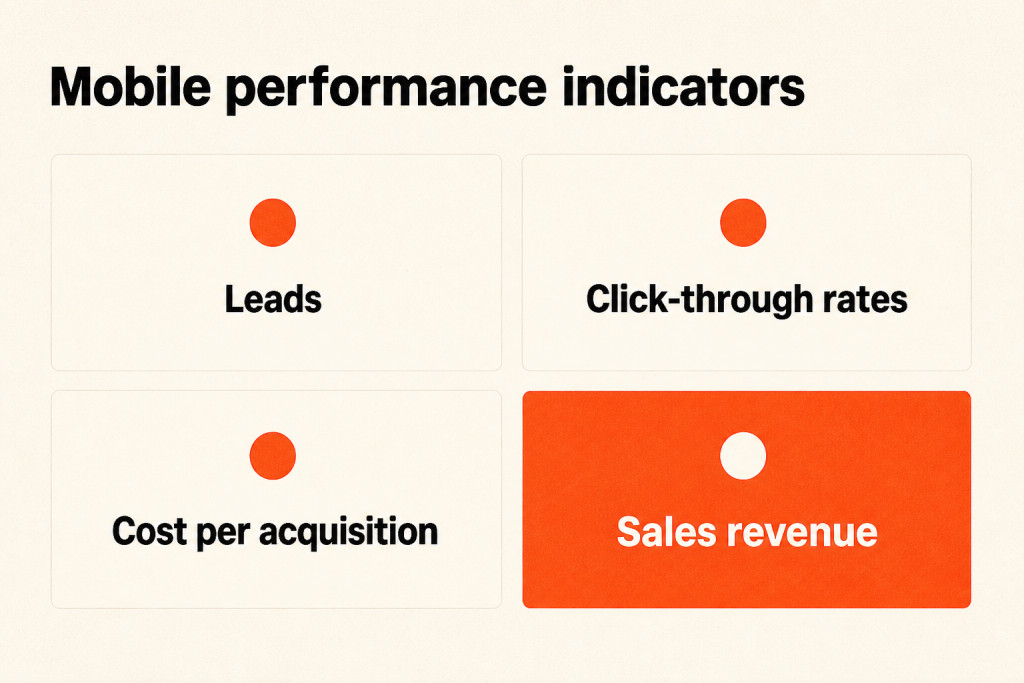
Track Leads generated, click-through rates, cost per acquisition, and sales revenue as key performance indicators across mobile touchpoints. Free mobile analytics software can guide your analysis, too.
Many CDPs integrate with third-party data analytics platforms, giving you a closer look at customer behavior. You can see when engagement rises or falls (both shifts are useful to track) and refine mobile marketing strategies through ongoing iteration. If your analytics platform does not integrate directly with your messaging automation platform, webhooks can send and receive data to connect them.
Customer Data Platform Unification
A customer data platform gathers information from every touchpoint into a unified profile. That profile shows what someone has done, where they are, and what they have bought, so you can act in real time; think of a shared hotel front-desk log (past room preferences and unresolved requests stay visible), where any staff member can greet a guest without asking twice. Everyone sees the same guest history.
Using the MCP Server to Simplify SDK Integration
Shahroz Ali Khan, a software engineer at Customer.io, says the team kept seeing “wrong regions, mixed-up keys, silent failures, and long-winded debugging sessions” across its supported mobile SDKs. Customer.io says its MCP-based SDK Setup Tool can generate configuration-aware code, verify push and in-app messaging, and troubleshoot data-flow issues.
- Use it to generate platform-specific code.
- Troubleshoot integration issues directly, without digging through documentation.
Audience Segmentation Strategies
Demographics, behaviors, product preferences, or other attributes can help you divide an audience into groups, then shape campaigns around what each group needs.
- New customers: Encourage rapid adoption with onboarding campaigns.
- Loyal customers: Send referral campaigns that help them become brand evangelists.
- Dormant customers: Use reactivation campaigns to bring them back into the fold.
- Customers who use just one of your products: Connect them to other products you offer through cross-sell campaigns.
Artificial Intelligence in Journey Orchestration
AI supports mobile journey orchestration by helping build and execute re-engagement journeys, while LLM actions can personalize recommendations, score intent, or route customers based on real-time context. 73% of marketers report meaningful AI impact on their messaging strategy, and mobile is one place where that impact is showing up fastest.
An AI Agent
An AI Agent understands your workspace, including its attributes, segments, and past campaign performance. Asked to build a re-engagement journey for lapsed mobile users, it reviews your actual inactive segments and engagement data instead of returning a generic template (the starting point reflects your workspace). You review, refine, and approve the journey; the agent handles execution.
LLM actions
During a journey, LLM actions can generate a personalized product recommendation, score intent, or route a customer down a different path. Those decisions use real-time context, with no external tooling required.
Machine learning cannot invent successful journeys on its own, despite a common misconception. To avoid jarring recommendations, it needs tightly structured message libraries and human-defined intent rules. At Duolingo, Kevin P. Yancey and Burr Settles describe a system that chose among human-written, rule-gated reminder templates; in a production A/B test, it increased daily active users by 0.5% and new-user retention by 2%.
Frequently Asked Questions
Which mobile channel delivers the highest engagement?
The available figures do not establish which mobile channel has the highest engagement; they report in-app messaging’s growth and performance against email, not an engagement ranking. In-app messaging is the fastest-growing mobile engagement channel, its volume rising 3 to 4x year over year; according to 94.6% of mobile-centric teams, it performs better than an email-only approach.
How can mobile personalization be achieved without annoying users?
Mobile personalization should follow real-time behavior and context, not demographic segments alone. A message about leaving a workflow or reaching a usage limit can feel like help, as can one prompted by a pause on a page.
What is the difference between geofencing and live activities?
Geofencing sends a message as customers enter or exit a real-world boundary, whether that’s a store or parking lot. For a delivery or live score in progress, a Live Activity stays visible on the lock screen as a notification that updates.
How much developer support is required to implement mobile messaging?
For Live Activities, developers handle bringing in the SDK and designing the experience on the device. Built on its Model Context Protocol server, the SDK Setup Tool lets them guide an AI tool with natural language instead of manual documentation. Marketers build and personalize campaigns and journeys inside the platform.
How should marketing teams incorporate artificial intelligence into mobile workflows?
AI can build and run campaigns, going beyond copy generation. An AI Agent can use a workspace’s actual audience segments and results to recommend and create a mobile journey.
Conclusion
Mobile content works best when you start with the reader’s immediate context and make the next action easy through the right channel and setup. Behavior can guide personalization, location can trigger Geofencing, and an ongoing event can show on a lock screen. Developers handle SDK integration, marketers shape campaigns and journeys, and AI builds from workspace data and human-defined intent rules. Start by reviewing one mobile journey in your workspace: check whether its context, landing page, and next action line up.