
Choose AI tools for social media marketing according to the work you need to improve, then treat the content scheduler as secondary.
Performance marketers seeking to scale ad spend and drive sales may use Madgicx to automate media buying, Jasper for ad copy, and Synthesia to produce video creative. Together, they address separate parts of social media marketing: media buying automation, ad copy, and video creative.
AI tools for social media marketing to manage accounts
Social media management software brings earlier and upcoming posts, scheduling, publishing, performance numbers, and audience details into one workflow, while automation keeps publishing steady and productive. Compare that legacy workflow with generative tools and standard social media marketing tools before choosing a platform.
AI helps generate ideas and written posts, then creates images while working through large datasets to surface audience sentiment and forecast performance before anything goes live. The toolkit spans planning, creation, scheduling, analytics, and reporting.
Buffer
Buffer fits smaller teams watching their budget and managing only a few accounts. Audience details include gender, age, cities, and countries, while every connected channel adds to the price.
- Account fit: Good match for smaller teams on a budget managing a low number of accounts.
- Audience overview: View gender, age, cities, and countries.
- Channel cost: The price increases with every channel you connect.
Every platform has different rules, so adapt one B2B social media marketing campaign across Instagram images and quick X takes, while LinkedIn discussion can sound more like a boardroom with water cooler banter.
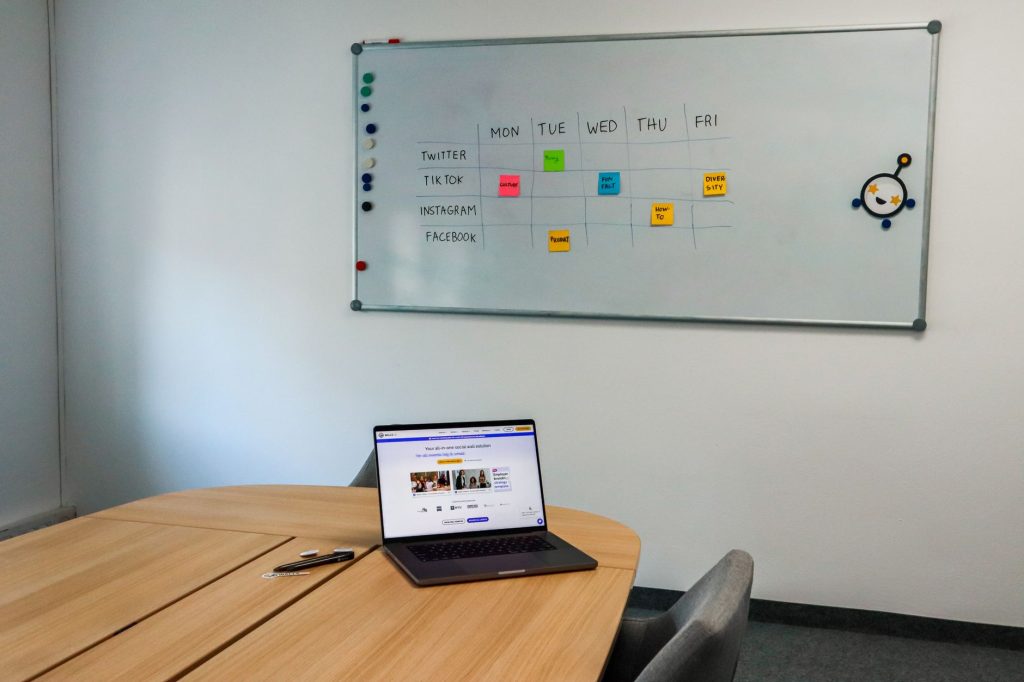
When you open the new-post window, the AI Assistant appears on the left, recognizes the selected social media channel, and reshapes generated text for that channel. Move through different versions and ask for a rewrite, with the option to make the copy longer or shorter.
Buffer AI Assistant can carry an idea from its first draft into reuse once the post has done well. Save promising thoughts in the Publishing section’s Create tab, then turn to AI for a starting point when your idea well runs dry.
A multi-channel campaign works much like an email drip sequence, mixing recurring material with new posts. The kanban-style area keeps fresh ideas visible, and reuse helps carry the campaign across channels.
Buffer’s Free plan supports up to 3 channels, with 10 posts per channel and 100 ideas. Its Essentials plan begins at $5/month/channel, billed annually, and includes unlimited posts, storage, and ideas. Every plan includes unlimited AI use.
Buffer AI Assistant and Social Bee CoPilot use past engagement patterns and follower activity to recommend publishing times. According to a 2026 Sprout Social benchmark, marketers using AI-recommended schedules saw engagement increases of 15% to 30%.
Take one idea and make 10 platform-specific posts; connect Buffer with Zapier when the process has to go beyond scheduling. Trending keywords can feed on-brand drafts, which pass through human approval before returning to Buffer for publishing.
Publer
Accessible pricing
Publer adds a capable AI toolkit to dependable social media management without charging the higher prices that often come with broader AI access. That lower price leaves more room for generated material while protecting the budget. Publer begins at $4/month/channel.
Brand voice
You can have Publer write copy with emojis and hashtags at the end of a prompt. Give it a brand voice, extra instructions, uploaded examples, or earlier material to study, and future drafts can keep the same feel. The saved voice remains available for later drafts.
Image generation
Publer’s image tool created eight appealing oil-painting-style ideas featuring heartwarming golden retrievers while keeping the dogs’ anatomy believable.
Editing and analytics
Publer lets you adjust image or video dimensions and add captions without downloading files and uploading them again. Its chat assistant checks the last 30-day performance of your accounts and points out when a campaign may need adjustment.

Publer’s Free plan includes 3 accounts and 10 scheduled posts. The Professional plan costs $4/month/channel, billed annually, removes most metered limits, and adds X integration plus a link-in-bio.
Publer still trails competitors on integrations, although Zapier now connects it with over 9,000+ apps used across day-to-day operations.
FeedHive
FeedHive comes with two account details to weigh before you pick it:
- Post variables: Add variables to a post and fill them with dynamic content.
- Plan limits: AI hashtags and AI performance prediction are unavailable on the lowest paid plan.
FeedHive’s AI recycling tool reviews your post history by age and performance, then brings forward material worth using again. It can also resurface a weaker post that may have been released at the wrong time, with suggestions under Assets > Recycle Suggestions. Every variation stays connected to its original post.
Reusing strong posts lets new followers find them without digging through your profile, while longtime followers get reminders of what first brought them in. Older ideas can regain their relevance.
The AI Writing Assistant lives in the lower-right corner and behaves much like ChatGPT. Ask it to create posts and carry useful passages into the next draft; use the AI-powered performance prediction tool to gauge likely results.
Once a post is live, FeedHive’s AI conditional posting can add comments when preset rules are met. Engagement above the usual level may trigger a lead magnet, while a time or like count can publish a flash-sale reminder, freebie, or promo code.
FeedHive offers a Free 7-day trial. The Creator plan starts at $15/month, billed annually, covers 4 social accounts, and includes the AI Writing Assistant. Higher paid plans alone offer AI hashtag suggestions and AI performance prediction.
ContentStudio
Trend discovery
ContentStudio reduces the time spent hunting for current topics. Go to Discover, choose Content Feed, and add subjects to follow; Cover Stories and Trending News then show what is gaining attention across the wider internet.
Content signals
Content Feed displays metrics for every article or post, including total engagement and broad online sentiment.
Influencer and competitor tracking
Follow popular influencers on Twitter/X and Instagram, then place competitors into monitoring lists so you can track account performance instead of building a hall of fame.
ContentStudio works with all major social media platforms, including Tumblr.

ContentStudio has a Free 7-day trial. Its Standard plan costs $19/month, billed annually, for 5 social accounts, up to 25,000 AI-generated words, and 25 AI-generated images per month.
ContentStudio’s Zapier link connects trend tracking with broader business processes.
Eclincher
Message triage
Publishing posts by itself doesn’t create an audience conversation. Comments and DMs still call for replies and follow-ups, so Eclincher’s AI agents sort incoming messages by urgency and sentiment and tag them before sending them to team members. Teams can answer positive reactions and handle concerns that are spreading quickly.
Knowledge-based replies
Eclincher’s private knowledge bases give its reply suggestions more context. Upload business data and FAQs so it can create drafts, then review them before automating replies to common, low-risk messages.
Channel management
Alongside those tools, Eclincher provides full social media management, including AI-driven content and scheduling that can create posts and publish them automatically at the best posting time, a practical step toward future autonomous agents.
Eclincher offers a Free 14-day trial. Its Standard tier is about $134/month, or $1609 annually, for 1 brand, 2 users, and 20 maximum profiles with unlimited posts.
Hootsuite
Hootsuite is aimed at larger operations that have outgrown basic scheduling.
- Post templates: A deep library of editable post templates.
- Reporting: A robust reporting tab.
- Cost: The service is expensive.
Hootsuite places AI post creation and analytics, along with idea collections, in the same workflow. OwlyWriter can turn URLs into posts and suggest ideas, including coverage of unexpected holidays, while AIDA and PAS formulas shape copy for engagement.
A separate page arranges several social feeds beside one another, letting you review them from the audience’s perspective and check the main engagement numbers.
Hootsuite’s Analytics page can report on almost any measure, from broad awareness to detailed platform statistics. Its idea collection covers ways to convert, educate, inspire, and entertain followers, including short-term offers and a flashback Friday habit.
All social media DMs land in one Hootsuite inbox, so you can handle conversations without jumping between platforms.
Hootsuite provides a Free 30-day trial. Its Standard plan starts at $199/user/month, billed annually, with unlimited posts and scheduling plus access to messages in one inbox.

Sprout Social
Sprout Social brings collaboration and listening together for teams that share one workflow.
- Team collaboration: Supports approval flows and internal conversation threads.
- Cost: Very expensive for small teams.
Basic analytics can tell you where performance sits without showing the next move. Sprout Social adds AI-powered analytics and social listening to give you a fuller read for tighter targeting and clearer messaging.
Sprout Social monitors over 30 billion messages sent each day across social media and the wider web. In Listening, create alerts for major shifts and review the mini-dashboard attached to each topic.
Analyze Topics by AI Assist reviews hundreds of messages and sums up the sentiment behind emerging trends. It also pulls quotes that show what people actually say, giving future posts direct voice-of-customer material.
Sprout Social can create content as well. While drafting a post, use AI Assist with one of nine starting options and the brand voice that should guide the result.
Sprout Social offers a Free 30-day trial. Its Standard tier is $199/user/month for 5 social profiles and 10 brand keywords per group.
AI content creation platforms
According to Socialinsider, AI for content creation is used by 70% of marketers, making it the top focus among AI tools for social platforms.
Content creation scope
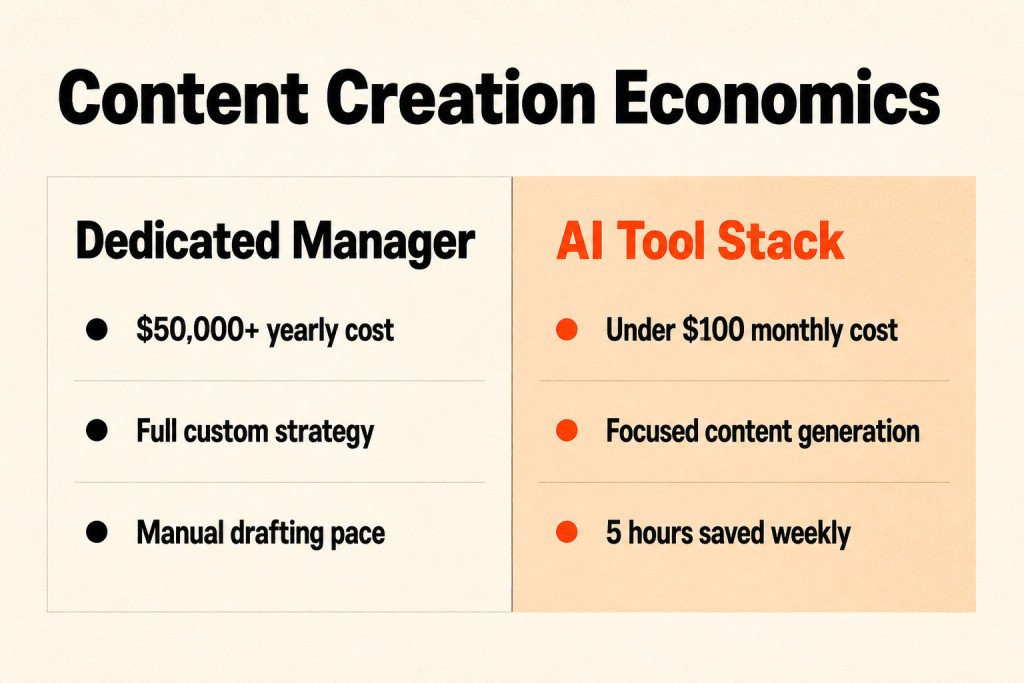
These tools produce written and visual content for publication, while generative AI reduces the time those tasks require. A 2025 Salesforce survey found an average of five hours saved per week.
Cost comparison
Use an AI content suite for under $100 per month, rather than paying $50,000 or more per year for a full-time manager of social channels.
Jasper
Brand voice training
Jasper’s brand voice features give teams writing support while keeping their content consistent. Feed it style guidance and earlier work, and its drafts are less likely to sound like generic AI. Give Jasper one campaign idea, then use it to develop channel-specific campaign or landing-page copy that carries the same message across channels.
Writesonic
Writesonic gave me a 1,600 word article in under five minutes, much faster than I could have written the same piece myself.
That pace works well for business owners and solopreneurs who want substantial online articles but can’t hire a writer. The article was ready in under five minutes.
Writesonic pricing includes a Free Plan with 25 one-time credits and no time limit. The Individual Plan costs $16/month for 100 monthly credits. Standard costs $79/month for 1,000 monthly credits.
Copy.ai
Copy.ai lets content creators on social platforms consolidate recurring creation tasks into one workflow.
I tested one by giving it a website URL and received the following results:
- Scrape the home page and summarize its content
- Provide the home page’s meta title
- Provide the home page’s meta description
- Produce a sitemap for the website
I entered an aspirational competitor’s domain for True North Resumes, and the automation delivered exactly what I wanted instantly.
Copy.ai helps content creators and business owners remove bottlenecks in their production process.
Copy.ai pricing starts with a Free Plan allowing up to 2,000 words in chat with no time limit. Starter costs $49/month. Advanced costs $249/month. Enterprise uses a custom quote.
Predis.ai
Predis.ai handles text, images, and video in one platform.
Predis.ai uses assets you already have. Give it a product or blog post, using its URL, and it turns that material into platform-specific posts with captions and video content.
- Text, images, and video: The platform combines all three, with a few animations to blend them.
- Editable assets: You get images with a coherent design and basic copy that you can adjust.
- Video method: Predis.ai searches a stock video library from your prompt rather than generating video itself.
Predis.ai’s Core plan costs $19/month, billed annually, and includes 1,300 credits plus 60 competitive analyses per month.
Ocoya
Ocoya focuses on AI-made content, including visuals and limited video, with auto-scheduling built in.
- Copywriting and assets: Ocoya combines AI copywriting with automated asset creation for social media campaigns.
- Pricing: Ocoya’s Bronze plan starts at $15/month and includes 100 AI credits and 10 automation runs.
Blaze.ai
Blaze.ai learns a company’s tone across different formats, then schedules content using existing brand context and marketing materials.
When billed annually, Blaze.ai Starter costs $27/month, while Growth costs $60/month.
AI visual design tools
Design bottleneck
Before AI, turning a concept into a finished asset could take one brief, one designer, and two days of revisions for one carousel.
On-brand graphics
AI design tools can make On-brand graphics, resize them for each platform, and hold fonts and colors steady through brand kits, while background removal and translation happen in seconds.
Originality trade-off
Freelance design may cost several hundred dollars more each month, but prompt-made graphics can share the same visual fingerprints as other prompt-made graphics.
Your photographs and pictures of customers still beat generated images, so use the design tool for the frame and real photographs for the content.
Canva
Canva’s Magic Studio combines AI design with image generation, so you can make polished visuals without knowing design.
Magic Switch adapts an ad for Stories, Reels, and feed placements within seconds, which can save hours.
Canva’s AI logo creator apps give business owners and social media content creators a quick, text-based way to explore logo ideas, though the generator struggled with image details.

Try different logo looks, type fonts, and colors, then use the concept to show a human designer the direction you want.
The generator repeatedly misspelled logo text, and its compass images looked wrong because the directional letters landed in the wrong places. The detail failures were frustrating.
Canva Pro includes 20+ AI tools at $120/year for one person; Canva Team costs $300/year for three persons.
Canva Team: $300/year (three persons)
Visme
Visme fits teams that want tighter design control, handling posts, stories, animations, videos, and other formats for reuse across campaigns.
Give Visme a prompt, link, or file, and it can repurpose that source as social content, story artwork, presentation materials, or other campaign formats; a webinar slide, customer quote, or report highlight can support several formats.
That flexibility also suits marketing teams making content beyond social media.
Best for: Brands that need polished visuals across several content formats.
Venngage
Within its online visual communication platform, Venngage supports infographics, social media visuals, brochure designs, flyer designs, and additional branded materials.
Its AI-assisted tools and customizable templates shorten the path from idea to product promotion, social campaign, or other e-commerce marketing material.
Start from a prompt or template, then change the layouts, colors, fonts, and branding before publishing. Customizable templates keep the first draft close to publishable.
When you’re building visuals from scratch, AI-generated images and icons can fill the gap, while the Brand Kit keeps colors, fonts, and logos aligned across designs.
Best for: Marketers and e-commerce teams that need branded social media graphics and other visual content quickly and consistently.
Piktochart
Piktochart creates Facebook infographics and Instagram post images, while its Carousel feature produced a six-slide sequence with fully editable text and imagery, ready to publish that day.
Its plans and output details are straightforward:
- Carousel output: Piktochart returned a six-slide carousel with tips for customizing a resume to a specific job description.
- Editable content: You could edit all text and images.
- Posting readiness: The carousel was ready to post that day, saving hours.
- Dimensions and assembly: Piktochart handled Instagram dimensions, content placement, and image selection for each slide.
- Free Forever Plan: 50 AI credits, no expiration date.
- Pro Plan: $14/member/month, 1,000 AI credits.
- Business Plan: $24/member/month, 3,000 AI credits.
- Enterprise: custom quote.
Some “tailor your resume” images felt basic and pushed the metaphor further than I wanted. Slide headers had the same issue, and some downloads required a paid plan.
Vista Create
Vista Create, formerly Crello, is a long-established visual-content AI tool and the simplest option tested for this article.
The interface is foolproof, with very little to figure out: press the button, wait, and the app cuts the background from an image of your sharply-dressed professional.
Vista Create Photo Background Removal tool fits social media content creators without a graphic design background, including these uses:
- Profile photos
- Product photos
- Creative “edits” of group or team photos
- Photo image canvases in common social media dimensions
Free Starter Plan: The AI photo background removal tool DOES NOT come with this plan
Pro Plan: $120/year, includes a 14-day free trial
Users have reported problems downloading images.
AI video generation tools
AI video tools fall into two groups: kinetic videos and AI-rendered videos.
Kinetic videos stitch together text, images, movement, transitions, and music. AI-rendered videos rely on synthetic faces and AI voiceover, or on entirely generated scenes.
Most platforms make kinetic videos, with Apaya among them; Predis.ai and ContentStudio do as well. Blaze.ai and some Predis.ai templates can render video with AI, but the seams show clearly: mouths drift from the audio, movements feel odd, making the difference easy for viewers to spot.
Social audiences engage with more AI video than they did a year ago, and the baseline quality keeps climbing. Brands seeking polished, human-quality video still don’t have many choices.
Choose kinetic video when you need a steady stream for platforms that favor video. AI-rendered video is getting better quickly.
InVideo
InVideo builds a video reel from a text prompt or uploaded script, adding AI animation features and access to a large stock-footage library.
My five-minute test delivered a narrator who sounded professional, smooth transitions, and upbeat music. Its drag-and-drop editor lets you make changes without wrestling with complicated audio or video interfaces. The quality floor is rising, although some selections are described as cringe-worthy.
Feed a script into the prompt for short reels, then polish the result inside the editor. This can get you to a serviceable video in less than an hour.
Its stock images and clips can miss the mark badly, so bring royalty-free assets of your own when the choices don’t hold up.
The available plans are:
- Free Plan: 10 minutes of video/week, with no credit card required for sign up.
- Plus Plan: 50 minutes of AI generation/month, priced at $28/month.
- Max Plan: 200 minutes of AI generation/month, priced at $48/mo.
- Generative Plan: 200 minutes of AI generation/month plus additional features, priced at $96/mo.
VEED
VEED works in the browser, letting teams create, clean up, or subtitle videos without installing desktop software. It also helps marketers move from an idea to a publishable clip quickly in order to keep production moving.

A social manager can handle much of the process in one browser tab using text-to-video tools and natural-language edits, plus automatic subtitles. Captions boost accessibility and make clips easier to follow with the sound off.
Best for: Marketers and creators, plus small teams that want simple video production with a fast turnaround.
Loom
Screencast-focused reels
Loom’s AI features suit creators making screencast-focused reels. I tested it with a short recording about analyzing LinkedIn job descriptions, started the recording on my phone, and completed the process in Loom’s desktop app.
AI editing
Loom then cut 11 filler words with its AI editing tool and trimmed about 3 seconds from the recording. I used the shorter version for a step-by-step guide.
Repurposing the guide
You can turn that guide into another social asset, such as an Instagram carousel, and get more mileage from the original piece. Loom recorded, rendered, and delivered the result quickly.
I figured I could make an ongoing True North Resumes series for LinkedIn, Facebook, or Instagram while spending less than an hour a week.
Starter Plan: free, 5-minute video recording limit, 25 total videos/screenshots limit
Business Plan: $15/mo
Business + AI Plan: $20/mo
Loom doesn’t offer advanced editing, and only a few text-based formats can come from the video itself.
Opus Clip
Opus Clip digs through long-form video to find the moments most likely to hold attention. It then converts those sections into short clips built for TikTok and Reels, as well as YouTube Shorts in order to make the source video easier to reuse.
Without repurposing, long-form video leaves part of its reach unused.
Lumen5
Lumen5 pulls written blog posts and articles apart automatically to make social videos. It identifies the main ideas and pairs them with fitting visuals and music. The system matches ideas with visual elements and musical tracks.
For content marketers extending blog posts into longer content packages, the time savings are real.
AI social listening platforms
Those time savings become useful when you’re trying to hear how people talk about your brand. Engagement numbers can’t show sentiment or track its movement, while NLP can process that text at a scale no human team could handle by hand.
This intelligence layer brings together analytics and competitor benchmarking, with listening as another capability, and often delivers more strategic value than teams expect.
Brandwatch
Listening coverage
Brandwatch has the depth you’d expect from one of the market’s most established dedicated listening platforms. Its NLP examines social channels, discussion boards, weblogs, news outlets, and review platforms, processing millions of conversations to detect sentiment, emerging topics, and signals of brand health. You see both the words people use and the feeling behind them.
Audience intelligence
Its audience intelligence layer helps explain why conversations change and what those shifts mean for brand perception over time.
Best for
Choose Brandwatch when your brand, marketing, or insights team requires enterprise-grade listening for brand health, content strategy, and early risk detection.
Brand24
Core listening use case
Brand24 gives mid-size teams a way to follow mentions and measure sentiment, while also detecting trends without a dedicated analytics function or enterprise-level complexity.
Real-time alerts
Its AI sentiment analysis handles most use cases reliably. Live alerts flag mentions and sentiment shifts as they happen instead of waiting for a weekly report.
Best for
Pick Brand24 when mid-size teams want dependable, continuous brand monitoring and sentiment tracking without enterprise listening costs or complexity.
Socialinsider
Connected system
Socialinsider combines analytics with competitive intelligence, while also handling reporting in one connected system, rather than splitting those jobs across three tools for social media and marketing teams.
Competitive benchmarking
It benchmarks the full competitive set through content type, content mix, posting frequency, engagement rates, and audience growth trajectory.
Executive reporting
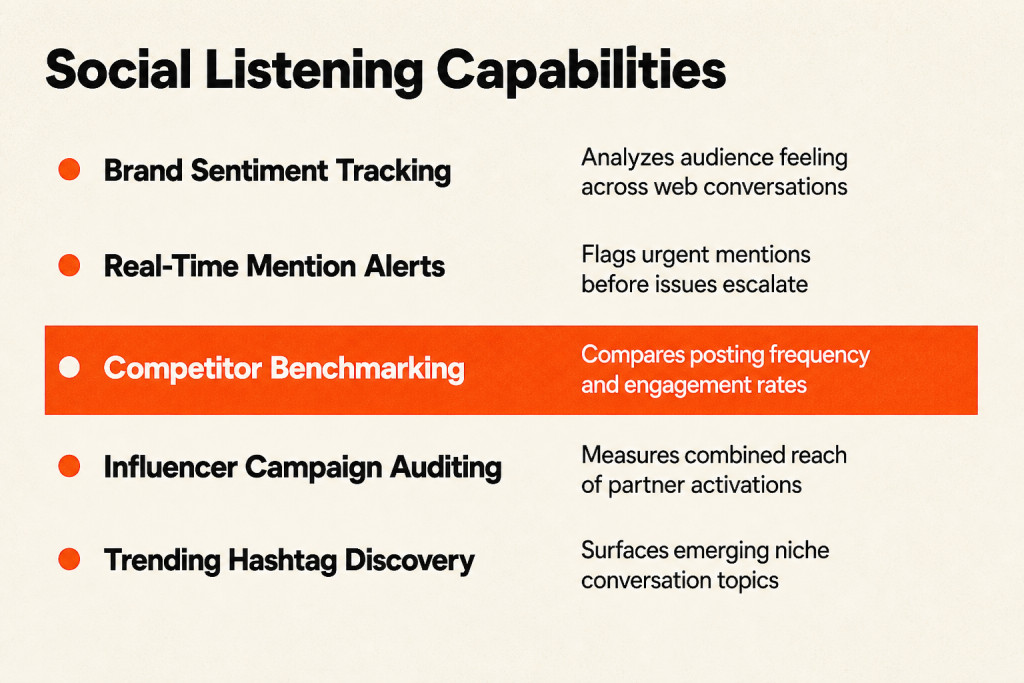
Its AI-generated executive summaries can go straight to leadership, covering both your brand and the competitive picture.
Cross-channel analysis
Use Socialinsider when you want engagement, strategy, and competitor data across channels instead of separate platform dashboards. It covers Instagram, TikTok, LinkedIn, Facebook, and YouTube. It also helps identify where engagement is strongest.
That same level of metric depth carries across all five channels.
Content pillar analysis
Socialinsider’s content pillar analysis sorts your posts and competitor posts by theme, letting you compare what drives results without tagging each post manually.
A social manager can tell whether a campaign theme, product angle, or content format is winning without labeling hundreds of posts by hand. The guesswork drops sharply.
MCP access
With Socialinsider’s MCP, you can query live Socialinsider data through any AI assistant instead of relying on a spreadsheet or copied-and-pasted information.
Keyhole
Campaign tracking
Keyhole brings campaign, hashtag, and influencer performance tracking into one dedicated social media analytics platform.
AI monitoring
Its AI handles performance forecasting, automated reporting, and current monitoring for both owned content and influencer activity.
Campaign-level analytics
Keyhole tracks a campaign’s impact over time, including reach, impressions, engagement, and sentiment from every account contributing to it, including influencer profiles.
Best for
Choose Keyhole when influencer programs run beside owned social and require campaign-level analytics across both.
Flick
Flick is designed for people whose main platform is Instagram, pairing hashtag discovery with Instagram content strategy and organized planning. It costs ~$30/month annual and is built around Instagram from the ground up. > Flick (~$30/month annual): Instagram-focused from the ground up. Hashtag research plus the Iris AI assistant make it the specialist pick for visual brands living on Instagram.
Flick’s Iris AI assistant writes Instagram captions and suggests matching hashtags, which makes it especially useful for teams focused on Instagram.
AI social advertising platforms
Social advertising platforms usually handle three jobs for advertisers.
Media Buying & Automation
Media buying and automation tools manage bids, budgets, and targeting to maximize profitability.
Creative Generation
Creative Generation provides the fuel, producing copy, images, and videos designed to win attention and generate clicks.
Analytics & Insights
Analytics & Insights give your strategy a GPS, showing what works, what fails, and where the campaign should move next.
With an estimated $276.7 Billion projected to flow into social advertising in 2025, choosing your technology gets harder to sidestep. Forecasts place the AI marketing market at $47.32 Billion by 2025, while plenty of tools already present themselves as the “next big thing.”
Meta’s Advantage+ Shopping Campaigns leave you with less control: upload creatives, choose a budget, and wait for the system to decide the result. That’s the workflow.
Meta’s algorithm remains the main system, while Madgicx sits above it as an intelligent co-pilot. It identifies the creatives driving results in an Advantage+ campaign, spots audience saturation, and supplies AI-powered recommendations.
Madgicx
Campaign recommendations
Madgicx pairs Meta campaign management recommendations with campaign diagnostics. Its AI Marketer checks your account 24/7 like a senior strategist, spots ways to scale and budget waste, then gives recommendations you can use for immediate campaign optimization.
One platform brings together AI-powered Meta ad management, creative asset production, and campaign diagnostics tools.
Ad variations
Its AI Ad Generator makes “thumb-stopping” image ads within seconds, so you can test endless variations without opening a design program.
AI Chat
With Madgicx’s AI Chat, you can ask plain questions about campaign performance. Ask why ROAS fell 20% yesterday, and it may connect that change to a 50% frequency increase among your main prospecting audience before suggesting fresh creative. Work that once took hours can happen in a 30-second conversation.

You can try the platform through a Free 7-day trial.
Adzooma
Adzooma gives beginners an entry-level way to automate across Meta and Google. Its simple if-then rules can say, “If CPA is over $50, pause the ad set,” helping stop major mistakes before they spread.
Best For: Small businesses or beginners looking for simple cross-platform automation rules.
For larger campaigns, you may want the deeper AI-driven analysis available through platforms such as Madgicx.
Revealbot
Revealbot applies AI rules to paid social campaigns, changing budgets, pausing weak ads, and scaling winners without asking you to monitor everything each day.
It connects cleanly with Facebook Ads and Google Ads.
Pattern89
Pattern89 applies predictive AI before spending begins, estimating which creative has the best chance to perform well.
It reviews thousands of visual and copy variables, then finds combinations most likely to drive engagement.
AdCreative.ai
AdCreative.ai uses AI to make polished ads and creative collateral while gathering brand details for competitive research.
The app asked enough about my test company to understand it, then asked which competitors it should study. I chose a heavily trafficked career site as an aspirational competitor, and it soon returned a detailed report on that site’s visitors.
That report was available online and as a PDF, with gender, age, household size, income level, and education covered.
It was easy to follow, and having a PDF version was a useful touch.
Free 7-day trial
Starter Plan: from $39/mo
Professional Plan: from $249/mo
Ultimate Plan: from $599/mo
Membership at the lowest priced tier includes only limited asset downloads.
How to evaluate ai social media marketing tools
Match the platform to the bottleneck costing your team the most time while returning the least strategic payoff. An enterprise listening system is too much for a two-person team, while basic analytics can slow an agency running twenty brand accounts. Put integration high on the list, because repeated manual transfers create more friction over time.
Test shortlisted platforms on live accounts and competitor data, never demo material, then judge them against your team’s actual workflow. True North Resumes served as the test company, where we connected over 15 AI tools to live Meta ad accounts carrying a combined monthly ad spend of over $1M. Live trials show the real gap.

Judge every platform through three checks: ROAS impact, time saved, and ease of use. In plain terms, ask whether it improves return on ad spend, removes manual steps, and lets the team get useful results quickly. Then score it across five dimensions: AI depth, cross-platform coverage, ease of use, reporting output, and fit for the use case. A tool that only displays metrics differs from one that compares competitors and offers recommendations, with Socialinsider as one example. Teams can implement ai for social media marketing across varying automation tiers: Level 1 may save 2-3 hours each week on captions, while Level 4 saves 15-20 hours across the full workflow.
Strategic tool selection framework
The bottleneck should decide your tool. When posts are lacking, turn to a tool centered on creating assets with AI; when completed content is ready to be published, use a scheduler for distribution. That choice keeps creation and distribution separate.
Next, test the tool’s grasp of your brand voice. Does it understand how your company talks, what it sells, and who it sells to? The more context it has, the more its drafts sound like you; basic caption support still needs constant babysitting.
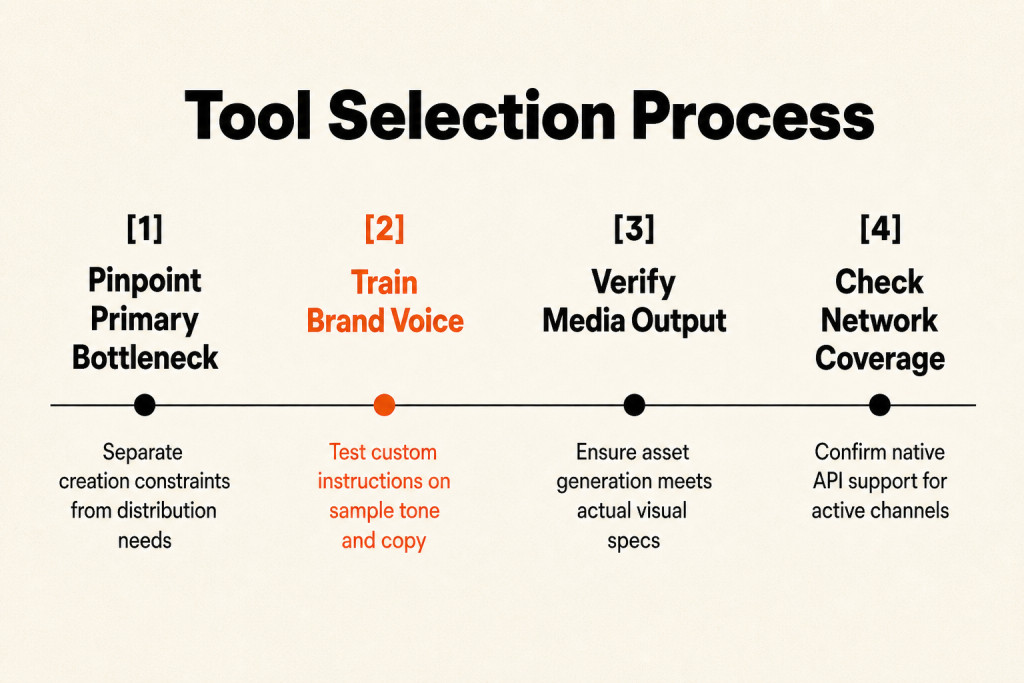
Before buying, check whether the visual features actually produce images or video. Agencies should choose tools built for multi-brand operations, with Marky and Sendible fitting automation across multiple client pages. Teams scaling multi-brand operations can also work with a Social Media Marketing Agency.
Choose for the networks you use today, then check current compatibility, comparing tools such as Buffer and Later.
Common pitfalls in AI tool adoption
But start with the problem you want solved, not a flashy feature list. The right tool gives you a usable first draft, with little cleanup left. Turning one video into several clips is safer than letting software answer customer or complaint messages, especially once volume turns those replies into noise. Automated ads can hide what’s actually working, so a human-led strategy remains necessary when Meta’s algorithm finds customers. Klaviyo reported that 31% of people trust a brand less when content is visibly AI-generated. Draw hard boundaries: sensitive or public-facing communication needs human editorial review, especially when it involves customers or money.

Frequently asked questions
What is the difference between an AI-first tool and a scheduler with AI features?
An AI-first tool
You can use AI-first tools to choose what to post, create it, and often schedule and publish it, shortening the entire process.
A scheduler with AI features
Schedulers with AI features mainly help after your content exists, polishing certain steps while you still manage the rest of the workflow yourself from start to finish.
What are the best ai tools for social media marketing for small businesses?
Lack of time
When time, rather than ideas, is the constraint, an AI-first tool that handles content creation and publishing is usually the better choice for your small business.
Owner-led businesses
For owner-led businesses, Apaya, Blaze.ai, and Predis.ai usually make more sense than schedulers such as Buffer or Later.
What is the cheapest AI social media tool?
On this list, Ocoya is the cheapest AI-first starting point at $15/month, followed by Blaze.ai at $27/month annual.
Don’t judge price alone. A $15 tool may still require you to do much of the work, whereas a $55 option could handle the full task and consume less of your time.
Which AI social media tool is best for agencies?
White-label delivery
When white-label delivery and a clear, client-facing structure matter to an agency, Marky and Sendible deserve consideration.
Multiple brands
Agencies seeking to reduce the labor of producing content for multiple brands should consider Apaya, FeedHive, and Blaze.ai.
Which AI social media tools generate images and video?
Text plus visual generation
Blaze.ai, Predis.ai, ContentStudio, Simplified, and Apaya combine text creation with visual output in different ways.
Video limitations
The word “video” needs some care: these tools generally produce motion-based video or AI-assisted short-form material rather than polished, human-quality production.
Do AI social media tools support every social platform?
No. Not even close.
Before you choose, check the platforms you need, since compatibility differs across tools and networks.
How to build your AI social media tool stack?
Start with the intelligence layer when you build your stack:
- Start with AI-powered analytics, competitive benchmarking, and reporting, where the strategic value is highest and most teams remain underinvested.
Can AI manage my Facebook ads entirely?
Not yet.
For Facebook ads, Madgicx can automate routine tasks and surface strong insights, giving a skilled human marketer more time for high-level strategy, creative direction, and offers. AI works best as that marketer’s co-pilot, and the division of labor stays there.
The best results pair AI efficiency with human strategy.
How much do these AI tools cost?
Tools for creative work, including Jasper, often start at around $49/month, while all-in-one advertising platforms such as Madgicx typically price plans by monthly ad spend. Their plans cover small businesses and scale to enterprise-level needs.
Adoption works better in stages.
Avoid adopting everything at once. Start with one or two tools aimed at your biggest current pain point, whether that’s content creation, scheduling, or analytics, and learn them well.
Name the bottleneck before you choose, and the decision gets easier. If creation, distribution, listening, or engagement is the gap, choose a tool for that job instead of judging feature lists. Check your actual platform coverage, budget, media needs, agency workflow, and advertising oversight. Add AI tools for social media marketing one at a time, beginning with the task that takes the most time or gets the least coverage from your current stack.