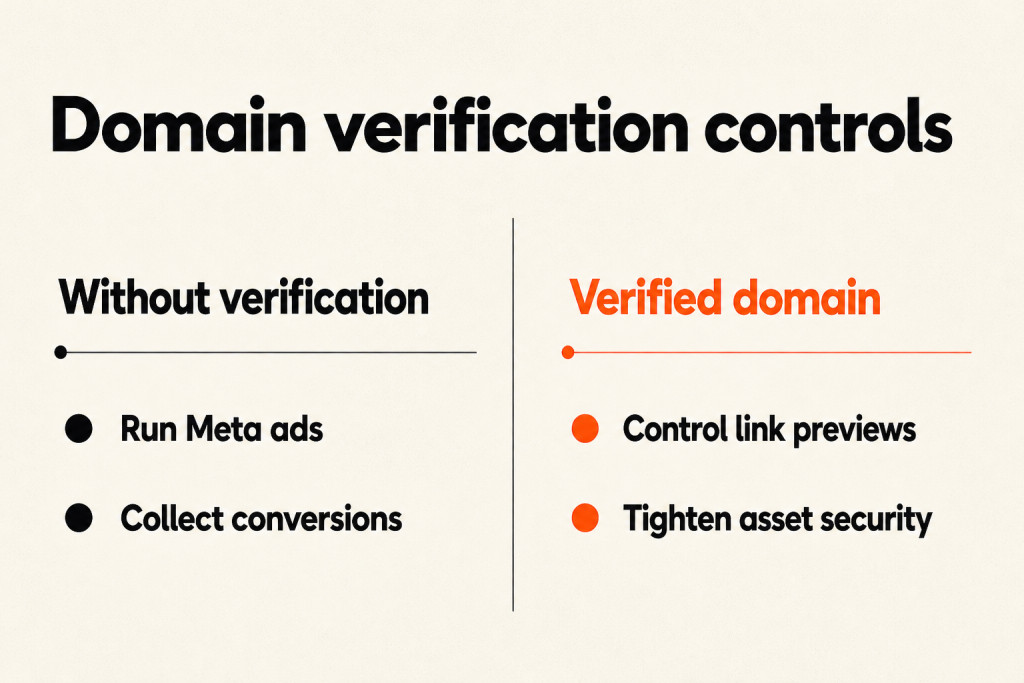
Is domain verification required for Meta ads? No. You can run Meta ads and collect conversions without verifying your domain. Verification matters for a narrower set of link and brand controls, and those are worth setting up once your campaigns are live.
This guide explains what domain verification changes, how the Conversions API handles events without it, and which verification method fits your site.
Is Domain Verification Required for Meta Ads?
Domain verification is not required to run Meta ads or to collect conversions. It proves you own a domain, which unlocks control over how links to that domain appear on Meta. If you are new to the platform, our primer on what Meta ads are covers the basics before you launch.
Aggregated Event Measurement (AEM):
Meta no longer asks advertisers to configure AEM events by hand. Eligible events are now aggregated automatically, so verification is no longer a step in event setup.
Link previews:
When someone shares a link to your website, a verified domain lets you edit its preview image, headline and description on Meta.
Security:
With a verified domain, you choose who can edit ad links that point to your domain. Verification also stops other accounts from claiming control over how your domain’s links appear across Meta’s platforms, which protects your brand from misuse.
Is Conversions API Mandatory for Meta Ads?
No, the Conversions API (CAPI) is not mandatory for Meta ads, and it does not require domain verification. CAPI sends events from your server using your dataset credentials, while verification only establishes domain ownership.

Because CAPI sends events from your server, they can still arrive when ad blockers or privacy browsers block the browser pixel.
When you run the pixel and CAPI together, each event is sent twice: once from the browser and once from the server. Both copies carry the same Event ID, and Meta deduplicates the pair by matching event_name and event_id, keeping one.
CAPI events also include match keys such as the fbp and fbc cookies, IP address and user agent. For logged-in users and purchases, you can add hashed customer data such as email and phone number to improve matching.
To generate an access token, open Events Manager, select your dataset and go to Settings. Scroll to Conversions API, choose Set up manually and select Generate access token. Copy the token into your integration. Our guide on how to run Meta ads shows where tracking fits into campaign setup.
Which Domain Verification Method Should You Use?
Use a DNS TXT record if you can reach your DNS settings, because it survives redesigns and migrations. Use an HTML file or meta tag only when DNS access is not available.

DNS TXT record (recommended): Add the record in your registrar’s DNS settings. It sits outside your website’s files, so a redesign, platform migration or full rebuild will not remove it. It does require access to your domain registrar.
HTML file upload: Meta gives you a specific file to place in your site’s root directory. If you forget to upload it again after a host migration or redesign, verification breaks.
Meta tag: Paste the tag Meta provides into the <head> section of your site. This works when you cannot access DNS, but a theme or platform change can wipe it.
Once the change has propagated, open Business Settings > Brand safety > Domains, select the domain and click Verify. DNS changes often take effect within minutes but can take up to 72 hours.
Frequently Asked Questions
Do I need to verify subdomains in Meta?
No. Verifying the root domain covers its subdomains.
Can I verify a domain on two different business portfolios?
No. A domain can be verified by only one business portfolio at a time. A partner who needs access should be assigned the domain from your Business Settings, so they can link their pages to it and edit link previews.
What happens if I remove the verification record?
Meta checks verification status periodically. If the DNS record, file or meta tag is gone at the next check, the domain loses its verified status and the link controls that depend on it stop working. Leave the record in place.
Conclusion
So, is domain verification required for Meta ads? No. You can run campaigns and send conversions through the pixel or the Conversions API without it. Verification is still worth a few minutes of setup because it gives you control over link previews and protects your domain from misuse. Choose the DNS TXT method if you can, verify the root domain once, and keep the record in place. If you want help setting up tracking and campaigns, our digital ads team can manage your Meta account end to end.