Learning how to see competitors Meta ads takes a few minutes in the Meta Ad Library, a free public database of ads running across Facebook, Instagram and Meta’s other platforms. The harder part is reading what those ads tell you, and what they cannot.
This guide shows how to find a competitor’s ads, what data the Library shows in different regions, which creative signals are worth noting, and how to turn what you find into tests for your own account.
How to See Competitors Meta Ads With Search Filters
To see a competitor’s Meta ads, open the Meta Ad Library at facebook.com/ads/library, choose a country and the “All ads” category, then search the brand’s exact Page name and filter the results. You do not need to log in.
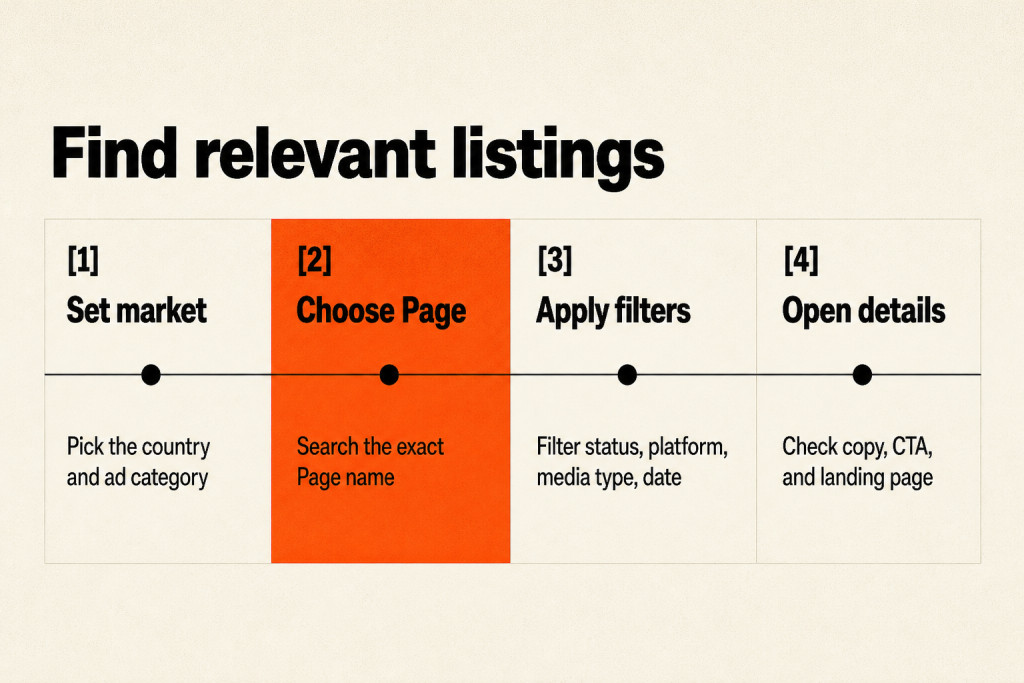
- Open the Library at facebook.com/ads/library.
- Pick the country you sell in. The Library shows ads delivered in that country, and global brands often run different ads in each market.
- Keep the ad category on All ads.
- Type the brand name and choose its Page from the suggestions. A plain keyword search returns any ad that mentions the word.
- Filter by active status, platform, media type and date. Facebook, Instagram, Messenger, Audience Network and Threads ads all sit in the same Library.
- Open each ad’s details to see the full copy, call to action, landing page and the platforms it runs on.
Each card shows the creative, copy, start date and how many ads use the same creative and text. One entry can hold several versions of the copy and headline, so a single card can hide a small test.
You can also start from the competitor’s Facebook Page. Open Page transparency and choose See all under ads from this Page to jump straight to its Library listings. If you are new to the platform, our guide to what Meta ads are covers the basics.
Meta Ad Library Data Visibility
What you can see depends on where the ad ran. Outside the EU and UK, the Library shows active ads only. For ads delivered in the EU or UK, it shows more detail and keeps ads for one year after their last impression.
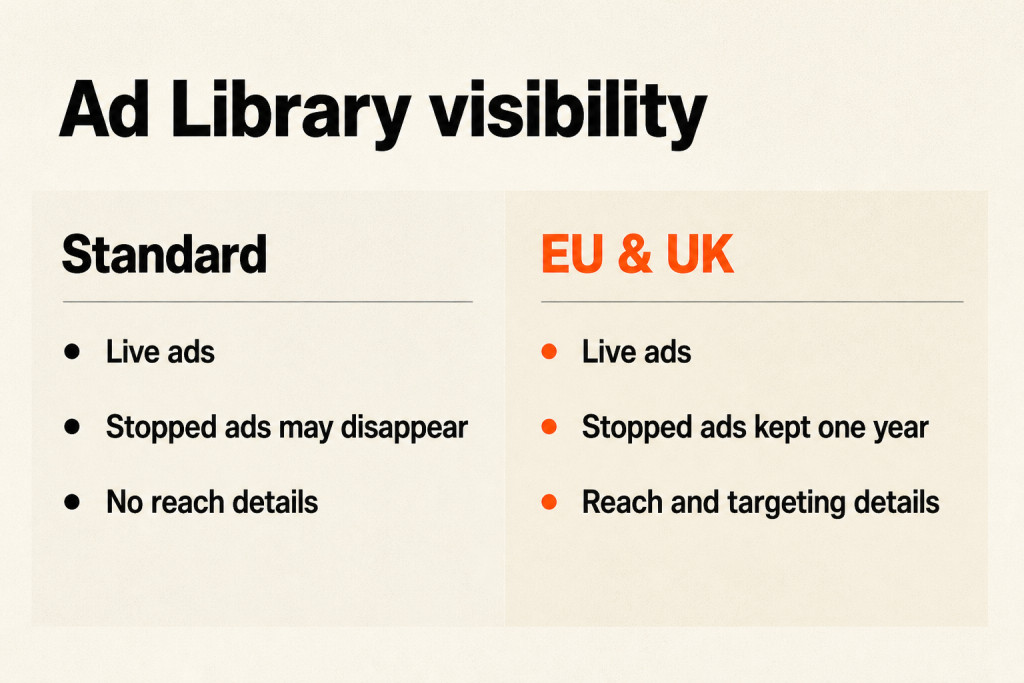
| Data | Standard view | EU and UK view |
|---|---|---|
| Live ads | Yes | Yes |
| Stopped ads | Can disappear once paused | Kept for one year after the last impression |
| Reach | No | Yes, including by country, age and gender |
| Targeting | No | Age, gender and location selections |
| Spend and results | No | No |
| Platforms and creative | Yes | Yes |
Ads about social issues, elections or politics are the exception. Meta shows spend and impression ranges for them and keeps them in the Library for seven years.
For regular commercial ads, you will not see spend, clicks, conversions or return on ad spend. You can see what a competitor is running, not whether it is profitable.
Creative Performance Signals
A few public patterns hint at which ads a competitor is backing, but each one can mislead, so compare it with that brand’s usual behavior.
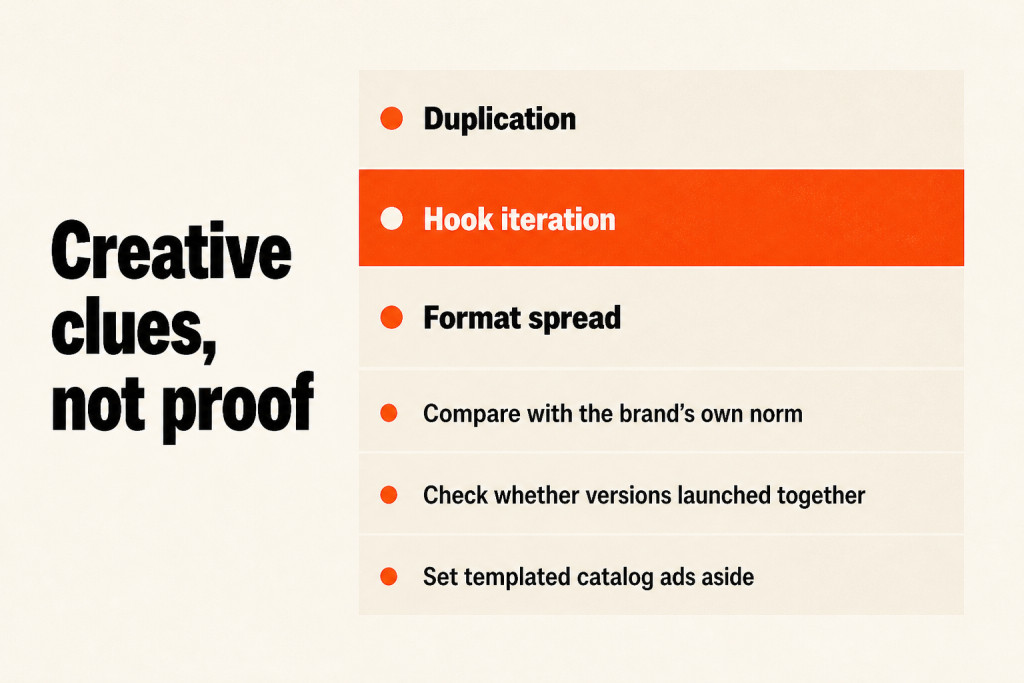
- Duplication: Many ads using the same creative may mean the advertiser trusts it across several ad sets. Some teams duplicate every ad by habit, though.
- Hook iteration: New hooks, creators or formats built on the same idea suggest a concept survived testing. Check start dates, because versions launched on the same day are still a test.
- Format spread: One message running as a static image, video and carousel suggests the advertiser is scaling it across placements. Dynamic and catalog ads create variants automatically, so set them aside.
Ad Longevity Analysis
An ad that has run for months usually means the advertiser is happy enough to keep paying for it, but runtime alone is weak evidence of success.

Containers outlive creatives: With dynamic creative and catalog ads, one entry can stay live while the products and assets inside it change. A long runtime may cover several different versions.
Cheap ads linger: An evergreen offer or a small retargeting ad can stay live for months because it costs little and nobody turned it off.
Runtime is not spend: The Library shows that an ad stayed available, not how much was spent or whether it delivered continuously. Treat long-running ads as a shortlist to study, not as proven winners.
How to Find Useful Gaps in Competitor Ads
To find useful gaps, list the main messages your competitors repeat, then compare them with the messages in your own account and your results. A message rivals lean on that you never lead with is a candidate for a test.

- Tag each competitor ad by message, hook, format, offer and call to action.
- Count how often each message appears across your main rivals.
- Line it up against your account: which messages you already run, what share of spend they get and how they perform.
- Pick the gaps: messages rivals use heavily that you do not lead with, or angles nobody in the market uses yet.
- Brief one new concept per gap and test it against your current best ad.
Let the gap, not the rival’s execution, shape the brief. Copying a competitor’s hook, visuals or wording can confuse customers and create trademark problems. If rivals all run feature lists, test customer stories. If emotional storytelling dominates, test direct proof and clear pricing.
How to Use Meta Ads Library for Ongoing Monitoring
Set up a simple competitor tracking sheet and check it on a fixed schedule, so you notice launches, stopped ads and offer changes as they happen.

Track these fields for each competitor: name, Page link, Ad Library link, date last checked, number of active ads, new ads this week, notable changes and priority.
- High priority: your top direct competitors, checked weekly or more often.
- Medium priority: secondary competitors, checked every week or two.
- Low priority: adjacent or emerging brands, checked monthly.
During each check, look for:
- Ads launched since your last check.
- Ads that stopped.
- New ads already duplicated many times, which often signals a creative the advertiser is backing.
- Long-running ads that are still live.
- Changes to the offer, such as a new discount, bundle or shipping threshold.
Save screenshots of anything worth keeping. Outside the EU and UK, stopped ads can disappear from the Library, so your sheet may be the only record. Once a month, review the long-running ads, update your gap list and choose one to three concepts to test.
Frequently Asked Questions
Does the Meta Ad Library require a login?
No. The Ad Library is free and you can browse it without a Facebook account.
Why can’t I find a competitor’s old or paused ads?
Outside the EU and UK, the Library only guarantees active commercial ads, so paused ads may disappear. Switching the country to an EU market where the brand sells can show more history, because those ads stay available for one year after their last impression.
Is it legal to look at competitor ads?
Yes. The ads are public, and the Library exists to make them transparent. Use them to understand angles and offers, but do not copy another brand’s creative, wording or trademarks.
Conclusion
Now you know how to see competitors Meta ads: search the brand’s Page in the Meta Ad Library, filter by country, platform and date, and open each ad’s details. Treat what you find as clues rather than proof, because spend and results stay hidden for commercial ads. Compare the patterns with your own account, test the gaps that matter, and keep a simple tracking sheet so you never lose sight of what rivals change. If you want help turning competitor research into stronger campaigns, our digital ads team can run your Meta ads.