How to optimize Google Ads comes down to deciding which signals deserve a change and which can wait. Clicks and platform CPA are easy to move, but the goal is more qualified leads and sales, so every change should be judged against business outcomes.
This guide covers location targeting, search query intent, offline conversion tracking, Smart Bidding, creative testing and a review routine you can keep up week after week.
How to Geofence Google Ads
To geofence Google Ads, set radius or location targeting around the areas that matter, then tighten or widen the boundary based on where qualified leads or sales actually come from. Avoid areas so small that they never collect enough conversions to judge.

- A physical business, such as a hardware store, can show ads only to people nearby.
- An ecommerce store that ships to specific regions can stop paying for clicks it cannot serve.
- A premium brand can focus on the areas where its buyers live.
To set locations, open Campaigns, go to Audiences, keywords, and content and select Locations. Click the pencil icon to add, edit or exclude locations for that campaign.
People behave differently by device and place. Mobile users may convert differently from desktop users, and city audiences may differ from regional ones, so bids, ad copy and landing pages may need to match. Check results by device and location, and if mobile clicks are expensive but rarely convert, lower mobile bids or improve the mobile landing page.
Audience data helps too. Review age, gender and household income segments, then exclude segments that consistently fail to convert and raise bids for those that perform well.
How to Optimize Google Ads Query Intent
Match keywords to the searcher’s intent and funnel stage, then choose match types that control how closely searches must fit. Exact and phrase match give tighter control, while broad match reaches more searches with more risk of irrelevant clicks.

Google often recommends pairing broad match with Smart Bidding, but irrelevant searches can still slip through, especially while a campaign is new. Check the Search terms report every week to:
- Remove irrelevant searches by adding them as negative keywords.
- Find new keywords worth adding so you can bid on them directly.
- Spot converting searches that deserve more budget or their own keyword.
Negative Keyword Lists
To add negatives, go to Campaigns, then Audiences, keywords, and content, then Keywords, and open the Negative keywords tab. Select the plus button, choose a campaign or ad group, paste the terms and save.
You can also build an account-level list under Admin, Account settings, Negative keywords. Keep universal exclusions there, such as careers, login or support searches, and put product-specific exclusions at campaign or ad group level.
Be careful with expensive terms that have not converted yet. A high-intent B2B search can take many clicks before it produces an opportunity, so look at the full sales cycle before you block it.
When to Move Proven Search Terms Into Search
Performance Max can surface searches that convert, while a Search campaign gives you more control over the keyword, ad, landing page, budget and bid. Review the PMax search terms insights and move a term into Search only when it passes these checks:
- Steady conversion volume and a good qualified conversion rate.
- Acceptable cost per qualified outcome, not just platform CPA.
- A clear match to a product or service.
- A dedicated ad and landing page that could improve message match.
- Search adds control without starving PMax of useful learning.
One conversion is not proof. It may be noise, branded traffic or a lead that never became pipeline, so promote intent that repeats.
Offline Conversion Tracking
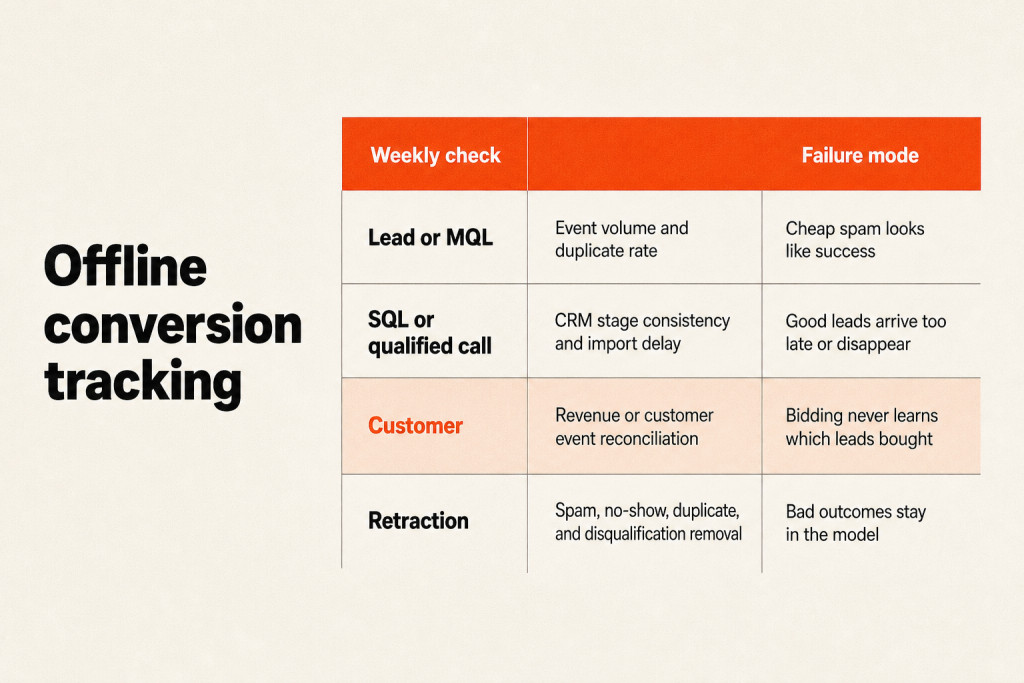
Offline conversion tracking connects ad clicks to later CRM outcomes. Capture the click ID (GCLID) with each lead, then import each funnel stage into Google Ads as its own conversion. Our guide on how to set up conversion tracking in Google Ads covers the basics.
| Funnel stage | Weekly check | Failure mode |
|---|---|---|
| Lead or MQL | Event volume and duplicate rate | Cheap spam looks like success |
| SQL or qualified call | CRM stage consistency and import delay | Good leads arrive too late or disappear |
| Customer | Revenue or customer event reconciliation | Bidding never learns which leads bought |
| Retraction | Spam, no-show, duplicate and disqualification removal | Bad outcomes stay in the model |
Check imports weekly rather than waiting for a monthly report, because a broken import can go unnoticed for weeks. Compare Google Ads totals with the CRM, confirm GCLIDs are captured and look for processing errors. If every form fill counts the same, the bidder may lower CPA while lead quality falls, so keep the stages separate.
Conversion Tracking Issues
- Conversion delays: A lead may only be marked qualified days after the form fill. Import it with the original click ID so the credit goes to the right click.
- Duplicate conversions: Importing the same action from both Google Ads and Google Analytics double counts it. Use one source per action.
- Cross-domain tracking: If checkout happens on another domain, such as a payment processor, set up cross-domain tracking or the sale will not be attributed.
- Tag conflicts: Manage Google Ads, Analytics and other tags in Google Tag Manager to avoid conflicts.
- Missing conversions: If the tag fires but nothing shows in reports, check that the conversion action is set as a primary action included in conversions.
Smart Bidding Calibration
Switch to Smart Bidding once your conversion tracking is reliable and you have steady recent conversion volume. Start with a target close to your actual qualified results, not an ideal number.
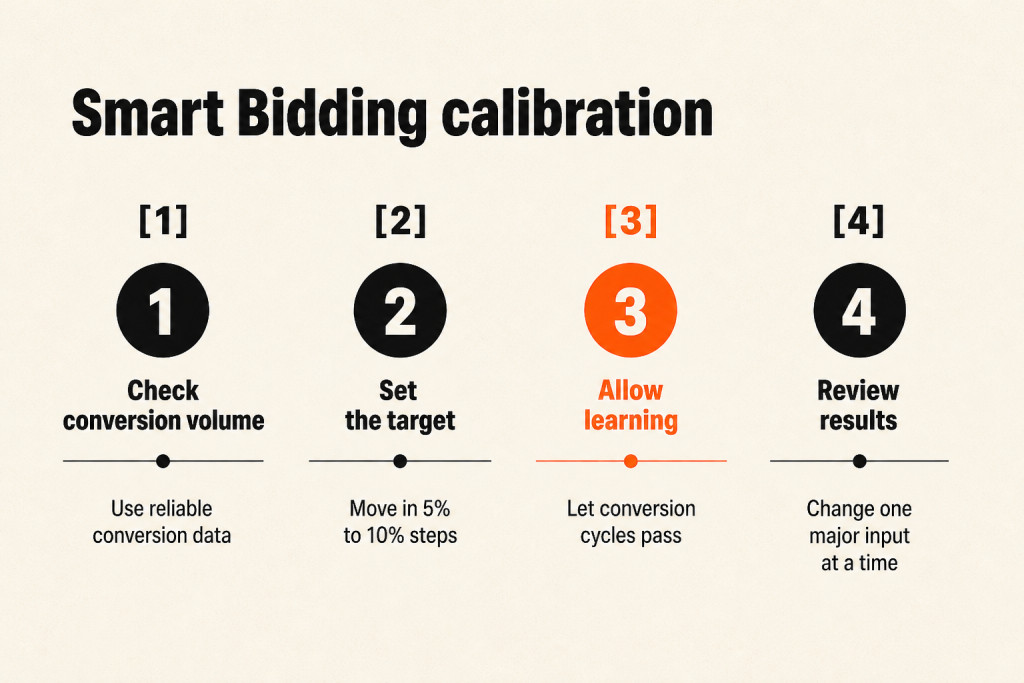
- Move the target gradually: Change targets in small steps, often 5% to 10%, then wait one or two conversion cycles before judging.
- Change one thing at a time: Do not change the conversion goal, campaign structure, budget and target on the same day, or you will not know what caused the shift.
- Respect the learning period: A new bid strategy or a big change sends the campaign back into learning, and results are unstable until it settles.
- Wait for conversion lag: Judge a change only after delayed conversions have come in, or a target may look better or worse than it is.
Pick the strategy that matches your goal:
- Maximize clicks: Drives as much traffic as possible within budget.
- Target impression share: Optimizes for visibility.
- Maximize conversions or target CPA: Focuses on conversions at your target cost.
- Target ROAS: Optimizes for conversion value, useful when conversions have different values.
Creative Testing
Test creative by changing one message at a time and comparing results on CTR and conversions, not just ad strength. Put the main benefit up front, match the searcher’s keywords and end with a clear next step such as Get a quote, Sign up or Call now.

For responsive search ads, Google allows up to 15 headlines of 30 characters and up to four descriptions of 90 characters. Fill most of the slots with distinct messages so the system has room to test combinations. Pinning keeps required statements in place but limits testing, so pin only what must appear.
To compare bigger ideas, run two responsive search ads in an ad group, for example one focused on price and value and one on quality and features. Review ads on a regular schedule, refresh tired messages and compare results with benchmarks such as what is a good CPC for Google Ads before making the next change.
How Often to Review Google Ads
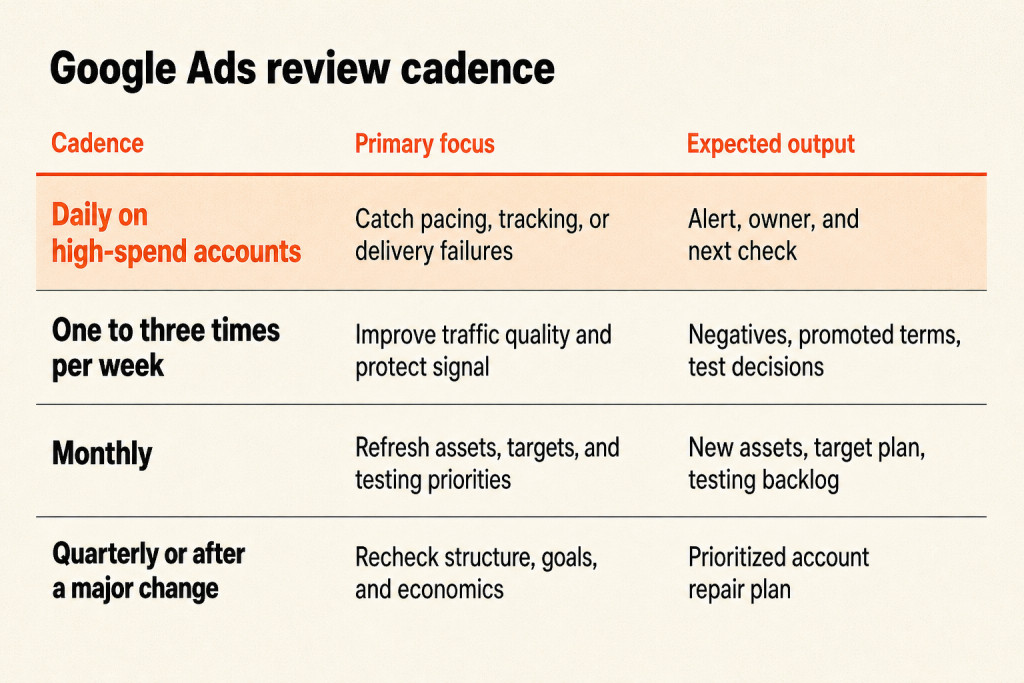
Review Google Ads on a fixed cadence so urgent problems get fixed quickly while normal swings are left alone.
| Cadence | Primary focus | Key checks | Expected output |
|---|---|---|---|
| Daily on high-spend accounts | Catch pacing, tracking or delivery failures | Pacing, tracking alerts, disapprovals, sudden spend or conversion changes | Alert, owner and next check |
| One to three times per week | Improve traffic quality and protect signal | Search terms, negatives, landing page tests, qualified conversion feed, sales feedback | Negatives, promoted terms, test decisions |
| Monthly | Refresh assets, targets and tests | Asset refresh, target review, landing page test decisions | New assets, target plan, test backlog |
| Quarterly or after a major change | Recheck structure, goals and economics | Structure, goals, geography, access and measurement audit | Prioritized repair plan |
A good routine does not trigger five changes every time you log in. Act at once on broken tracking or runaway spend, and leave routine fluctuations until the weekly review.
Conclusion
Knowing how to optimize Google Ads is less about constant tweaks and more about a steady feedback loop. Fix tracking and delivery problems straight away, handle search terms and bids in the weekly review, and keep monthly and quarterly checks with a change log. Judge every change by qualified leads and revenue, not clicks or platform CPA alone. If you want a team to run that routine for you, our digital ads specialists can manage your Google Ads.