Choosing essential technical SEO tools for agencies gets complicated when audits, monitoring, and performance checks call for different capabilities. A platform that simplifies buying and reporting may still leave a specialist audit without the evidence it needs. This guide compares the essential technical SEO tools for agencies by job, cost, and team size.
You’ll be able to judge what each tool contributes, choose a desktop or cloud crawler for your workflow, and build a stack that fits your agency’s scale.
Essential Technical SEO Tools for Agencies
The essential technical SEO tools for agencies cover four jobs: crawling and auditing, log and indexation analysis, performance testing, and structured data validation. No tool replaces an experienced specialist, though; settings can trigger false positives or audit errors that nobody catches unless someone reads the audit properly.

A single stack rarely suits every agency workflow. Technical SEO, content, local, and reporting work each call for different tools, so match the tools to the job. These are the tools behind most agency technical SEO audits.
Screaming Frog SEO Spider
Screaming Frog SEO Spider is a desktop crawler. Running audits on your own machine gives you control and avoids monthly URL caps, though your computer’s memory and connection set the crawl capacity.
For a basic audit, Screaming Frog can spot:
- Missing page titles and meta descriptions
- Large images
- Error response codes
- URL errors
- Canonical errors
For deeper technical checks, it supports:
- Pagination issues
- International SEO (hreflang) problems
- Site architecture analysis
- JavaScript rendering to crawl pages as Googlebot does
- Custom extraction via XPath, regex, and CSS selectors
- XML sitemap generation from live crawl data
The free version handles up to 500 URLs, which covers small audits. The paid licence removes the cap and unlocks features such as JavaScript rendering.
Sitebulb
Sitebulb gives you prioritized hints, crawl visualizations, and client-ready audit reports. It is strictly an audit tool, not a backlink or keyword platform.
Lumar
Lumar, formerly DeepCrawl, is an enterprise technical SEO platform for large sites and agency teams that need automated crawling and monitoring. Lumar Monitor puts multiple domains on one dashboard, with customizable alerts that catch regressions before they cost organic traffic.
Botify
Botify brings crawl data, server logs, and Search Console data into one view, so agencies can connect wasted crawl budget, indexation gaps, and internal linking issues with their effect on traffic and revenue. Its key features include:
- Unified crawl, log file, and GSC analysis
- ActionBoard for impact-prioritized SEO and developer tasks
- RealKeywords for searcher behavior and trending queries
- Missed clicks reporting tied to title tag and structured data opportunities
- Shareable reporting for clients and stakeholders
Automation and ranked recommendations help lean SEO teams move faster with less developer time.
JetOctopus
JetOctopus is a cloud-based technical SEO platform that combines crawl data, log-file analysis, Google Search Console, and GA4 in one environment. For multi-client agencies, the most useful features are:
- Large-scale cloud crawling with scheduled crawls and no local machine bottleneck
- Log file analysis showing how Googlebot and AI crawlers such as GPTBot, ClaudeBot, and PerplexityBot interact with client sites
- GSC and GA4 integration that ties technical issues to search performance and traffic
- Internal linking suggestions that find underlinked pages from crawl, log, and GSC data
- AI bot monitoring of blocked pages and crawl efficiency compared with Googlebot
- Real-time alerts on log, crawl, GSC, and Core Web Vitals changes
- Bulk Core Web Vitals checks for LCP, INP, and CLS across large URL sets, with CrUX field data
Preset charts surface the highest-priority opportunities, so teams can prepare client findings without hours of manual interpretation, and the cloud setup keeps enterprise-scale audits from stalling.
Oncrawl
Oncrawl combines crawl data, log-file analysis, and performance data in one platform, showing how search engines and AI bots interact with client sites. Its features include:

- SEO Log Analyzer: cross-references crawl behavior and performance data to surface crawl budget waste and indexation gaps.
- AI bot monitoring: tracks visits from OpenAI, Anthropic, Perplexity, and Mistral crawlers.
- JS rendering, Web Vitals, and data scraping for deep technical audits.
- Scheduled crawls, alerts, and automation for ongoing programs.
- Oncrawl Query Language for custom filtering and segmentation on large, complex sites.
Google Search Console
Google Search Console is Google’s own tool for tracking search performance, and agencies should connect it to every client site.
- Performance reports show queries, clicks, impressions, CTR, and average position.
- Page indexing reports reveal which pages are indexed, excluded, or erroring.
- Core Web Vitals reports provide Google’s official field performance data.
- URL Inspection checks individual page status and lets you request indexing.
- Sitemaps reports track submission and processing.
Include the sitemap report in every audit. A healthy XML sitemap should:
- List only 200 OK URLs. Keep 4xx and 5xx URLs out.
- Match the site 1:1. Every sitemap URL should appear in your crawl, with no orphaned pages missing from the Screaming Frog results.
- Exclude parameter URLs that aren’t primary pages. Some parameters can also cause sitemaps to fail validation.
WebPageTest
WebPageTest shows how a page’s technical parts come together in the final render and its timing. Agencies use it for:
- Waterfall speed tests
- Competitor speed tests and side-by-side videos
- Fully loaded time
- Time to first byte
- Start render time
- DOM element counts
Google PageSpeed Insights
Google PageSpeed Insights reports desktop and mobile speed data, combining lab tests with real-user field data where available. Lab results are simulations, so they can differ from other tools; treat PageSpeed as a starting point and confirm performance with more than one tool.
Google Rich Results Test
The Google Rich Results Test checks your structured data against the schema types Google supports for rich results. Test schema code before it goes live to catch issues early.
Desktop Versus Cloud Crawlers
Desktop crawlers such as Screaming Frog suit focused, ad-hoc audits, while cloud crawlers such as Lumar, Botify, JetOctopus, and Oncrawl suit ongoing monitoring and shared reporting.

A paid desktop crawler has no URL limit, so it can audit anything from 10,000 to millions of pages, with your computer’s processing power setting the ceiling. But it runs on one machine, can’t share live dashboards with the team, and has no automated monitoring: every crawl has to be started by hand. Cloud tools crawl on a schedule and alert the team when something changes.
Choose desktop software when your team wants low overhead for focused audits. Choose cloud infrastructure for enterprise clients with several stakeholders who need shared dashboards and automated alerts.
Technical SEO Stacks by Agency Scale
The right stack depends on your agency’s size and the clients it serves.
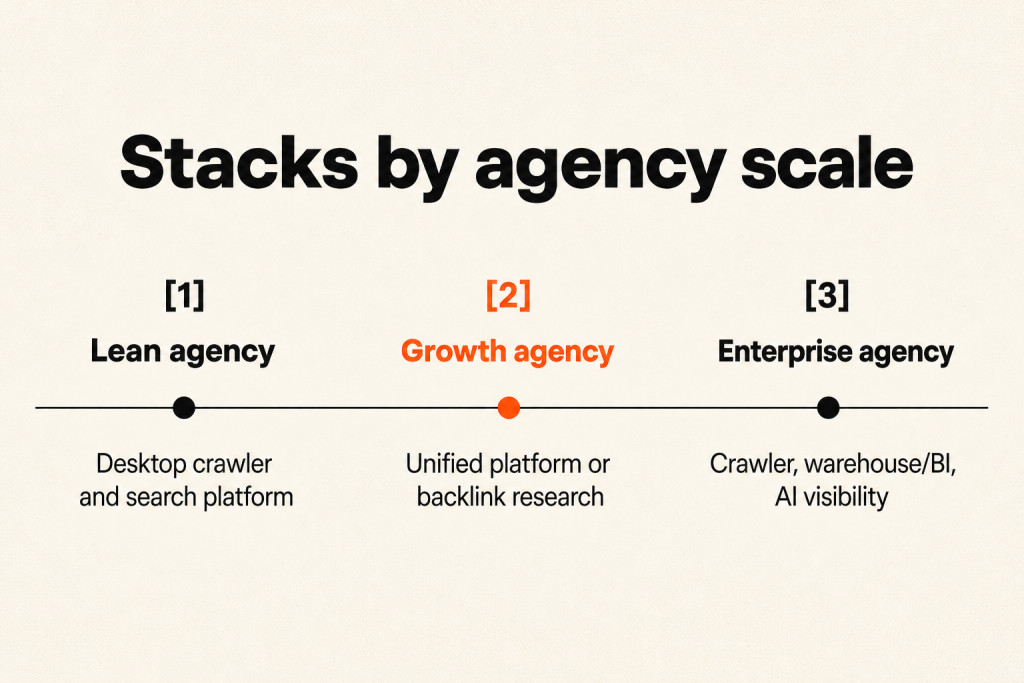
Lean agency: pair Google Search Console and a desktop crawler with a value-focused SEO suite and a reporting dashboard. Add an AI visibility platform only when clients are paying for GEO or AI visibility work.
Growth agency: choose an all-in-one SEO platform or a backlink research platform, plus a desktop crawler or guided audit tool such as Sitebulb. Add a rank tracker, a client reporting platform, and an AI visibility platform. Standardize naming and evidence fields before you automate reports. When bandwidth limits audit work, SEO outsourcing services can fill the gap.
Enterprise agency: combine an enterprise SEO suite, a cloud crawler, a data warehouse or BI system, an AI visibility platform, and controlled content and workflow automation. Check requirements such as SSO, user permissions, API limits, audit logs, and data retention before you commit.
Frequently Asked Questions
What is the best technical SEO audit tool for agencies?
For most agencies, a desktop crawler such as Screaming Frog is the best core audit tool, because it gives deep, flexible crawl data at a low cost. Agencies with large enterprise clients usually add a cloud crawler for scheduled monitoring and shared dashboards.
Can an all-in-one platform replace a technical SEO audit tool?
No. All-in-one suites simplify buying and reporting, but they may not render JavaScript or reveal deep crawl-path problems the way a specialist crawler does. Use the suite for routine reporting and a dedicated crawler for technical audits.
Conclusion
The strongest technical SEO stack gives each tool a distinct job instead of asking one broad platform to do everything. Use specialist crawlers and log analyzers for diagnostics, Google’s own tools for indexing and performance data, and a broader suite for routine reporting. Start by mapping your recurring audit, monitoring, and reporting jobs, then check each tool against the workflow it is meant to cover. Review your essential technical SEO tools for agencies once a year, as client needs and pricing change.