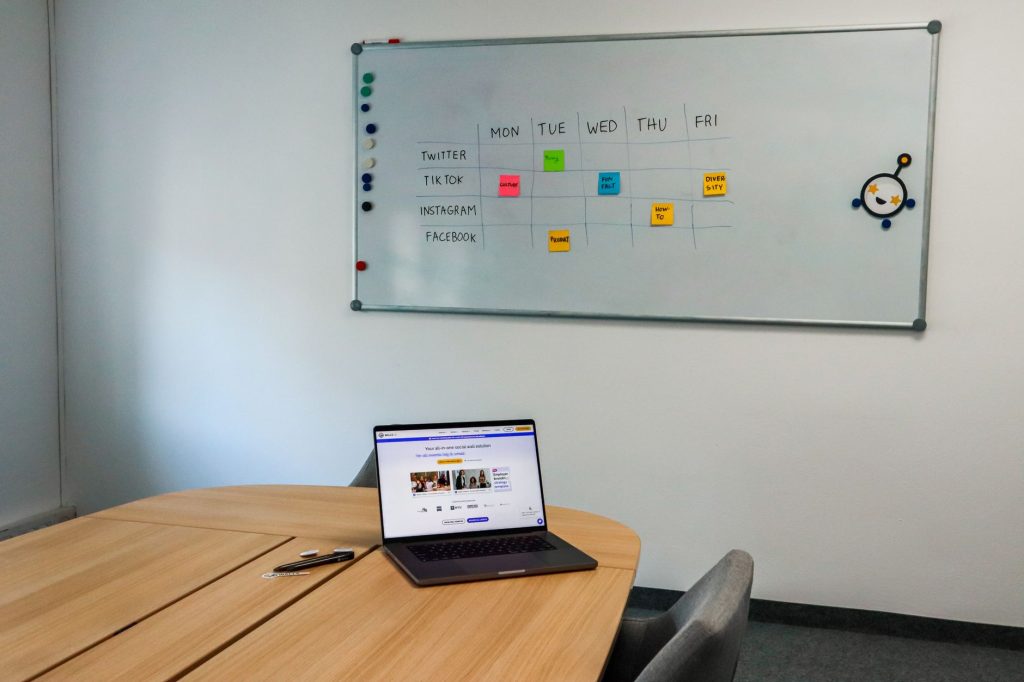
Manual work turns every post, reply, report, and trend check into a chore.
Across LinkedIn, TikTok, or RedNote, social media marketing software, often paired with an AI assistant, helps manage the channels and the daily flow of content, engagement checks, trend spotting, and team coordination. Modern social media marketing uses machine learning models to transform campaigns. Those tasks can consume the day, but social media marketing tools handle much of the logistics and leave more room for strategy. Use them for every post, reply, report, and trend check.
Social Media Marketing Tools for Solopreneurs and Small Teams
In my experience, a small company can handle 90% of its social media tasks with three or four tools from this list.
Match each task with the tool designed for it. Use one app for design, another for analytics, and connect them through Zapier so the pieces keep moving together.
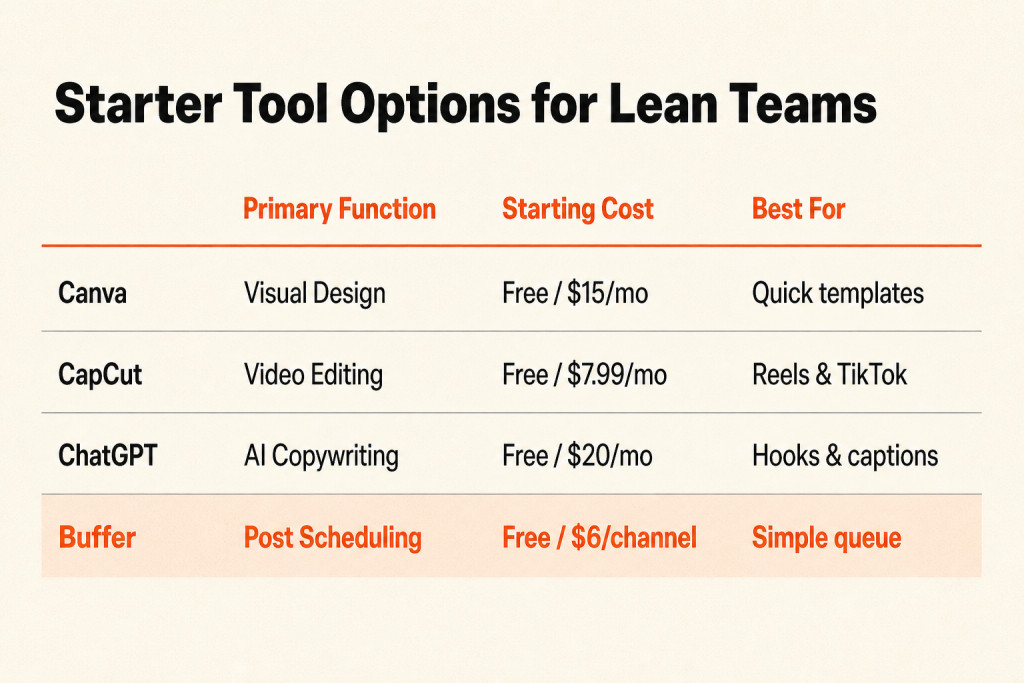
You can start on free plans with accessible social media marketing tools for small business, tailored to solo founders and startups. Canva, CapCut, and Buffer cover much of the early workload, and you can upgrade once plan limits slow you down or the time saved justifies the subscription.
Begin with one scheduler and one content tool; the table below lays out their usual features and plan types.
| Plan Type | Average Price | Common Features |
|---|---|---|
| Free Plan | $0 | Limited scheduling, basic analytics, and single user access. |
| Personal Plan | $5-$25/user/month | Multi-platform scheduling, performance reports, and content calendars. |
| Business Plan | $50-$150/user/month | Advanced analytics, team collaboration tools, and social listening capabilities. |

A small team can get moving with three or four focused tools instead of a sprawling software stack.
Canva
Canva | Content Creation | Visual Design | Free / $15 per month | Beginners & Pros
You don’t have to be a graphic designer to make social posts in Canva. It includes templates for an Instagram Reel, a high-resolution LinkedIn banner, and plenty of other formats, keeping the early design process in one place.
Magic Studio goes past standard templates, using AI-driven workflows to handle tedious design chores and sometimes acting like an extra full-time assistant. Avoid committing to a large software stack.
- Magic Switch: Turn one post into ten sizes and formats while keeping the layout aligned.
- Image to Video: Add subtle, professional movement to a static product shot without using a video camera.
- AI Connectors: Connect Claude and ChatGPT to Canva to generate copy and designs in one place.
Canva connects with Canva, WordPress, Feedly, Pocket, Facebook, Instagram, Twitter, LinkedIn, and Pinterest.
CapCut
CapCut | Content Production | Video Editing | Free / $7.99 per month | Reels & TikTokers
CapCut is my preferred editor for mobile-first content, even when desktop programs are available. ByteDance owns TikTok too, so the app often gets trending sounds and effects early, and that timing matters.
Trim your clips, add text overlays, and turn on Auto-Captions to make videos easier to follow. CapCut Pro removes watermarks and adds Voice Isolation plus Generative Video Fill for backgrounds or distracting noise in a busy public place.
If TikTok or Reels is your main format, choose an editor built specifically for that kind of content.
ChatGPT
ChatGPT | Content Production | AI Copywriting | Free / $20 per month | Bloggers & SMMs
I use ChatGPT as a creative partner rather than a replacement.
ChatGPT can turn a rough thought into five hook options or educational tweets. For complex content plans and deeper B2B social media marketing strategy, I prefer ChatGPT Plus because it has the highest reasoning capabilities.
Generative applications such as AI tools for social media marketing can suggest social media copy, develop campaign ideas, write product descriptions, and help research industry trends for a small company. ChatGPT is also completely free to use.

AI can be inaccurate, produce errors, and reflect bias, so verify every claim before it appears in your marketing. That review helps keep false claims and undeliverable promises away from your customers.
Buffer
Buffer | Scheduling | Simple Publishing | Free / $6 per channel | Small Businesses
Buffer gives creators and small teams a queue for publishing, which removes much of the daily fuss. Set your schedule once, then each new post takes the next open slot instead of making you pick a time from scratch. For straightforward publishing, Buffer remains the gold standard.
Its core features include publishing, engagement, analytics, and access through both mobile and desktop.
- Lean Pricing: The Essentials plan costs $6 per channel, which works for small brands focused on a few platforms.
- Start Page: A simple link-in-bio landing page gives your profile a cleaner look than most free alternatives.
- Ease of Use: The mobile app matches the desktop version, so you can approve posts while traveling.
- Browser Extension: Add content to your queues while browsing, then share or create social media posts from anywhere.
- Analytics and Reporting: Buffer tracks engagement, reach, and performance metrics for social media posts.
- Advanced Analytics: Track weekly or monthly performance, then export analytics data for calculations or reports.
Buffer includes a 14-day free trial as well.
Later
Later | Scheduling | Visual Planning | Free / $25 per month | Instagram Users
Later fits brands that depend on a consistent Instagram or TikTok look. Its Visual Planner lets you arrange photos, review colors and themes, and see the Instagram grid before anything publishes. You can inspect the grid before the post goes live.
With shoppable tags, Linkin.bio makes a profile a clickable shop or gallery. Later also supports automated publishing, post scheduling, keyword filtering, and multi-account management.
Metricool
Competitor tracking
Metricool combines social media management, analytics, and competitor tracking insights. You can compare other brands’ posts and spot trends that may shape your strategy, with those comparisons based on platform performance.
Pricing and scheduling
Metricool has a free plan and starts at $20/month, while Autolist scheduling handles bulk posts through RSS feeds or CSV imports.
Trackable links and inbox management
Trackable links show engagement and marketing effectiveness, and Metricool gathers social messages in one inbox for simpler audience conversations.
Integrations
Its integrations include Instagram, TikTok, YouTube, X, Facebook, LinkedIn, Pinterest, Twitch, Google Ads, and Facebook Ads; accounts may occasionally disconnect and require reconnection.
Enji
Enji gives small companies and solopreneurs planning, AI-assisted content creation, publishing, marketing strategy management, scheduling, and campaign tracking in one social media workflow.
Enji includes a 14-day free trial, with plans starting at $29/month.
The marketing strategy generator arranges tasks around the time you actually have, so your plan fits your schedule rather than becoming an endless list of actions.
Brand voice generator
Its brand voice generator keeps your messaging consistent across content.
AI copywriter
The AI copywriter produces branded content for you.
Marketing calendar
Plug-and-play templates let you plan ahead with a marketing calendar.
Enji connects with Facebook, Instagram, LinkedIn, Pinterest, YouTube Shorts, Threads, TikTok, Google Analytics 4, iCal, Canva, and Google Calendar.
The tradeoffs are a steeper learning curve at the start and fewer customization options.
Social Media Marketing Tools for Growing and Mid-Sized Businesses
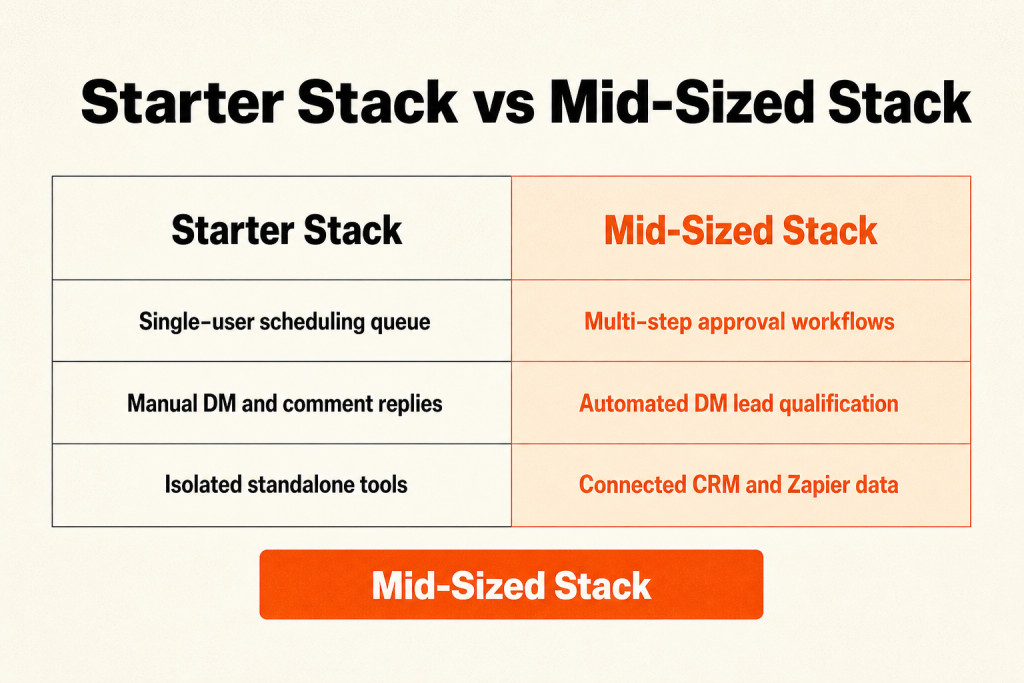
As brands grow, they usually need richer analytics, team coordination, social listening, automation, and deeper listening tools.
Copywriters, designers, and stakeholders should review posts before they go live. Use role-based permissions and multi-step approvals that match your actual review chain.
Choose a social media marketing tool that talks to the rest of your apps. When a SaaS site captures leads, route that information straight across or through Zapier.
Zoho Social
Zoho Social gives businesses and agencies one workspace for Facebook, X, Instagram, LinkedIn, and TikTok, with more control over their online presence.
AI Assistant Zia
AI Assistant Zia handles repetitive jobs, then provides recommendations and insights to sharpen your social media strategy.
Content Calendar
Content Calendar puts scheduled posts from every platform in one view, so you can plan and arrange content there.
Direct Instagram Scheduling
Direct Instagram Scheduling sends posts to Instagram without another app in the middle, making a steady publishing routine simpler.
Custom Reports
Custom Reports lay out detailed social performance data and make decisions easier to support.

Zoho Social includes a 15-day free trial, a free plan, and a free demo; annual pricing starts at $10/team member/month.
Its integrations cover Zoho CRM, Zoho Desk, Facebook, Instagram, LinkedIn, Twitter, Google My Business, YouTube, Pinterest, and TikTok.
You’ll find the advanced features on higher-tier plans, and approval workflows for posts are still limited.
Agorapulse
Social inbox
Agorapulse gathers conversations from every platform into one social inbox, with support for influencers, social profiles, and analytics. It’s a cloud-based social media marketing tool.
Pricing
Agorapulse includes a free trial and free plan, then starts at $79/user/month annually, so it may not suit small biz.
Team collaboration
For teams, it handles content collaboration, assigning tasks, and moving approvals through the process.
Audience engagement
Use the inbox to track and answer messages and comments before they disappear from view.
Agorapulse connects with Instagram, YouTube, Facebook, and LinkedIn, though its reporting tools are lean.
Social Status
Social Status combines social analytics with automated reports, cutting down the time regular reporting takes.
Pricing
A free trial is available, and Social Status pricing begins at $99/month.
Performance metrics
Its performance metrics include engagement, reach, and follower growth, giving you a cleaner read on campaign effectiveness.
Report formats
You can schedule reports to arrive as Excel, PDF, PPTX, or Google Slides files.
Reporting coverage
The reporting reaches across profiles, ads, competitors, and influencers, plus detailed Instagram Stories and Reels data covering impressions, reach, replies, taps back, and taps forward. It also ends manual screenshotting.
Twitter connections require higher tier paid plans, while very specific report customization remains limited.
ManyChat
ManyChat supports engagement and DM Automation for E-commerce Brands, with pricing of Free / $15 per month. It sends automated direct messages for Instagram and Facebook businesses.
A flow can fire when someone engages with content, reply to interested followers right away, and reduce manual outreach. That can help turn followers into leads.
- Comment-to-DM Triggers: A keyword in a comment can send resources or discount codes automatically.
- Story Reply Automation: Story mentions can trigger an immediate thank-you note or helpful link.
- Lead Qualification: Basic DM questions can identify what a customer needs before a human team member takes over.
ManyChat costs Free / $15 per month.
Zapier
Zapier acts as the connector between apps that otherwise don’t share data.
For example, Zapier pricing can run from free to $20 per month, with one Zap sending a new Facebook Lead Ad contact into Google Sheets or email marketing software.
That cuts out manual data entry. If you repeat a task between two websites, Zapier can probably automate that use case.
Zapier plans run from free through $20 per month.
Brand24
Brand monitoring
Brand24 searches the web for brand mentions and chosen keywords, which is why I use it for serious brand monitoring.
Pricing and audience
Brand24 costs $199 per month or more and serves PR & Brand Managers.
Sentiment Analysis
Sentiment Analysis labels each mention happy, angry, or neutral instead of simply counting that it appeared.
Crisis alerts
When a negative comment starts spreading on a forum such as Reddit, Brand24 sends an immediate crisis-management alert.
Competitor tracking
Competitor tracking follows rival brand names, while complaints from their customers can point to where your brand may position itself as a stronger alternative.
Social Media Tools for Marketing in Large Teams
As organizational hierarchies grow complex, enterprises need enterprise-level governance at scale, with asset approvals, extensive security controls, and support from a Social Media Marketing Agency.
Hootsuite
Centralized dashboard
Hootsuite suits agencies and large companies because it acts as a full social media command center, not just a post scheduler. Its user-friendly centralized dashboard gives you one place to manage multiple social media accounts, with post scheduling and analytics monitoring available there.
Multiple streams
Open Multiple streams to see mentions and competitor activity, with specific hashtags appearing on the same screen.
Collaborative Inbox
Although Hootsuite is a premium investment, a professional agency can use Collaborative Inbox and team approval workflows to manage review work.
OwlyGPT assistant
Inside the dashboard, OwlyGPT helps you refine captions and find the best times to post.
Sprout Social
Reporting

Sprout Social turns data from all your social accounts into clear charts that you can share with clients or people reviewing the work. It’s widely considered the best in the business for deep reporting when your team is ready to take its data seriously.
Custom Metrics
Set your own formulas with Custom Metrics directly inside the app’s post-level reporting.
Optimal Send Times
Optimal Send Times reads data to show when your specific followers are most active.
Social collaboration
Social collaboration tools cover content creation and approval while supporting team workflows and teamwork.
Smart Inbox
Smart Inbox pulls messages and notifications from different social media platforms into one stream, letting you engage with and respond to audience interactions in real-time.
Asset Library
Store images and videos in the Asset Library, adding brand logos before organizing everything within the software.
Integrations include Slack, Dropbox, Shopify, and Google Analytics.
Sprout Social gives you a 30-day free trial, with pricing from $79/user/month when billed annually.
How to Choose Tools for Social Media Marketing
Choose marketing tools for social media by balancing ease of use with integration depth and reporting clarity, keeping the way your team actually works in view.
First, start with a clean, intuitive interface; when learning a tool takes three hours, it drains productivity instead of giving time back.
Make integration your second test: the tool should connect with the systems around it, while analytics should identify the content formats that drive site visits or brand mentions rather than merely likes. That’s how you move from raw counts to useful reporting.
Leave analytics quality until after that; data doesn’t help much when it can’t guide a decision, so use the factors below to structure your review.
| Factor | What to Consider |
|---|---|
| Scalability | Will the tool grow with your business? Consider whether it supports your future needs and user growth without requiring costly upgrades or replacements. |
| Integrations | Does it connect with your existing tools? Ensure it can integrate with your CRM, email marketing, and other essential platforms to avoid data silos. |
| Customizability | Can you tailor it to your workflows? Look for options to adjust settings, dashboards, and reports to match your specific processes and preferences. |
| Ease of use | Is the interface user-friendly? Assess whether your team can navigate the tool easily without extensive training to prevent productivity loss. |
| Implementation and onboarding | How quickly can you get started? Evaluate the time and resources needed to implement and onboard, including training materials and support availability. |
| Cost | Does it fit your budget? Compare pricing plans, considering both upfront costs and long-term value. Watch for hidden fees or necessary add-ons. |
| Security safeguards | Does it protect your data? Verify that it complies with industry standards for data protection and offers features like two-factor authentication. |
| Support availability | Can you get help when needed? Check if the vendor provides timely support through multiple channels, such as chat, email, or phone, and during your business hours. |
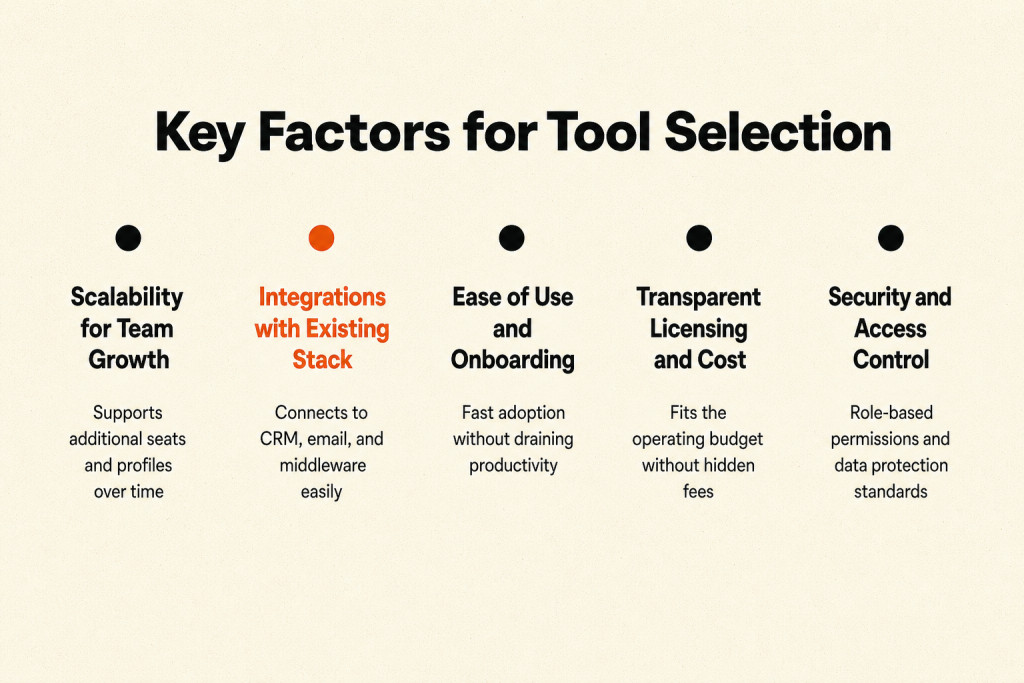
This review asks whether the tool can scale with the operation, connect to existing systems, suit specific workflows, stay easy to use, support setup, fit the budget, protect data, and offer help when you need it.
Baseline Requirements
Rate each core function from 0, meaning the tool offers none of it, through 5, meaning it excels there. Keep a social media marketing platform only when its minimum total reaches 75%.
- Multi-Platform Publishing, I review the number of major networks a tool supports and whether posts can be customized for each channel.
- Content Calendar, A good calendar supports drag-and-drop posts, filtering by channel or campaign, and previews of scheduled content.
- Social Analytics & Reporting, Reporting should cover all connected channels and show KPIs such as engagement rate, reach, and follower growth in formats that can be exported and presented.
- Engagement & Inbox Management, Handling DMs and comments across five networks in five tabs can consume productivity.
- Social Listening & Monitoring, The review should go beyond owned-account mentions.
- Team Collaboration & Approvals
Multi-Platform Publishing
Check the major networks supported and whether you can tailor posts for each one. A single workflow should handle aspect ratios for Reels vs. TikTok vs. Shorts.
Content Calendar
Look for a Content Calendar with drag-and-drop posts, channel or campaign filters, scheduled-post previews, and shared views for team use and client approvals.
Social Analytics & Reporting
Reporting should include every connected channel, with KPIs such as engagement rate, reach, and follower growth available in exportable, presentation-ready formats.
Engagement & Inbox Management
Managing DMs and comments across five networks in five tabs can eat up productivity, so find one inbox with tagging and assignment features.
Social Listening & Monitoring
Check beyond mentions on your own accounts. The tool should follow keywords, hashtags, and brand conversations across wider social channels, then surface audience sentiment and trends.
Team Collaboration & Approvals
Platform Differentiators
Compare these differentiators once the core functions are broadly similar across platforms.
- AI-powered caption and hashtag generation: This can reduce content production time when teams manage multiple brand voices across channels.
- Paid ad management with organic scheduling: Combining paid ad management with organic scheduling keeps you from switching to a separate ads manager when boosting a post.
- Competitor benchmarking: Track a rival’s engagement rates and posting cadence to give your own strategy more context.
- Native connections: A tool with Native connections to your CRM, DAM, or design tools like Canva keeps content workflows tight.
- Account scale: An agency managing dozens of client accounts has different needs from a solo brand marketer running three profiles.

Commercial Licensing Structures
Match the pricing model to publishing volume, team size, and how many people require access.
- Per-user seat pricing: When publishing volume is high but the team is small, prioritize platforms priced per user seat.
- Per-connected-profile pricing: When several external people only join for approvals, per-connected-profile pricing may fit better.
- Combined pricing: Check whether a vendor charges per user, per social profile, or both.
- Scaling costs: Review the price again as brands or team members are added.
| Plan Type | Average Price | Common Features |
|---|---|---|
| Free Plan | $0 | Limited scheduling, basic analytics, and single user access. |
| Personal Plan | $5-$25/user/month | Multi-platform scheduling, performance reports, and content calendars. |
| Business Plan | $50-$150/user/month | Advanced analytics, team collaboration tools, and social listening capabilities. |
| Enterprise Plan | $200+/user/month | Customizable dashboards, dedicated support, and comprehensive integrations. |
Plans run from Free at $0, to Personal at $5-$25/user/month, Business at $50-$150/user/month, and Enterprise at $200+/user/month. As prices rise, scheduling, reporting, collaboration, listening, dashboards you can customize, dedicated support, and comprehensive integrations become more extensive.
Check for hidden fees and required add-ons; lower-tier plans limit account counts and advanced features.
Buffer offers a 14-day free trial, with pricing from $5/month billed annually. Sprout Social offers a 30-day free trial, starting from $79/user/month billed annually.
Building a Cohesive Marketing Workflow
A connected workflow moves each task into the next stage, beginning with listening and ideas, then moving through batch production, scheduling, CRM logging, and automated first replies. Brand24 can track brand sentiment while TweetDeck catches real-time industry shifts; send those findings to ChatGPT or Claude to build a 30-day content calendar around the pain points you found. Create assets in batches with Canva for static carousels and CapCut for video, then use Buffer for general scheduling or Later for visual Instagram planning. Zapier can cross-post a live post or record it in a CRM, while ManyChat handles first-round DM inquiries and comment triggers before a person steps in.
- Start by listening with Brand24 for brand sentiment and
- Batching content at once, scheduling it for the week, and
- Evaluate the connected system by tracking time saved, value
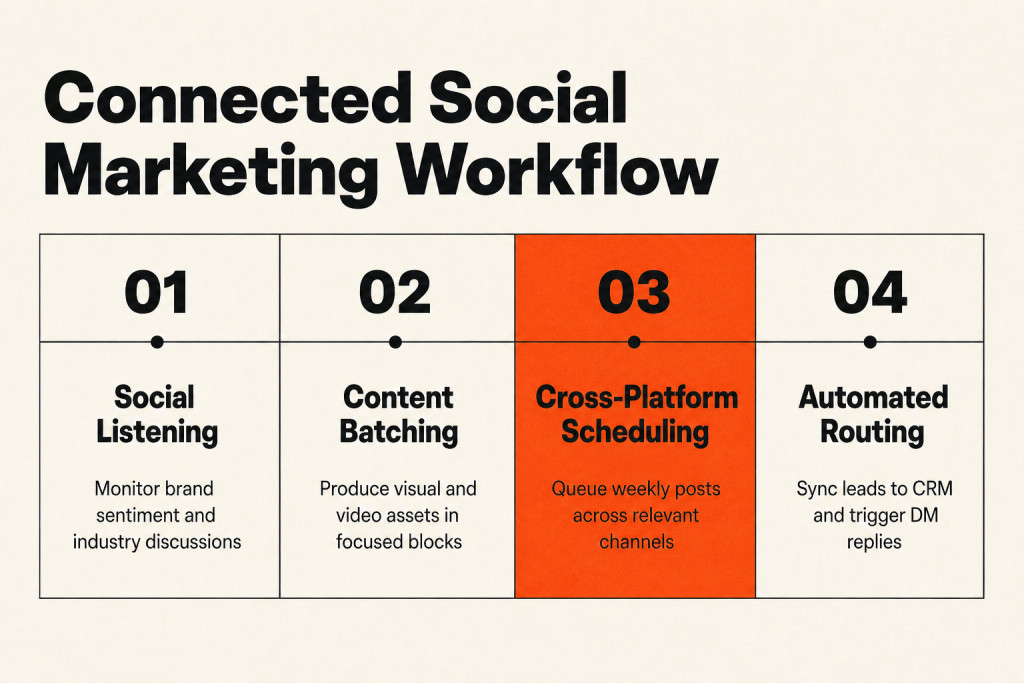
Create the content in one batch and schedule the week ahead, with two daily 15-minute blocks set aside for manual engagement. That keeps production efficient even when separate tools handle separate stages. An external Social Media Marketing Agency can help resolve workflow and attribution gaps. The biggest gap usually sits between platforms: social and email systems may not exchange data, which can split the customer experience, while automation covers routine tasks and real conversations still call for a person.
Native schedulers are free and usually support new post formats, but working across separate browser tabs can scatter your attention. Use Google Business Profile for local marketing so people can find you through Google Search and Google Maps. Google Analytics adds website visitor activity to what you see in Google Search Console, while MailChimp is free for up to 250 contacts and 500 monthly email sends. Free tools only make sense when the time they take stays low.
Track time saved and value generated, along with performance metrics, to judge whether the connected system is doing its job. Watch engagement rates and conversions, as well as website traffic, then adjust from what the numbers show. If a sales lead could be worth $500, a free tool costs $0, and it generates $1000, the ROI is strong.
Frequently Asked Questions
What are the most popular social media marketing tools?
Platform popularity varies by channel, while general-purpose toolkits such as Buffer, Google Analytics, Hootsuite, HubSpot, and Sprout are widely used.
Specialized tools handle data analytics, post scheduling, user engagement, market listening, and task automation.
What is the easiest social media marketing software to use?
Clean and intuitive interface
Buffer keeps things simple: its clean and intuitive interface lets you schedule and publish across social channels without difficulty.
Which platform is best for social media marketing?
Depending on your marketing objective and target audience, choose among Facebook, Instagram, LinkedIn, YouTube, and X, each attracting a very large number of monthly users. In a February 1, 2024 report, Meta said Facebook had 3.07 billion users at the end of 2023.
Can social media marketing software help with audience engagement?
Yes, these platforms can strengthen audience engagement through quick automated replies, AI-powered customer-service chatbots, brand-mention monitoring across social channels, and analytics on audience behavior. You can reply faster, reshape content around audience preferences, and take part in conversations that create stronger follower connections.
Can social media marketing software track ROI?
Yes, many platforms measure return on investment (ROI) against the goals you set for each social media campaign.
Is social media marketing software suitable for small businesses?
Smaller companies can use these tools to automate tasks, save time, and understand customer engagement and content performance better.
Scalable pricing gives teams with limited budgets room to start, since many platforms include free or low-cost options.
How frequently do social media marketing platforms update to match social media sites’ changes?
Platforms regularly refresh their software to follow changes and new features on social media sites.
Weekly releases may contain small fixes and performance improvements, whereas major additions may appear every few months.
What role does social media marketing software play in crisis management online?
Online crisis management starts with real-time monitoring and alerts from social media marketing software.
Across platforms, these tools watch sentiment, hashtags, and mentions so brands can identify and answer possible crises quickly. Helpful features include unusual-activity spike alerts, sentiment analysis of public mood, and workflow tools for organizing the response.
Are there tools specifically designed for video content strategy on social media?
Video creation, editing, distribution, and analytics
Video strategy tools cover creation, editing, distribution, and analytics, helping marketers shape videos for different social media platforms. For high-volume narrative video, reviews of video creation platforms for large-scale social media marketing can help identify advanced production software. They also measure engagement and performance while showing how viewers behave.
YouTube, like Meta, offers native marketing tools for businesses and content creators. Browser extensions, statistics trackers, SEO tools, and market intelligence assistants such as TubeBuddy, VidIQ, Social Blade, and Tubics extend those capabilities.
Are automation tools safe for social media growth?
Yes, as long as you use official partners.
Use automation only through official partners. Avoid tools that promise thousands of followers or automatically generated likes, as such practices violate platform policies; ManyChat and Buffer are approved by the platforms.
Do I really need paid tools, or are free tools enough?
Free tools may handle your early needs, but watch their performance so you can decide when an upgrade becomes necessary.
Pick the social media marketing tools that match the job in front of you. Match each platform to your audience and marketing objective, then check whether engagement, ROI, pricing, updates, and safety suit your workflow. You can start with free or low-cost software, add narrower tools where needed, and use monitoring and workflow tools when crisis response matters. You’ll end up with a smaller stack, clearer jobs, and fewer unused features.