There are dental clinics out there spending $2,000–$5,000 a month on ads and still wondering why the phone isn’t ringing. Meanwhile, competitors in the same area are fully booked weeks in advance.
The difference usually comes down to how Google Ads for dentists are structured and executed. In 2026, competition is higher, and patients are quicker to choose. If your setup misses intent, you’re paying for clicks that go nowhere. (Yes, it’s basically donating money to Google.)
This guide by Golden Owl Digital walks through how Google Ads actually works for dentists, what it costs, and how to turn search intent into real patient bookings.
What is Google Ads for Dentists? How Does It Work?
Google Ads for dentists is a pay-per-click (PPC) advertising platform that displays dental practice ads at the top of Google search results when local users search for services like “dentist near me” or “emergency dentist”.
It works by bidding on specific keywords, allowing dentists to target high-intent patients in their area and only paying when a user clicks the ad.
Here’s the simplified flow:
- A patient searches for a dental service
- Google runs an auction between advertisers
- Your ad appears based on bid, relevance, and quality
- The user clicks and lands on your page
- They either book, call, or leave
The key detail most clinics miss is this: Google rewards relevance more than budget. A well-structured campaign with clear intent alignment often beats a higher spender with messy setup.
One thing we often see in audits is clinics targeting broad terms like “dentist” without context. That usually attracts low-intent traffic, which doesn’t convert into bookings.
Why Is Google Ads for Dentists Important?
Dental services are intent-driven. People don’t casually browse for “root canal treatment”. They search when they need it.
Google Ads is crucial for dentists to immediately capture high-intent, local patients searching for urgent services (e.g., “dentist near me”), ensuring top-of-page visibility in a competitive market. It drives qualified traffic, offers measurable ROI, and allows targeting specific services like implants, while providing flexible budgeting that only charges when users click.
Key Reasons Google Ads is Essential for Dentists:
- Immediate Visibility & High-Intent Leads: Unlike long-term SEO, Google Ads places your practice at the top of search results immediately. This is crucial for patients searching for “emergency dentist” or immediate services, who are likely to convert.
- Highly Targeted Local Traffic: Ads can be targeted to specific geographic locations, ensuring your marketing budget is spent on potential patients in your immediate vicinity.
- Cost Control & Measurable Results: Dentists only pay when someone clicks on their ad (PPC model). Furthermore, detailed analytics (impressions, clicks, conversions) allow for precise tracking of ROI.
- Competitive Advantage: Even smaller practices can compete with larger chains or dental groups by appearing at the top of search results.
- Promote Specialized Services: Google Ads is effective for promoting high-value, specialized treatments such as Invisalign, dental implants, or cosmetic dentistry.
Read more: How Google Display Ads Grow Marketing Results in 2026
How Much Do Google Ads for Dentists Cost?
Google Ads for dentists typically cost between $2,000 and $5,000 per month, depending on location and competition, with average cost-per-click (CPC) rates ranging from $5 to $25+. For competitive markets, dentists often spend $3,000–$10,000+ per month.
Typical benchmarks in 2026:
| Factor | Typical Range |
| Cost per click (CPC) | $5 – $25+ |
| Monthly budget (starter) | $2,000 – $5,000 |
| Competitive markets | $3,000 – $10,000+ |
| Conversion rate | 8% – 12% |
| Cost per Lead (CPL) | $75 – $95 |
A quick, practical example:
- Budget: $3,000
- Avg. CPC: $7.50
- Clicks: 400
- Conversion Rate: 10%
- Leads: 40
- Cost Per Lead: $75
Recommended Budgeting Strategy
Most successful dental practices allocate 4%–7% of their gross revenue to marketing. A common starting point is $50-$70 per day to begin tracking results and to scale up based on ROI.
Monthly Budget Guidelines:
- Small/Rural: $1,000–$2,000
- Suburban: $2,000–$4,000
- Urban/Competitive: $4,000–$8,000+
Now the real question is how many of those leads turn into actual patients. That depends on your landing page, offer, and front desk handling.
This is where many clinics misread performance. Clicks look fine, but revenue doesn’t follow.
Find out more: Google Ads Cost for Fintech Companies (2026): How Much Should You Budget?
How to Set Up Google Ads for Dentists Step by Step
This is the part that usually separates profitable campaigns from expensive experiments.
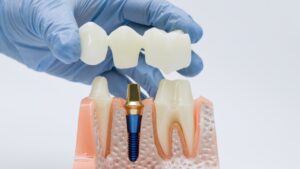
Step 1: Define High-Value Services
Not all chairs in your clinic are equal in ROI. While “general cleaning” keeps the lights on, it shouldn’t be the focus of your ad spend.
Actionable Tip: Calculate your Patient Acquisition Cost (PAC). If an implant brings in $4,000, you can afford to spend $200 to get that lead. If a cleaning brings in $150, a $50 lead fee kills your margin.
What to do: Rank your services by “Profit-per-Chair-Hour.” Focus your initial $1,000–$3,000/month budget on the top 2 services only.
Keep this in mind: Trying to promote everything at once spreads your budget too thin.
Step 2: Build Keyword Clusters
Don’t just bid on “dentist.” That’s too broad. You need to categorize keywords by users’ Search Intent.
Example:
| Cluster Type | Keywords | Goal |
| Urgent/Problem | “abscessed tooth,” “emergency dentist open now” | Immediate booking |
| Solution/Brand | “Invisalign providers,” “best dental implants [City]” | Research & Comparison |
| Educational | “how much do veneers cost,” “is dental sedation safe” | Email capture/Lead magnet |
Avoid mixing different intents in one group, which usually leads to irrelevant clicks.
The “Secret Sauce” is Negative Keywords: A targeting feature that prevents your ads from appearing for specific search queries, preventing wasted ad spend on irrelevant traffic.
Add terms like “jobs,” “salary,” “school,” and “cheap” to your negative keyword list immediately. This prevents your ads from showing to job seekers or bargain hunters.
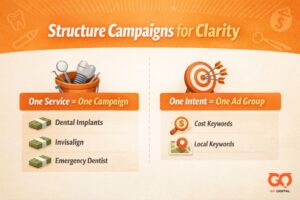
Step 3: Structure Campaigns for Clarity
The biggest mistake dentists make is putting every service into one campaign. This creates a “junk drawer” effect where your budget gets spread too thin, and you can’t tell what’s actually working.
To fix this, think of your account as a series of Buckets.
- The “One Service = One Campaign” Rule
Each major service needs its own campaign. Why? Because budget is set at the campaign level. If you want to spend $50/day on Implants and $20/day on cleanings, they must be in separate campaigns.
- Campaign A: Dental Implants ($1,500/mo)
- Campaign B: Invisalign ($1,000/mo)
- Campaign C: Emergency Dentist ($500/mo)
- The “One Intent = One Ad Group” Rule
Inside each campaign, you create Ad Groups. This is where you match specific keywords to a specific ad.
Example for the Invisalign Campaign:
- Ad Group 1 (Price Intent): Keywords like “Invisalign cost” or “Invisalign payment plan.” (Your ad should mention “Affordable Financing”).
- Ad Group 2 (Location Intent): Keywords like “Invisalign near me” or “Invisalign [City Name].” (Your ad should mention “Right here in [City]”).
Dig deeper: What Is Ad Group Targeting: How To Optimize for Better ROI
Step 4: Create Aligned, Mobile-First Landing Pages
Sending traffic to your homepage is the fastest way to burn your budget. If a user clicks an “Invisalign” ad and lands on a general homepage, they have to “hunt” for the info. Most will just hit the back button.
For dentists, mobile-first design is king. Over 70% of dental searches happen on mobile devices. If your landing page takes 5 seconds to load or has tiny buttons, you’re paying for clicks that never become patients.
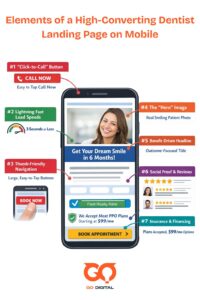
The Mobile-First Anatomy of a High-Converting Page:
- The “Click-to-Call” Button: On mobile, your phone number should be a prominent, colorful button that triggers a call instantly. Don’t make them copy-paste it.
- Lightning Fast Load Speeds: Use compressed images. If a page takes more than 3 seconds to load, bounce rates skyrocket.
- Thumb-Friendly Navigation: Ensure all buttons (CTAs) are large enough to be tapped easily with a thumb. Avoid “fat-finger” frustration.
- The “Hero” Image: Use a photo of a happy patient or your actual staff. Avoid generic stock photos of people with impossibly perfect teeth; real photos build 10x more trust.
- The Benefit-Driven Headline: Focus on the outcome. Instead of “Our Invisalign Services,” try “Get Your Dream Smile in 6 Months.”
- Sticky “Book Now” CTA: As the user scrolls down to read about the procedure, a “Book Appointment” button should remain “stuck” to the top or bottom of the screen.
- Social Proof (Specific to Service): Don’t just show general reviews. If the page is about Implants, embed 3–5 Google Reviews specifically mentioning your implant work.
- Insurance & Financing Visibility: Mentioning “We accept most PPO plans” or “Financing starting at $99/mo” right below the hero section can increase conversions by 20% instantly.
Why it works:
A mobile-optimized landing page reduces the “friction” between a person in pain (or wanting a better smile) and your front desk. By matching the landing page to the specific ad intent, you maintain a high Quality Score, which actually lowers your cost-per-click (CPC).
We’ve even seen conversion rates double just by fixing this step alone.

Step 5: Set Up Conversion Tracking Properly
If you’re not tracking conversions, you’re guessing.
Track at least:
- Phone calls
- Form submissions
- Appointment bookings
We advise using CallRail or a similar dynamic number insertion (DNI) tool. This tells you exactly which keyword triggered the phone call.
You can also set up Enhanced Conversions in Google Ads. This helps the AI understand which users are most likely to book based on their hashed data, improving your bidding over time.
Don’t forget: Track “Directions” clicks on mobile. For a local dentist, someone looking up your office on Maps is a high-intent lead.
Many clinics stop at “click tracking”, which doesn’t tell you anything about actual patients.
In some cases, connecting CRM or call tracking systems gives much clearer ROI visibility. This is often where a proper SEO audit or analytics setup overlaps with paid ads performance.
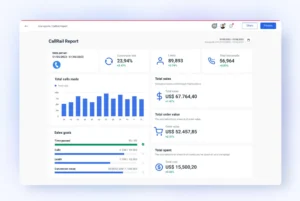
Step 6: Optimize Weekly Based on Data
Google Ads is not “set it and forget it.” Spend 30 minutes every Tuesday reviewing the previous week’s data.
The Weekly To-Do List:
- Search Term Report: Look at what people actually typed. If you see irrelevant terms, add them to your Negative Keyword list.
- A/B Testing: Run two ads per group. After 2 weeks, pause the “loser” and write a new challenger.
- Impression Share: If your “Search Lost IS (budget)” is high, it means you’re leaving money on the table because your daily budget is too low.
Small changes compound over time. Ignoring this step is like leaving money on the table every week.
Dig deeper: PPC strategy in 2026: How to Build and Optimize High-ROI Campaigns That Actually Scale
Advanced Tips for Dentist Google Ads in 2026
By this point, you already have the fundamentals in place. This is where most clinics stop. The ones that scale faster usually go a bit further.
Two shifts in 2026 are worth paying attention to if you want your campaigns to stay competitive.
Leverage Local Service Ads (LSAs) Alongside Search Ads
Those listings with the “Google Guaranteed” badge at the very top of search results are called Local Service Ads.
They work differently from standard Google Ads:
- You pay per lead, not per click
- You appear above traditional search ads
- Trust signals are built in (reviews, verification badge)
For dentists, LSAs can sometimes deliver lower cost per lead compared to PPC, especially for services like emergency or general dentistry.
The practical approach is simple:
- Use LSAs to capture top-of-page demand
- Use search ads to target specific, high-value services
Running both together often gives better coverage across different patient behaviors.
Use AI-Powered Bidding
Manual bidding used to be the default. In 2026, Google’s algorithm now handles bidding more efficiently through strategies like:
- Maximize Conversions
- Target CPA (Cost Per Acquisition)
But there’s a catch. The system is only as good as the data you give it. If your conversion tracking is messy, the algorithm will optimize toward the wrong outcome.
What actually works:
- Track real conversions, not just clicks
- Prioritize booked appointments over form fills
- Remove duplicate or low-quality signals
One thing we often tell clients is this: you don’t need to “outsmart” Google’s AI anymore. You just need to give it clean, accurate data and let it do its job.
Google Ads vs. SEO for Dentists: Which Should You Choose?
It’s not an “either/or” choice; it’s a sequence.
In 2026, patients don’t just use one channel. They might see your Google Ad for “Invisalign,” skip it to check your Google Maps rating (SEO), and then finally click your website. You need to be visible in both places to build the “Trust Stack” required for a booking.
| Aspect | Google Ads (PPC) | Dental SEO |
| Speed | Instant. Your phone can ring today. | Slow. Takes 3–9 months to “mature.” |
| Cost Basis | Pay-per-visit. You pay for every click. | Asset-building. High upfront, $0 per click later. |
| Visibility | Top of page (and Local Service Ads). | Map Pack and “AI Overviews.” |
| Best For | Emergency cases, Implants, & promos. | General cleanings & “Topical Authority.” |
| The “Tap” Effect | Turn it off, the leads stop instantly. | Once you rank, the leads flow for “free.” |
Why You Need Both
Modern dental marketing uses a 70/30 Budget Split:
- Google Ads for Dentists: Use ads to fill your chairs now. Focus your ad spend on high-intent keywords like “emergency dentist open now” or “Invisalign cost [City]”.
- SEO for Dentists: While your ads are running, invest in SEO to win the Google Map Pack. In 2026, 44% of mobile local search clicks go to Map Pack listings. If you don’t rank there organically, you’ll be forced to pay for ads forever.
The “AI Overview” Factor in 2026
Google now uses AI to summarize answers for patients (e.g., “Which dentist in Chicago is best for nervous patients?”).
- The Ads Play: You can now pay for “Sponsored” placements within these AI summaries.
- The SEO Play: By creating deep, FAQ-style content on your site, Google’s AI is more likely to cite your practice as the “source,” giving you massive organic credibility.
The Verdict
- Use Google Ads if: You’re a new practice, you have a slow month, or you’re launching a high-margin service (like All-on-4 implants).
- Use SEO if: You want to lower your Patient Acquisition Cost (PAC) over time and build a practice that doesn’t depend on a monthly “tribute” to Google.
Find out more: SEO for Dentists: 8 Proven Strategies That Drive Bookings in 2026
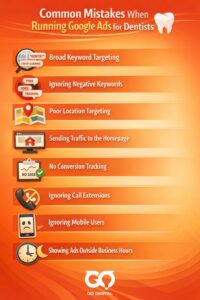
Common Mistakes When Running Google Ads for Dentists
- Broad Keyword Targeting: Using generic terms like “dentist” or “teeth cleaning” attracts irrelevant clicks. Instead, use long-tail keywords like “emergency dentist in [city]” or “Invisalign treatment near me”.
- Ignoring Negative Keywords: Failing to exclude terms like “free,” “training,” “jobs,” or “orthodontist” (if you only do general dentistry) leads to wasted spend.
- Poor Location Targeting: Targeting too large an area. Most patients will not travel far, so focus on a 5–10 mile radius around the clinic.
- Sending Traffic to the Homepage: Directing users to a generic homepage rather than a dedicated landing page with a clear call-to-action (e.g., booking an appointment) leads to low conversion rates.
- No Conversion Tracking: Failing to track phone calls and form submissions means you cannot calculate which ads result in actual patients.
- Ignoring Call Extensions: Not using call extensions prevents patients from calling directly from the ad, which is crucial for emergencies.
- Ignoring Mobile Users: Most, if not all, dental searches are done on mobile. A poor mobile website experience loses patients instantly.
- Showing Ads Outside Business Hours: Running ads when the front desk is closed prevents turning clicks into booked appointments.
Another pattern we keep seeing is clinics focusing too much on traffic volume. More clicks don’t mean more patients.
How to Measure Performance of Google Ads for Dentists: The 2026 ROI Framework
If your marketing agency is only sending you reports on “Clicks” and “Impressions,” they are hiding a lack of results. In the dental world, a click is a cost; a booked appointment is an asset.
The Metrics That Actually Matter
1. Cost Per Lead (CPL)
This is your primary health indicator. It’s the total spend divided by the number of people who called or filled out a form.
Target: For general dentistry, aim for $40–$70. For high-value services like implants or All-on-4, $150–$300 is acceptable given the $5k+ case value.
2. Cost Per Booked Appointment (CPB)
This bridges the gap between marketing and your front desk. If you get 10 leads but only 2 book, your “Cost per Lead” might look great ($50), but your “Cost per Appointment” is a staggering $250.
Pro Tip: If this number is high, the problem isn’t the ads—it’s your front desk’s follow-up speed.
3. Return on Ad Spend (ROAS)
In 2026, we track “Production Value.” By connecting your Google Ads to your Practice Management Software (like Dentrix or Open Dental), you can see exactly how many dollars in treatment were accepted from a specific ad campaign.
Benchmark: Aim for a 5:1 or 10:1 ratio. (For every $1 spent, you should see $5–$10 in accepted treatment).
The 2026 Benchmark Table
| Metric | What “Good” Looks Like | Why It Matters |
| CTR (Click-Through Rate) | 6% – 12% | High CTR lowers your CPC by proving to Google your ad is relevant. |
| Conversion Rate | 10% – 20% | Anything under 5% usually indicates a broken mobile landing page. |
| Lead-to-Booking Rate | 40% – 60% | Measures how well your staff handles incoming digital leads. |
| Search Lost IS (Rank) | < 20% | Shows if you’re losing patients to competitors because your ad quality is low. |
Conclusion
Google Ads for dentists works when it’s built around patient intent, not just keywords.
Most clinics don’t struggle because ads don’t work. They struggle because the setup doesn’t match how patients search and decide.
If you focus on high-value services, structure campaigns clearly, and track real conversions, the results usually follow. (Not overnight, but fast enough to notice.)
At Golden Owl Digital, our role is often to help teams figure out what to stop doing first, then rebuild campaigns around what actually drives bookings. If your current campaigns feel unpredictable, that’s usually where our Paid Ads solution comes in handy.
FAQ
How long does it take to see results from Google Ads for dentists?
You can start seeing leads within a few days, but consistent performance usually takes 4–8 weeks.
What keywords work best for dentists?
High-intent keywords like “emergency dentist near me” or “dental implants cost” tend to convert better.
Do I need a landing page for Google Ads?
Yes. Dedicated landing pages typically convert much better than general website pages.
Is Google Ads expensive for dentists?
It can be, especially in competitive cities. But when structured properly, it often delivers strong ROI.
Can small clinics compete with larger dental chains?
Yes, especially with localized targeting and strong landing pages.
Why am I getting clicks but no patients?
This usually comes from weak landing pages or mismatched search intent.
Should I run ads for all services?
Start with high-value services first, then expand gradually.
Is it better to invest in SEO or Google Ads?
Both work together. Ads bring immediate leads, SEO builds long-term growth.

Jaden is an SEO Specialist at Golden Owl Digital. He helps brands rank higher with technical SEO and content that resonates