Think about all the people who land on your site, look around, and leave without buying. Most advertisers just wave goodbye. But your account for Google ads already has a built-in feature for remarketing, designed to reach those folks who showed interest in what you’re selling.
This blog goes deep, from total beginner to expert, so keep it handy.
I’ll walk you through the whole range here, starting with the basics and building up to the advanced conversion plays. By the end, you’ll know what to set up first, and the ground rules to nail down before you touch anything.
What Is Google Ads Remarketing and Why Use It?
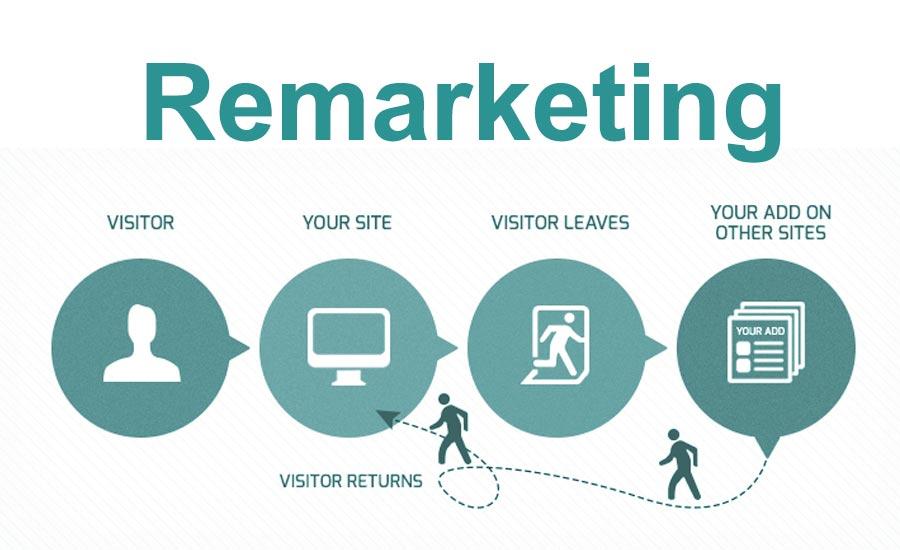
Think of google remarketing as your second swing at people who already cost you money to bring in. Someone lands on your site or app, pokes around, then bails before they buy, sign up, or fill out your contact form. Remarketing reconnects with those folks and gives them a nudge back to finish what they started.
Here’s the thing: almost nobody buys on that first visit. A full 92% of first-time visitors show up with something other than a purchase in mind. They’re checking prices, sizing up competitors, or just not ready yet, and then they drift off without a trace.
Run your remarketing well and it can convert up to 292% better than plain display ads. That’s the whole game right there. It’s what turns cash you’ve already spent into money that actually comes back.
If you’re in B2B, you need this more than anybody. You might wonder whether a sales cycle that drags on for weeks even pays off on ad spend. It does, because those long deals pull in a handful of decision-makers, and when they finally pick, they pick the brand they still remember. Staying top of mind is the whole point.
The numbers close the case. Digital Applied points to 2026 cross-network data showing standard display campaigns limp along at a 0.71% conversion rate. Switch that same spend over to retargeting display, and it climbs to 1.42%, twice as high.
Doubling conversions on traffic you’ve already paid for is about as close to free money as this business gets. But that only pans out if you run it with real discipline.
How Remarketing Technology Works
Under the hood, this is simpler than most people expect. You drop a little snippet of code on your site, usually called a remarketing tag (or a pixel), and it slips a cookie into each visitor’s browser. From there it keeps a quiet record of which pages they read and which products they hovered over but never bought. Google Ads scoops up all that behavior and sorts people into lists, say, everyone who loaded up a cart and then vanished.
Later, Google reads those lists and follows the same folks around with your ads on places like Google search and YouTube. Track, group, serve. That three-step loop is the whole machine.
One thing before you build any lists: get the Google Ads Global Site Tag (Gtag.js) on every single page first. That’s the part doing the watching, tracing how visitors wander through your site. Think of it like a booth handing out anonymous tickets at the door. Someone shows up, their browser quietly grabs a ticket, and your ads get to wave that ticket back at them later on other sites in Google’s network.
Here’s the catch: third-party cookies aren’t the dependable thing they used to be. Safari and Firefox have been blocking them by default for a good while now. Chrome hit pause on its own plan to scrap them, and as nice as a delay sounds, it doesn’t make the ground under you any more solid.
That pause just buys you a bit of time, not safety. Call it the crack in the foundation.
So the smart play is to quit renting your data and start owning it. Give it a year, and the marketer still betting everything on third-party cookies will watch those lists shrivel up, while the one running on first-party data keeps landing in front of real people. Hook Google Analytics 4 (GA4) up to Google Ads and you can build audiences straight from what people actually do on your site. Flip on Google Ads Enhanced Conversions and it sends hashed customer details, like emails, back to Google to claw back the attribution the browser blocked.
But the cleanest option by a mile is Customer Match. You upload your CRM email list and retarget those people across Search, YouTube, and Gmail. That list is yours, cookies or no cookies.
The Key Benefits of Google Ads Remarketing
Most people treat remarketing like a memory jog and stop there. That’s leaving money on the table. Done with some discipline, it pays you back in two ways nobody talks about enough: it makes your ad spend go further, and it deepens the relationship with people who already know you.

Skip the discipline, though, and it’s just budget waste dressed up. Do it right and you get cheaper clicks and warmer leads from buyers who recognize your name before you’ve said a word.
Strengthen Customer Relationships
Did you know there’s a nice little quirk in how Google charges you here? Every time your ad shows up again in front of someone who was already thinking about buying, it nudges them, but Google only bills you when they actually click. No click, no charge. The view is free.
So all those impressions that never turn into a click? They’re still keeping your brand in front of past visitors, and they cost you nothing. Free exposure, riding along on top of a click-based auction. That’s the relationship-building working in the background while you only pay for real intent.
Improve Overall Campaign Efficiency
The efficiency story is simple: you already paid to get that traffic once. When someone bounces on their first visit, reaching them again doesn’t cost you a fresh acquisition. Sitting next to your SEO, social, and email efforts, remarketing gives you a second, third, even fourth crack at the sale. And here’s the part that surprises people: display and social remarketing clicks can run 2 to 100 times cheaper than other ad types.
You don’t have to take my word for it either. Three numbers you can pull on your own will tell you the truth: Cost Per Acquisition, Conversion Rate, and Attribution Paths. Line your remarketing campaign up against your normal search or display work (the gap shifts depending on your industry) and you should see your CPA come in well under it, with your Conversion Rate climbing well above what new visitors give you. Open the ‘Conversion paths’ report in GA4 and you’ll usually spot remarketing getting credit as the final touch that closed the deal, on clicks that tend to land somewhere around $0.66.
Reach Users Across Google’s Vast Network
Your ad can follow a shopper from a recipe blog to a news homepage to a weather app on their phone. That’s the Google Display Network at work, a sprawl of more than 2 million websites. It reaches 90% of everyone online, from niche blogs to Gmail inboxes. That kind of reach is exactly why it can drain your budget if you let it wander.
Without tight audience rules, that same enormous network starts chasing people who were never going to buy from you. The reach is the gift and the trap. Loose targeting across all those 2 million-plus sites just burns money on visitors who never convert. For a sense of scale, a normal Google search or display click usually runs less than $1 up to around $2, so paying to chase the wrong crowd adds up fast.
Use Google’s Free Ad Creation Tools
Take the Display Ad Builder Google hands you inside your account for free. You get to set the layout, adjust colors and messaging, pull in stock photos at no cost or upload pictures of your own, and have a finished ad ready to go in a few minutes flat.
Making the creative is the easy part, though. Slick layouts and nice colors won’t save a campaign that skips the work that actually matters: segmentation and planning.
Setting Up Your First Remarketing Campaign
Before you build any audience, two things need to be true: your Google Ads account is live, and you’ve decided where your lists are going to live. That second one feels like plumbing, so most people rush past it. Don’t.

It quietly sets the ceiling on how sharp your segments can ever get. You’ve really got two roads here, and they split on effort. Either you spin up quick lists right inside Google Ads, or you open GA4 and wire up the behavior-based audiences it hands back to you.
Choosing Between Google Ads and GA4 for Audiences
The whole call comes down to speed versus depth. Google Ads is the fast lane. It’ll throw together a basic segment like “all visitors” in a couple of clicks, and you can be live by dinner. But those lists stay blunt, and blunt lists put a cap on everything you try to do after that.
If you want audiences that actually scale, the ones built on time on site, scroll depth, where someone is in your funnel, you’re going to need Google Analytics 4. Growth pushes you toward that deeper segmentation sooner or later. That’s exactly why a lot of strategists skip the shortcut and just start in GA4 from day one.
Installing Your Google Ads Remarketing Tag
Picture the moment before a single ad ever runs: that’s where discipline starts. You can paste the code straight into your page’s HTML by hand and it’ll work. But the cleaner habit is Google Tag Manager (GTM, which is free and parks everything in one console). It keeps all your marketing tags in a single spot, so nothing ends up orphaned in some template you stopped thinking about six months ago.
Getting the tag is quick. Log into Google Ads, head to the Tools & Settings menu, and open Audience Manager. Find the Tag setup section and pick Google Ads tag. Your Global Site Tag shows up under Tag details, and here’s a nice bonus: that same tag doubles as your conversion tracking tag.
Building Your Initial Audience Lists
Should you dump everyone into one giant bucket called “all visitors”? No. Start with high-intent segments instead. Once you know the path, they’re fast to build.
Give each list a clear name and set a membership duration that fits the behavior you’re tracking. Inside your Google Ads account, go to Tools & Settings, open Audience Manager, click Audience Lists, and hit the blue plus icon.
Name the list, set how long people stay in it, then choose Website traffic as your source. Down under “Who to add to your list,” you’ll define visitors by the pages they saw or how long they stuck around. Turn on the pre-populate option so the list fills with people who already match instead of starting empty, then click Create Audience to save it. Saving one broad list and calling it a day is tempting, but the money is hiding in the narrow ones.
Your starter set is three lists, each tied to a real signal. First, Cart Abandoners: the folks who made it to the cart page but never hit the order confirmation screen. Those are your near-buyers.
Then layer on High-Engagement Users, anyone who spent more than 2 minutes on site or dug through 3 or more pages, plus Specific Category/Product Viewers who landed on a key page like /services/seo. Between those three, you’ve got your warm traffic covered.
Understanding the Different Campaign Types
The right campaign type is just the one that matches what you’re actually trying to do. Standard remarketing runs across the Google Display Network and gets the job done for plain brand recall. Dynamic remarketing is where things get interesting, because it shows e-commerce shoppers the exact products they were already eyeing.
Past those two, you’ve got a few more tools. Video remarketing catches people back on YouTube. Customer list remarketing runs off contacts you upload yourself. And Remarketing for mobile apps goes after your app users.
There’s also Remarketing Lists for Search Ads, which kicks in when a past visitor runs another Google search, letting you raise your bids or swap in different ad copy for them. Pick the type before you build, and match it to your goal. That’s really the whole game.
Examples of Remarketing Ads in Action
Say a shopper walked away from a full cart: tie the ad to that exact thing. Skip the generic “hey, come back” plea. This only lands when your creative lines up with the segment you built. A cart abandoner seeing the specific item they walked away from is a completely different experience than some stranger catching a banner they’ll scroll past without blinking.
Essential Rules for Running Remarketing Google Ads
Getting the campaign switched on is the easy part. What separates a campaign that pays for itself from one that quietly torches your budget and irritates the exact people you wanted back is a handful of rules you don’t get to skip. They read like fluff right up until you watch a solid budget drain away through one wrong setting. Discipline is the whole game here.

Set Frequency Caps to Avoid Annoying Users
How often can a single user or audience segment see a given ad inside a set window? A frequency cap sets that ceiling. I don’t recommend running without one because I’ve felt what happens when there’s no ceiling at all. A big client once told me their own staff was getting hammered by our ads all day, and that near-miss almost cost us the account.
So set a cap. A safe place to start is 3-5 impressions per user, per day, per campaign, and only nudge that number once your data gives you a reason to. A longer B2B sales cycle can take more contact, so a lower weekly setting like 10-15 impressions per user each week makes sense there.
What you’re really fighting is ad fatigue. That’s the slow burn where the same creative keeps popping up until a curious visitor starts resenting the sight of your logo. Keep the cap on and the ad feels like a nudge instead of an ambush.
Use ‘Targeting’ Not ‘Observation’ for Pure Remarketing
This one setting decides whether you’re doing real remarketing or just throwing darts. Pick the `targeting` setting so Google serves your ads exclusively to the people on your list. The `observation` setting looks innocent enough, but it won’t hold anything back. It pushes your ads out to anyone who fits the broader criteria, and that undoes the entire reason you built a remarketing list in the first place.
Keep an eye on it, because `observation` is the priciest bad habit I catch in audits. A widespread and expensive error is leaving this exact setting parked on `observation`. Leaving it there tells Google to show your ads to strangers who never touched your list, so flip it to `targeting` every single time.
Always Exclude People Who Already Converted
Why keep serving your “come on back” ads to someone who already bought or signed up? The second they convert, yank them out of your general lists. Nothing screams “we forgot who you are” like an ad for the thing they paid for last week, and paying to nag a customer you already won is money set on fire.
Once they’re out, drop them onto a separate post-conversion list. That’s where you pitch new products, loyalty perks, or a referral bonus.
Check Your List Size Requirements
To protect user privacy, Google sets minimum list sizes, which is Google’s concern and has almost nothing to do with your growth plans. Still, you have to clear the threshold before a retargeting list will even turn on. It works like a floor you cross before anything runs.
Here’s the catch: those numbers are floors, not targets, and clearing them by a hair backfires. A Display campaign limping along with only 110 individuals will chew through that tiny audience fast and over-saturate the few people on it, which is the exact opposite of what you set out to do. So aim comfortably above the line.
For Shopping Ads you’ll need at least 100 product IDs that are currently live, alongside 1,000 users for Search Ads, 100 users for Display Ads, and 1,000 cookies for Video Ads. Each of those is the absolute minimum, with no lower option available.
A/B Test Your Ads and Rotate Creatives
The biggest lever is almost always the offer itself, so test it first. It’s tempting to go tinker with fonts, but running ‘10% Off’ against ‘Free Shipping’ will swing your numbers way harder than any headline tweak.
The order that actually pays off is offer first, then headline, then images and creative, because small shifts to the offer move results the most.
Optimize Your Post-Click Landing Pages
Winning the click doesn’t win the customer. The page they land on has to close out what the ad started. If your ad dangles “Free Shipping” and the landing page doesn’t breathe a word about it, you’ve broken the promise and paid for a click that goes nowhere. Match the page’s message and deal to the exact ad, same wording, same offer, and the momentum carries straight through to the conversion.
Write a Strong and Clear Call-to-Action
A re-engaged visitor still needs to be told point blank what to do next, or the click just dies on the page. A vague ad leaves them stuck guessing, while “Shop Now” or “Book a Demo” points them right at the step you’re after. That single line is what turns a glance into a click.
Align Campaigns with Seasonal Events
Run a generic ad and a timely one side by side and they cost the same, but when a holiday or industry event rolls around, they rarely perform the same. The timely one wins because it borrows urgency the calendar already planted in your visitor’s head. For a shopper who was already leaning in, shaping your copy and offers around the season, a holiday, or a trade show makes a stale reminder feel fresh again.
Monitor and Adjust Campaigns Regularly
Set-and-forget is how remarketing budgets quietly rot. Checking performance on a steady schedule and adjusting bids, creative, and targeting is the actual job, not a one-time flip of the switch. Once these fundamentals are running clean, there’s a sharper level of play waiting for the campaigns that have earned their way to it.
Advanced Tactics for Better Performance
Most of the money that leaks out of a remarketing budget goes the same way: treating everybody who ever landed on your site like one big blob. Dump them all into a single catch-all list and you’ll pay the same price to chase a guy who bounced in two seconds as you do the buyer who almost checked out. That’s a bad trade.

The advanced work is where you stop doing that. You start slicing people into real segments and matching the message to where they actually are in their thinking. I’ve seen way too many accounts torch cash on one bloated audience to believe the basics carry you the whole way.
Segmenting Audiences by On-Site Behavior
Behavior tells you more than anything else, and that makes it the first thing I sort on. The easy one is the cart abandoner, someone who dropped an item in their cart in the last 30 days and then disappeared without paying. Figure out what actually stopped them (sticker shock or not enough reviews) and write copy that answers that exact worry.
On the B2B side, the group I’d build is what we call Engaged Non-Converters. These are the folks who landed on your pricing page, hung around for more than 90 seconds, and still never made it to your demo-booked confirmation. They’re doing the math and getting cold feet over one lingering doubt. Serve them ads that push value and ROI, or simply invite them to a direct consultation.
Using Time-Based Lists for Sequenced Messaging
Why does sequencing run circles around plain repetition? Take the same pool of visitors and split them by how recently they showed up, starting with anyone from the last 7 days. The whole thing hinges on exclusions: your 14-day list has to cut out the 7-day crowd, the 21-day cuts out both, and every list drops purchasers, so no one’s getting two ads fighting for the same attention.
Give each time window its own ad group with its own creative. That way you can feed people answers to their objections a little at a time, long before you ever flash a discount.
For Days 1-7, keep it light with a straightforward reminder built for brand recall, just a nudge to jog their memory, something like “still thinking it over?” The Days 8-21 stretch is where you drop in proof or tackle a common hang-up, maybe an ad pointing to the glowing feedback from 500+ satisfied customers, or one dangling free onboarding for anyone who’s nervous. Hold the actual offer until Days 22-30, like a free consultation this week, as one last tug before they age off the list entirely.
Structuring Campaigns by Funnel Stage
Take two people, a first-timer and a loyal customer: funnel stage is the setup that keeps your spend honest. Over at Farsiight, campaigns get split into three buckets by intent, because a brand-new visitor and a repeat buyer have no business fighting over the same dollars. The top-of-funnel (TOF) campaign goes after fresh users and shuts out anyone who’s already visited or bought. The middle-of-funnel (MOF) campaign works past visitors while excluding purchasers, and the bottom-of-funnel (BOF) campaign circles back to previous buyers to bring them in again.
The payoff is control. When you wall off each stage, your warmer MOF and BOF crowds get the budget they need to grab more impression share, instead of quietly bleeding it out to cold traffic that converts at a tiny fraction of the rate.
Using Dynamic Remarketing for E-commerce and B2B
The last piece worth bolting on is dynamic remarketing. Say someone pokes through three products and leaves. This setup automatically drops the exact items they looked at right into the ad they see. Showing a shopper the specific thing they were eyeing beats any generic “hey, come back” follow-up by a mile.
It’s basically the standard playbook on steroids. As Google remarketing methods go, this one takes a more targeted and personalized approach to serving your Google Ads. And honestly, nothing snaps an e-commerce shopper back faster than seeing those shoes still parked in their cart.
Common Mistakes That Waste Your Budget
Bad Google Ads settings will burn through cash way faster than a weak headline ever could. And most wasted spend on google ppc remarketing comes back to one bad habit: leaving the campaign on autopilot and hoping it sorts itself out.

The usual culprit is an ‘All Visitors’ list that nobody ever cleaned up. Think about who actually lands on your Careers page, your Login portal, or your Investor Relations section. You’re looking at job seekers and shareholders, not customers. But if your list never filters them out, your ads keep chasing them anyway, and every one of those impressions is money down the drain.
Then there’s the flip side: serving a bland, one-size-fits-all ad to someone whose intent is crystal clear. Say a shopper walked away mid-checkout with Men’s Size 11 Running Shoes still in the cart. Hitting them with a generic ‘Shop Now’ banner throws away the whole moment. A dynamic ad showing that exact shoe (or copy built around it) is what actually brings them back.
So block off an hour this week and go through your audience lists with those exclusions in mind. If a list can’t tell the difference between a buyer and a job applicant, that’s the one you fix before anything else.
FAQ
Eight sections in, and whenever I get talking with marketers about this stuff, a small cluster of questions keeps coming up. They want to know what to call it, what it costs, how long to keep people on a list, and which setting is quietly eating their money. Fair questions, all of them.
Audience Expansion is where most people trip up, so I’ve given it its own answer below. The rest are quick. Let’s take them one by one and figure out which default is costing you.
What is the difference between remarketing and retargeting?
As far as Google Ads is concerned, they’re the same thing. Pick whichever word you like and move on.
If you dig around online you’ll see people tie retargeting a little more tightly to the dynamic stuff, the campaigns that chase someone with the exact products they looked at. Remarketing tends to be the wider umbrella term Google uses across the whole platform. Either way, none of that changes a single step when you sit down to build a campaign.
Is Google remarketing free?
Turning it on costs nothing. Running it does. The remarketing features ship with any Google Ads account, and Google won’t charge you a penny for access to them.
But every click still comes with a price, and that price moves around depending on your bids and how many other advertisers are fighting for the same eyeballs. Good news is Google is still one of the cheaper places to do this.
How long should a user stay on a remarketing list?
Why reach for a round number just because it feels tidy? The membership duration decides how long someone hangs around on your list before Google quietly removes them, which is what keeps the audience fresh instead of stale. So you want that number to match how long your customers actually take to buy.
You can pull that figure straight out of Google Analytics 4. Head to Advertising > Attribution > Conversion paths and open the ‘Time to conversion’ card. Whatever average is sitting there is your starting point.
If the data says 30 days, use 30 days. If your buyers take their sweet time before pulling the trigger, stretch the window out to cover it.
Should I disable Audience Expansion?
The short answer is yes. For anything that’s pure remarketing, switch it off. It’s tucked quietly inside your Search, Display, and YouTube campaigns, and it works a lot like the lookalike audiences you’d find on Meta Ads. It takes your ads and pushes them at brand new people Google reckons look similar to your visitors.
Sounds great on paper, more reach, more eyeballs. But on a remarketing campaign that’s exactly the wrong move. You’re now spending money chasing strangers instead of the folks who already know who you are.
The one time it earns its keep is when your whole goal is finding new customers. In that case your remarketing list becomes the seed Google builds the bigger audience from, and Audience Expansion is doing the job you actually hired it for.
How do I create a Google remarketing ad?
Say you want to build one: open up your remarketing campaign, go into its ad group, and start a fresh ad. When Google asks what type you want, choose ‘Responsive display ad’. From there you upload your creative, so images, a logo, a handful of headlines and descriptions.
You don’t get to lay any of it out yourself, though. Google then automatically arranges the pieces into ads suited to the Display Network. Google takes all those pieces and stitches them together into display ads sized to fit wherever they land across its network.
Behind the whole thing there’s a tag sitting on your site, doing the quiet work of following visitors after they leave and serving these ads as they wander around the web.
You can probably see the pattern by now. Effective google ads remarketing pays off for people who treat it like a real discipline, not some box you tick once and forget. You’ve seen why the tag matters, why smart segmentation beats blasting everyone the same message, which rules keep you from wearing out the exact people you’re trying to win back, and how one sleepy default like Audience Expansion can bleed a budget dry.
Tighten those list durations, line them up with your real sales cycle, and turn off anything spending on strangers. Do that, and the second chance starts paying for itself.