When someone wakes up at 2 a.m. with a cracked molar, they aren’t scrolling Instagram. They grab their phone and Google an emergency dentist. In that moment, you’re either at the top of the results ready to book them, or you’re invisible.
Search ads are your ticket to the front of that line, and this Google ads for dentists guide turns your ad spend into a machine that brings in the patients who actually keep the lights on. If you’d rather hand that off, a digital ads agency can run the whole system for you.
Why Your Practice Needs Google Ads for Dentists
Someone searching “emergency dentist near me” isn’t window shopping. They’re in pain and they need a fix now. They aren’t scrolling social media hoping an ad finds them. Search ads let a practice jump to the front of the line right when someone’s problem is most urgent. It’s less about marketing and more about being the first and best answer when it really matters.
Balancing Immediate Leads with Long-Term SEO
Paid search is the fastest way to get your name out there, especially for a new practice. You’re looking at phone calls within hours of launch and qualified leads within days. Organic SEO is a slow build, with 6 to 12 months before you see real traction.
The catch is that a practice has to keep paying to play. The second the ad budget turns off, the leads dry up completely. Sustained growth still depends on organic presence, content, referral programs, and review collection. Paid search is a powerful tool, but it’s not the whole toolbox.
Pros and Cons of Google Ads for a Dental Clinic
The real advantage of Google Ads is control. Paid campaigns bring in qualified inquiries within hours, and you can get specific about who you target.
The upside:
- Set a tight geographic fence, say a 5 or 10-mile radius, so budget isn’t wasted on clicks from too far away to book.
- Trace every call and form submission back to the exact keyword that triggered it, unlike general branding campaigns.
- Pay only when a prospect interacts with your ad, making it cost-effective versus mass media.
- Justify higher click costs easily, since a patient’s lifetime value spans many future procedures.
The downside: it demands attention. You’re constantly fighting rising click costs and other dentists bidding on the same terms. All that traffic is useless if it lands on a clunky page that can’t convert a visitor into a patient. And the biggest downside is dependency: when the money stops, the leads stop.
The Dental Ads Market in 2026
You can’t just out-spend your local competitor anymore. That playbook is stale, and throwing more money at the problem is a fast way to go broke when every practice on the block will do the same.
How the Google Ad Auction Really Works
It’s fair to ask whether Google Ads is a pay-to-play game where the richest practice wins. The answer is no. Your ad’s spot isn’t just for sale. Position depends on a mix of your bid, ad quality, and landing page experience.
Google runs a blind auction for every search, and its Ad Rank formula weighs your bid alongside the relevance of your ad and the quality of your landing page. The secret isn’t a bigger budget, it’s a smarter ad.
Every advertiser gets thrown into this lightning-fast auction. Winners get the “Sponsored” slots at the top, and you’re only charged when someone actually clicks.
Google Ads Dental Benchmarks: CPC, CVR, and Spend
The raw stats show why a relevance-first plan is the only way to survive.
|
Metric |
Figure |
|
Average Cost Per Click |
$7.85 |
|
Click-through rate |
5.44% (bottom of the barrel vs. other industries) |
|
Typical Conversion Rate |
7% to 9% |
|
Cost Per Lead |
$50 to $85 (general dentistry) |
Suddenly that $7.85 for a click from the wrong person feels like a huge waste.
Launching Your First Campaign in 30 Days
Think of the next 30 days as building a machine that finds high-value patients, not just any warm body with a toothache. Google’s algorithm is powerful but it’s not a mind reader. Give it messy instructions and it will happily spend your cash on clicks that go nowhere.
Do not skip the setup to get to the spending, because it’s the most expensive mistake you can make.
Defining Your Goals and Patient Targets
Start with a question most people skip: what does a “win” actually look like? Are you boosting general awareness of your clinic brand, hunting for a few high-margin cases, or filling chairs for a new whitening promotion?
Google has different campaign types for a reason, and each can be aligned with a specific business target. Without knowing your goal, you’re throwing money at the wall to see what sticks.
Once you know your goal, you can figure out who you’re talking to. A campaign for veneers is not for the same person who needs dentures. Match the service to the audience:
|
Audience |
Focus |
|
18-34 years |
Cosmetic enhancements, orthodontic options |
|
35-54 years |
Restoration implants, crowns, general family treatments |
|
55+ years |
Complex work like custom dentures |
You can layer in income targeting too, pointing premium implant ads at the top 10% income bracket and focusing clear aligners and standard cosmetic treatments on the top 20% bracket. This isn’t guesswork, it’s being smart with your money.
Building, Launching, and Reviewing Your Campaign
The first two weeks are all about planning and setup, the unglamorous work that actually makes a campaign profitable.
- Week 1: Nail down your goals, define your ideal patient, and set a firm budget.
- Week 2: Get the technical foundation right. Set up a clean Google Ads account, connect it to Google Analytics, and set up conversion tracking for every possible lead, from form fills to phone calls. This includes embedding the Google Ads conversion code into your website’s backend.
- Week 3: Start building. Run keyword discovery in Google Keyword Planner and assemble keyword groups that match your ad group themes. Your account setup should mirror your practice’s services, which keeps ads relevant and budget easy to manage. Draft responsive search ads for every ad group and build dedicated landing pages for each service.
- Week 4: Launch, but don’t flip the switch and walk away. Turn campaigns on with a small test budget and watch closely. Check in daily, pausing ads that aren’t getting clicks, killing keywords that aren’t converting, and moving budget to the winners that bring in good leads.
How to Structure Your Google Ads for a Dental Office
All that daily budget shifting is useless if your account is a mess. A poorly built structure burns cash because it lumps patients with a cracked tooth in with people price-shopping for whitening. You can’t optimize for both at once.

Choosing the Right Campaign Types for Your Goals
First, pick the right campaign type, since this decides where your ads show and how you pay. Run both standard Search Ads and Google’s Local Services Ads. Local Services Ads are a godsend because you pay for the lead, the actual phone call, not the click.
It’s the difference between paying for a real prospect and gambling over $7 a click on someone who might just be browsing.
Grouping Campaigns by Service Line
A person frantically searching for an emergency dentist has different needs than someone casually looking up the cost of veneers. They aren’t the same customer, so don’t group them together. When you mix them, your bidding becomes a shot in the dark and your cost-per-lead numbers turn into educated guesses.
Siloing your services into four main campaigns is the only way to get real control:
- General Dentistry: Your bread-and-butter services like cleanings and checkups, targeting keywords like “dentist near me.”
- Cosmetic: Services like whitening and veneers, where people do more research before they buy.
- Emergency: Laser-focused on immediate pain, with keywords like “dentist open now.” These people convert fast.
- High-Value Procedures: Big-ticket services like implants or Invisalign. They support higher ad spend and need dedicated landing pages.
Inside each campaign, keep ad groups tight: a maximum of 10 to 15 closely related keywords per group. No exceptions.
Setting Your Geographic Targeting Radius
Your location targeting has to match the service. Nobody drives 45 minutes for a routine cleaning, so keep general dentistry ads to a 5 to 10 kilometer radius (about 3-5 miles). For a specialized, expensive service like full-mouth reconstruction, expand your reach to a 15 to 20 kilometer range (around 10-15 miles) to find enough of the right patients.
Finding Keywords That Attract New Patients
A common mistake is thinking the keyword job is to find more search terms. The real work is subtraction. You have to be ruthless about filtering out the wrong people. If you let broad match run wild, you’re paying to attract every price shopper and curious Googler in a huge radius, and they’ll drain your budget without ever booking.
High-Intent vs. Research Keywords
Break searchers into two camps: people doing their homework and people ready to book. Someone typing “how much do dental implants cost” is browsing and needs a different ad and landing page than the person searching “dental implants near me.” That second person is prepared to schedule immediately, and they’re your target.
Must-Have Keyword Categories for Dentists
Keywords that signal real distress are goldmines. When someone’s in pain, their desire to shop around tanks. They just want a solution now. That’s why you should bid aggressively on phrases like “emergency dentist open now” or “broken tooth repair urgent.”
Using Negative Keywords to Stop Wasting Money
This is where you protect your budget. Build a big list of negative keywords to stop paying for clicks that will never convert, such as dental assistant jobs, DIY tooth repair, or a dentist for their dog. Check your search query reports and add any junk you find. Also exclude specialty fields you don’t offer: add “pediatric” if you don’t treat kids, or “school” if you’re not a training facility.
Targeting Patients by Demographics and Income
For big-ticket services, keywords alone won’t cut it. Showing a full-mouth reconstruction ad to someone who can’t afford it is a waste. Layer in demographic targeting: for premium cosmetic treatments, show ads only to the top 10% income bracket in your area.
For private treatments like Invisalign, open that up to the top 20% bracket. For everyday general dentistry and emergency calls, turn income filters off completely to reach as many people as possible.
Writing Ad Copy That Gets Clicks
Getting your ad in front of the right person is half the battle. Now you have to convince them to click. This isn’t the time for clever wordplay. It’s a split-second audition where the patient is the judge, and they’re not forgiving. Your ad has to earn the click with a promise that’s rock-solid.
A Simple Formula for High-Converting Ads
The best ads command action rather than describe a service. They tell the user exactly what to do next, which is surprisingly rare. Use direct calls to action in your headlines and descriptions, like “Book Your Consultation Today” or “Call Now, Same-Day Appointments.” Layer in immediate value with lines like “Get a Free Treatment Quote.”
Using Ad Assets to Take Up More Space
Use every ad asset Google gives you. The goal is to make your ad physically bigger on the results page, which shoves competitors down the screen:
- Call extensions so people can call right from the ad.
- Location extensions to show your address on a map.
- Sitelinks for key pages like “New Patient Offers” or your booking calendar.
- Review extensions to show off your best testimonials.
- Callouts to highlight differentiators like “Same Day Appointments.”
You’re answering every question before the person even has to click.
Why Most Dental Ads Get Ignored (And How to Fix It)
Most dental ads are invisible because they’re clones of each other. When a searcher sees a wall of results all saying “Quality dental care,” “Gentle dentist,” and “Family dentistry,” it turns into background noise, and patients scroll right past.
A specific offer beats a vague promise every time. Toss the fluff like “caring staff” and replace it with hard facts:
- “Open Saturdays 8 AM, 2 PM”
- “Sedation Options for Anxious Patients”
- “Same-Day Crowns with CEREC Technology”
- “New Patient Special: Exam + X-Rays + Cleaning $99”
- “500+ Five-Star Google Reviews”
The same goes for trust. Instead of calling yourself a gentle dentist, prove it with real authority: highlight your years in practice, patients seen, or professional achievements. It’s no wonder click-through across the sector is a dismal 5.44% when everyone sounds the same.
Can You Put Prices in Your Dental Ads?
A lot of practices worry that prices will scare patients away, and that’s a fair fear if your prices are way out of line with the market. But transparent pricing is a powerful filter. It saves you from paying for clicks from people who could never afford your services. You’re paying to pre-qualify your leads.
Before, the generic ad: Generic copy could be for any clinic in the city, giving a patient zero reason to choose you. A typical implant ad is just a collection of keywords: Dental Implants in [Your City], Call Us Today. We offer dental implants and other cosmetic services. Our friendly staff provides state-of-the-art care.
After, the high-converting ad: Weave in real data and the ad becomes an actual offer: Dental Implants in [Your City], 0% Financing Available. Replace missing teeth for good. Dr. Smith has placed over 1,000 implants with a 98% success rate. Book Your Free, No-Obligation Consultation. But even the greatest ad copy won’t work if the click leads to the wrong place.
Turning Ad Clicks into Booked Appointments
Your homepage is the wrongest place to send ad traffic. One clinic burned through its entire Invisalign budget sending perfect clicks to a beautiful but generic homepage, and their booking numbers tanked. Someone in pain who clicked your ad for “emergency dental implants” doesn’t want staff bios or a flossing blog post.
They want a solution now, and your homepage just asks them more questions. That gap between their urgent need and your general welcome is where your money vanishes.
Anatomy of a High-Converting Dental Landing Page
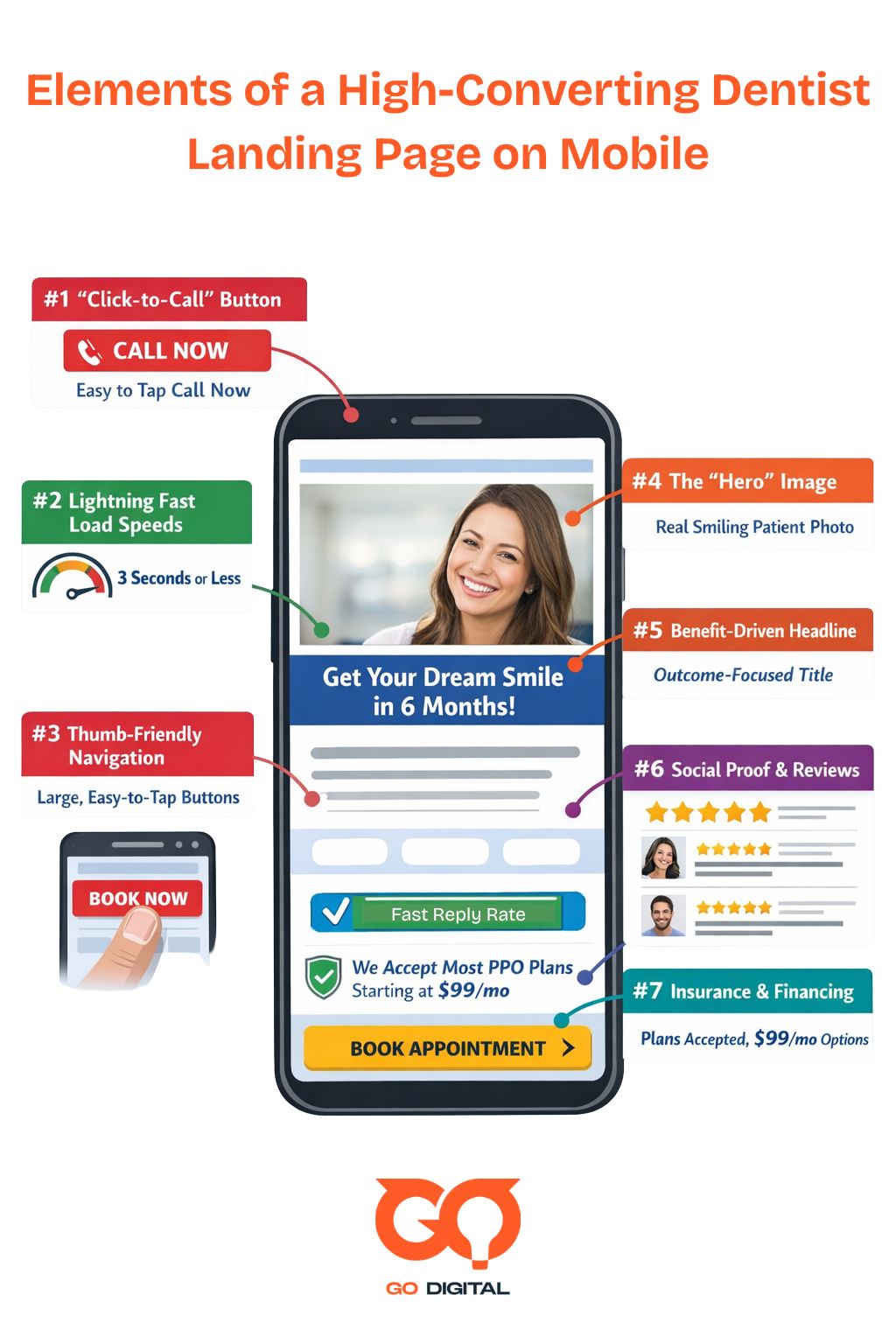
The single most effective tool for turning clicks into patients is a dedicated landing page. Each page should have exactly one job: get the appointment. When a visitor lands, they need to know they’re in the right place instantly. That means:
- A headline that mirrors the ad they just clicked.
- A huge, can’t-miss-it booking button and a clickable phone number at the top.
- Trust signals woven in immediately: five-star ratings, patient quotes about that specific treatment, and professional association logos.
- A plain-English breakdown of the treatment, covering steps, recovery, and timeline to build confidence.
- High-quality photos and short bios for your dentists, because people book with people, not a logo.
- The practical stuff: street address, hours, accepted insurance, and open cost details.
- Every way to get in touch: phone links, a simple form with only the must-have fields, and maybe a live chat box.
Keeping traffic away from your main domain home page is almost always the right call.
Why Your Landing Page Must Be Mobile-First
The huge majority of your ad clicks come from a smartphone. If your page takes longer than three seconds to load on a phone, you’ve already lost. Don’t mistake a “mobile-friendly” page that just shrinks your desktop site for a true mobile-first design. Over 70% of local dental searches happen on a phone, so designing for desktop first and hoping it works on mobile isn’t a plan.
Managing Your Budget and Measuring ROI
Chasing mobile clicks without a financial plan is a fast way to burn cash. Shake off the obsession with cost-per-click and start measuring what matters: how much profit you make from specific procedures. The health of your campaign isn’t about clicks, it’s about booked appointments and the value those patients bring.
How to Set a Realistic Ad Budget
A test budget that’s too small is doomed from the start, but the math is straightforward. Work backward. Say your average cost-per-click is $8 and your page converts at a conservative 7% (if it’s lower, you have a landing page problem, not an ad problem).
It takes about 14 clicks to get one lead. A daily budget between $50 and $80 yields roughly 6 to 10 daily visits, or one new lead every two to three days. The takeaway isn’t that clicks cost $8, it’s that a single patient lead actually costs about $112.
Choosing Between Manual and Smart Bidding
It’s tempting to let Google’s Smart Bidding run the show from day one, but its algorithm needs data to learn, and a new campaign has none to give. For any new campaign, start with a manual bidding strategy to gather baseline data.
Once your campaign has logged 30 or more conversions, flip the switch to an automated strategy. At that point the system has enough history to optimize for patient acquisition.
How to Calculate Your Real Return on Ad Spend
Your return on ad spend (ROAS) tells you whether this is working, but you need benchmarks to judge your numbers.
|
Benchmark |
Target |
|
Landing page lead rate |
5% to 12% (forecast at 7%) |
|
Minimum ROAS |
3:1 |
|
Optimal ROAS |
5:1 or higher |
|
Cost Per Lead |
$35 to $150 |
|
Lead-to-Patient (front desk) |
30% to 50% |
Typical procedure values run from $150 to $500 for emergency services, $80 to $300 for general dentistry, $400 to $3,000 for cosmetic, $1,500 to $4,000 for implants, and $2,000 to $6,000 for orthodontics.
A Practical Guide to Calculating Patient Lifetime Value (LTV)
The most accurate budget decisions come from knowing the true lifetime value of a new patient, and all the data is already sitting in your practice management software like Dentrix or Open Dental. Pull a financial summary for the last 12 months and divide total production by your active patient count.
That gives your Average Annual Revenue per Patient. Then evaluate your files for the average duration of your client relationships, which gives your Average Years Retained. Multiply the two and you’ve got your baseline LTV. No more guesswork.
Setting Up Tracking and Improving Performance
Without the right tracking, Google’s algorithm is an expensive machine for generating clicks. If it lacks a clear finish line, a booked appointment, it will happily spend your money chasing traffic. A proper setup is the only way to know which keywords and ads actually make your phone ring.
It’s a classic case of garbage in, garbage out, and the default Google Ads setup is built for brand awareness, not a profitable practice.
Tracking Calls, Forms, and Bookings
Here’s one of the most costly mistakes practices make: they track web form submissions but ignore phone calls. At least 50% of new patient leads come directly from a phone call, so if you aren’t logging those, you’re making budget decisions on half the story.
Track every meaningful way a patient can contact you:
- Phone calls from your ads and website.
- All web forms, including scheduling requests and pricing inquiries, not just “contact us.”
- Clicks on a WhatsApp link.
- Completed appointments through an online booking tool.
For phone calls, use dynamic call tracking numbers for each campaign and only count conversions lasting a minimum of 30 to 60 seconds to filter out wrong numbers and quick hang-ups. Add descriptive UTM parameters to your URLs, set up clear conversion rules in Google Analytics 4, and assign estimated dollar values to different conversion types.
The data shows you exactly where your revenue comes from.
The Only KPIs That Matter for Your Practice
Stop obsessing over impressions, click-through rates, and cost-per-click. In a high-value service business, these are vanity numbers. Shift your focus to four figures that measure actual business growth:
|
KPI |
How to calculate it |
|
Return on Ad Spend (ROAS) |
Clinical revenue divided by total ad spend |
|
Cost Per Lead (CPL) |
Ad spend divided by leads generated |
|
Cost Per Acquisition (CPA) |
Ad spend divided by confirmed new patients |
|
Conversion Rate |
Total conversions divided by total ad clicks |
These define whether you’re profitable or not.
Your Weekly and Monthly Optimization Checklist
A 15-to-30-minute review each week is the simplest way to stop wasting money. Check your Search Terms Report, look at budget pacing for the month, and monitor key numbers for scary drops. When you find irrelevant searches that triggered your ads, add them to your negative keyword lists, because this one step stops you from paying for the same useless clicks over and over.
Once a month, set aside an hour or two for strategic moves. Dig into ad copy performance, review which keywords are most profitable, and check results by device and location. Test at least two ad variations per ad group, adjust bids up for winners and down for losers, tweak your landing pages, and work to improve Quality Scores.
Run a compliance check too: remove unverified healthcare claims, test landing page speeds, confirm your SSL certificate is active, review geo-targeting, and run test submissions through your own forms.
Advanced Tactics to Scale Your Campaigns
Once your search campaigns are humming and turning a profit, the next step is to change the game. The goal isn’t more patients, it’s more of the right patients. You move from paying for clicks to paying for results.
Using Local Service Ads (LSAs) for Verified Leads
If you want to take the risk out of lead gen, this is your tool. Local Service Ads put you at the top of the results on a pay-per-lead model, not pay-per-click. Google rolled this out for dentists in January 2023, with general dentistry leads coming in at a competitive 30-60.
You only pay for valid leads, and you can dispute unqualified ones in the dashboard for a refund. The “Google Verified” badge builds instant trust, and the campaigns are simpler to manage than traditional search.
Campaigns for High-Value Services like Implants
A single implant case can bring in $3,000 to $5,000 or more. That means you can afford to pay more for a click, but only if your team is ready to pounce. These leads can’t land in a general inbox, they need to go straight to a dedicated treatment coordinator, and you should contact every new implant lead within 5-10 minutes of submission.
Any longer and they’re gone. Your ads need to speak their language: talk about your success rate (“Over 500 implants placed with a 95% success rate”), the tech you use (“3D guided implant placement”), and the financing you offer (“0% financing available”).
Capturing Urgent Patients with Emergency Campaigns
Someone with a broken tooth isn’t comparison shopping, they’re in pain and need help now. This calls for a separate campaign with tight keywords like “emergency dentist near me” or “tooth pain relief,” and call-only ads so they can reach you with one tap.
This campaign needs to run 24/7, because dental emergencies don’t stick to business hours. The landing page should be ruthlessly simple: a huge clickable phone number at the top, a clear message like “Call Now for Immediate Relief,” and your urgent care hours.
Don’t make them think, just make it easy to call.
Remarketing to Website Visitors Who Didn’t Convert
For every person who fills out a form, a dozen others clicked around and left. Use the Google Display Network to follow them with simple, branded ads for the next week or so. It’s a cheap way to stay top of mind while they’re making a decision, especially for bigger treatments.
When to Test a Performance Max (PMax) Campaign
You should probably ignore Performance Max for now. PMax requires a large volume of historical data and substantial daily budgets to work effectively, and running it without that foundation just lights money on fire.
Only test PMax after your regular search campaigns are stable and predictable. If you do get there, know that PMax tends to bring in broader, less-qualified inquiries, which makes your team’s phone skills more important than ever.
They’ll need open-ended questions like “What are your main goals for your smile?” to figure out if the caller is a good fit.
Staying Compliant with Google’s Health Policies
All the phone skills in the world won’t matter if your ads get shut down, and Google’s health review system has a hair-trigger. One wrong word and your main source of new patients can vanish overnight. The algorithm doesn’t know you’re a great dentist with good intentions, it just sees a rule violation and shuts you down.
Google’s Main Ad Policy Rules for Healthcare
Google’s rules fall into four buckets:
- Prohibited content: the easy stuff to avoid, like sketchy at-home whitening kits or unapproved aligners.
- Prohibited practices: shady tactics like guaranteeing results or using fake reviews. Cross this line and you risk a full account suspension.
- Restricted content: things like clear aligners and implants. You can advertise them, but you need clear disclaimers and can’t slap up any old clinical photo. This is where most dentists trip up.
- Editorial and system requirements: accurate grammar, functioning mobile scheduling forms, and emergency lines that work outside normal hours.
Common Violations That Get Dental Ads Disapproved
Over-the-top promises and sloppy trademark use are common reasons ads get smacked down. An ad guaranteeing a 100% success rate on bone integration is asking for a penalty. If you want to bid on a brand name like Invisalign, you need official permission from the manufacturer first, otherwise the system flags you instantly.
A few other mistakes get ads pulled just as fast: raw graphic before-and-after photos, hiding the full cost of treatment, and posting patient reviews you can’t prove are real.
Patient Privacy, Data, and HIPAA Compliance
Retargeting based on someone’s personal health information is absolutely forbidden. Both Google’s rules and HIPAA forbid you from creating audiences of people who searched for specific oral surgeries or symptoms.
Your targeting has to stay broad, sticking to local zip codes and general age groups. If you have offices in the UK, be extra careful with your cookie consent banner, since the generic pop-up isn’t enough.
You need specific language such as: “We use cookies to show you relevant dental treatment information and measure advertising effectiveness. You can manage preferences or opt out at any time.”
How to Fix and Appeal a Policy Violation
Google has a two-step review process. An initial programmatic check analyzes copy within minutes for banned phrases. If you’re using tricky medical language about outcomes or financing, it gets kicked to a real person for manual review, which can take 24 to 48 hours.
If you fail a check, Google uses a strike system, and the news is good for you. A first-time offense usually just gets your ad disapproved, not your account suspended. It’s a warning shot and you get a chance to fix it.
But repeat the same mistakes and you’ll face temporary suspensions, then eventually a permanent ban. Fixing a rejection means doing exactly what Google tells you: remove exaggerations and unsubstantiated promises from headlines, and if you can’t support a statement with peer-reviewed data, remove it.
Swap graphic clinical photos for approved shots of your actual office, team, or diagnostic equipment. To get a formal hold lifted, file an appeal in the Policy Manager and attach your credentials or manufacturer certificates to prove you’re legit.
Common Budget Leaks and How to Fix Them
It’s easy to blame a “mysterious algorithm update” when your patient numbers tank, but it’s almost never Google’s fault. We once had a client hemorrhaging cash on ads running at 2 AM on a Sunday for emergency services.
The clicks were real and expensive, but the office was closed and no one answered the phone. Before you panic about a big Google shake-up, run a diagnostic on your own setup, because the money is usually leaking out of a simple hole you poked yourself.
Top Mistakes Dentists Make with Google Ads
The fastest way to set your budget on fire is to pay for clicks when no one’s at the front desk. A patient in pain sees your ad at 11 PM, calls, and gets voicemail. You paid for that click and the lead is gone. Either schedule ads to run only when staff can answer, or give late-night searchers a way to book directly into your calendar online.
Another common one: a practice’s conversions fall off a cliff, and it turns out the “Submit” button on their landing page is broken after a website plugin update. The ads were working perfectly, but people physically couldn’t book. It’s a five-minute fix that can save tens of thousands in lost business.
Other leaks are just as painful:
- Paying for clicks from people too far to book, from loose geo-targeting.
- Generic, fluffy ad copy like “Quality Dental Care” that says nothing.
- Dumping expensive implant traffic on the homepage instead of a dedicated page.
- Overusing broad match keywords.
- Failing to track phone calls, which can be over 50% of new patient leads.
- Forgetting to add negative keywords like “DIY tooth repair.”
- Neglecting ongoing optimization. “Set it and forget it” is a recipe for failure.
A Troubleshooting Checklist for Underperforming Ads
Google itself makes you pay for lazy work through your Quality Score, its grade on how relevant your keyword, ad, and landing page are to each other. For every point that score drops, your cost per click goes up.
If a competitor opens down the street or gets aggressive with spend, your ads might stop showing as often, so check your dashboard for these shifts and normal seasonal dips first.
Then sift through your keyword list. Anything with a Quality Score below 6 out of 10 is a red flag, since better scores directly lower click costs and secure premium positions. Work through these areas:
- Test your own forms regularly and confirm phone calls are still counted, since website updates can silently break tracking.
- Accelerate mobile rendering speeds and improve the smartphone layout.
- Use all the assets Google gives you, like sitelinks, callouts, and location extensions, to take up more space.
- Simplify booking forms so they’re dead simple to fill out.
- Show off your five-star reviews and pause generic keywords in favor of specific long-tail ones.
- Use ad scheduling so you only pay for clicks when you can turn them into patients.
Real-World Results: The Best Google Ads for Dentists
Running ads is one thing, running them so they grow your practice is another. This is the difference between buying clicks and buying high-value patients. Just look at one Manchester office where a compliance issue, using uncertified patient photos, got their ads shut down for 18 days.
In that short time they missed 47 implant consults, an estimated $28,000 in lost opportunity. That’s how much a good campaign is worth.
Case Study 1: Emergency Dental Practice – Manchester
This practice figured out the real money was in capturing the most urgent cases, so they went all-in on people in pain, right now, on their phones. They got aggressive with mobile bidding, pushing it up 100%, and ran call-only ads inside a tight 5-mile radius, with all copy hammering home same-day availability.
A 24/7 reception service answered every call instantly, backed by a mobile-friendly landing page with a can’t-miss dialing link.
On a budget of $2,500 a month focused entirely on emergency keywords, bookings shot up 142% and brought in $48,000 in new revenue from Google Ads patients. The return was a staggering 1,920%, meaning $19.20 back for every $1 spent. Their cost to acquire a new patient dropped 35%, and the average value of an emergency appointment was $280.
Case Study 2: Cosmetic Dental Practice – Birmingham
This cosmetic practice was tired of wasting money on unqualified leads, so they used strict demographic filters to find the right people. They ran separate campaigns for whitening, veneers, and smile makeovers, all targeting a 15-mile radius, and featured interest-free financing throughout their messaging.
Crucially, ads were only shown to households in the top 20% of income, aged 25-55. Their offers made it easy to say yes, pushing 0% financing, before/after galleries, and video testimonials, with a free consultation to close the gap.
On $4,200 per month across their high-value campaigns, cost per cosmetic lead tanked from $145 to $78. That drove an 89% jump in consultation bookings and pulled in $156,000 in new revenue, a 312% return. Best of all, 68% of those new patients went ahead with treatment, at an average case value of $1,850.
FAQ
How much should a dental clinic spend on Google Ads?
A realistic starting point for a single practice in a regular city is $1,000 to $3,000 a month. Smaller towns can sit at the lower end, but major metros need $3,000 to $7,000 a month or more to compete.
How quickly will I see results from Google Ads?
You’ll see clicks and probably some calls almost right away. A steady, predictable flow of the right leads takes patience: about two to four weeks to gather enough data for smart adjustments, with the first 60 to 90 days spent dialing everything in.
What is a good conversion rate for dental Google Ads?
For a properly set up campaign targeting high-intent keywords, aim for 5% to 12%. If your numbers are below 5%, something is broken. Pause the campaign and dig into your landing page before spending another cent.
Should I advertise all my dental services at once?
No. Spreading a monthly budget across eight services guarantees none get enough traction to be profitable. Pour that budget into one or two high-value services, build momentum and get it profitable, then expand.
What’s the difference between Google Ads and Local Service Ads?
With standard Google Ads you pay every time someone clicks, including accidental clicks and tire-kickers. Local Service Ads charge per lead, not per click, and come with the “Google Verified” badge. You only pay when a real potential patient actually calls or messages.
Which dental services perform best with PPC ads?
Focus on services driven by urgent pain or strong cosmetic desire: emergency care, dental implants, Invisalign, and veneers. Even a simple clean-and-exam special can work if it’s positioned as an easy first step.
Do I need an agency to manage my Google Ads?
You can run a basic campaign yourself if you’re comfortable with the tech and have time to watch it. The trouble comes when you scale up to compete for high-margin patients, where it’s easy to burn money on mistakes an expert would see coming. Specialized oversight is about not setting your budget on fire.
How do Google Ads policies for dental services differ from platforms like Facebook?
On Facebook you can get away with more in healthcare ads. With search ads, showing before-and-after photos or making specific promises about treatment results is off-limits. Try it and your ads get rejected fast, and repeating it risks a full account suspension.
Achieving a profitable Google Ads for dentists comes down to a string of smart, sometimes tough decisions. You now have the playbook to tell a high-intent patient from a window shopper, cut the keywords that suck up your budget, and build landing pages that turn a toothache or a dream smile into a booked appointment.
This isn’t about tricking Google. It’s about building a predictable engine that brings you the exact patients you want, right when they’re ready to book.